FRONT WHEEL ALIGNMENT ADJUSTMENT
CAUTION / NOTICE / HINT
Note
For vehicles equipped with VSC, if wheel alignment has been adjusted, and if suspension or underbody components have been removed/installed or replaced, be sure to perform the following initialization procedure in order for the system to function normally:
-
Check that the steering wheel is in the centered position.
-
Disconnect the negative battery terminal for more than 2 seconds.
-
Reconnect the negative battery terminal.
-
Perform zero point calibration of the yaw rate and deceleration sensor and test mode inspection Click here.
PROCEDURE
-
INSPECT TIRE
-
Inspect the tires Click here.
-
-
INSPECT VEHICLE HEIGHT
Note
Before inspecting the wheel alignment, adjust the vehicle height to the specification.
-
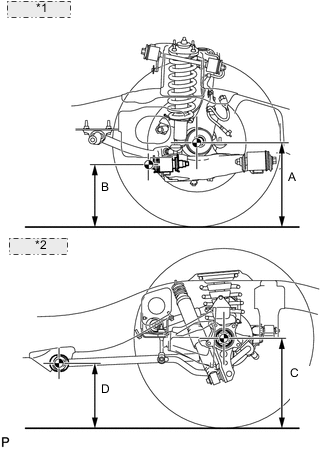
*1 Front Side: *2 Rear Side: Press down on the vehicle several times to stabilize the suspension, and then measure the vehicle height.
Standard Vehicle Height (Unloaded Vehicle) Suspension Package Option Front A - B Rear C - D Active Height Control
STD
101.4 mm (3.99 in.) 93.6 mm (3.69 in.) Measuring point A Ground clearance of the front drive shaft center B Ground clearance of the front adjusting cam bolt center C Ground clearance of the rear axle shaft center D Ground clearance of the rear lower control arm front side center If the vehicle height is not as specified, adjust the height by pressing down on the vehicle several times to stabilize the suspension.
Note
The standard value shown here is a value that is used for adjusting the wheel alignment and does not indicate the height of an actual vehicle.
-
-
INSPECT CAMBER, CASTER AND STEERING AXIS INCLINATION
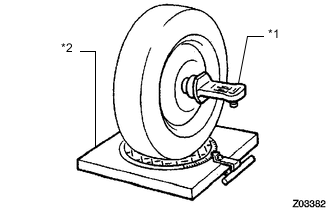
*1 Gauge *2 Alignment Tester
-
Install the camber-caster-kingpin gauge or place the front wheels on the center of the wheel alignment tester.
-
Inspect the camber, caster and steering axis inclination.
Standard Camber Inclination (Unloaded Vehicle) Suspension Package Option Camber Inclination Active Height Control
STD
Camber
Left - right error
0°00' +/-45' (0.00° +/-0.75°)
45' (0.75°) or less
Standard Caster Inclination (Unloaded Vehicle) Suspension Package Option Caster Inclination Active Height Control
STD
Caster
Left - right error
3°22' +/-45' (3.37° +/-0.75°)
45' (0.75°) or less
Standard Steering Axis Inclination (Unloaded Vehicle) Suspension Package Option Steering Axis Inclination : Reference Active Height Control
STD
Steering Axis 13°00' (13.00°) Tech Tips
The steering axis inclination is a reference value.
-
-
ADJUST CAMBER AND CASTER
Tech Tips
After the camber has been adjusted, inspect the toe-in.
-
Loosen the front adjusting cam bolt and rear adjusting cam nut.
-
Turn the front adjusting cam and rear adjusting cam in both directions, and adjust the camber and caster to the center value.
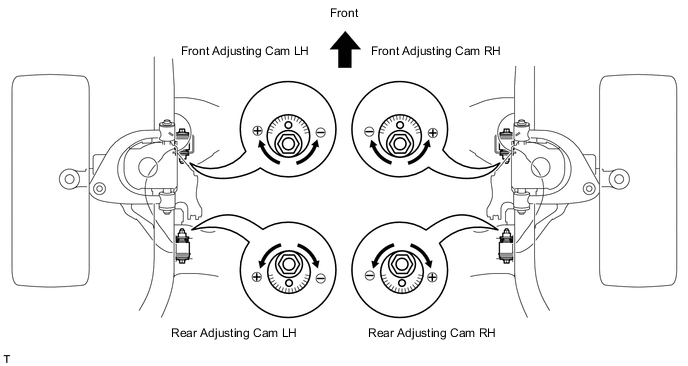
Tech Tips
-
The camber and caster should be as close as possible to the center value.
-
Make sure the difference between the left and right camber and caster is within +/-30' (0.5°).
-
-
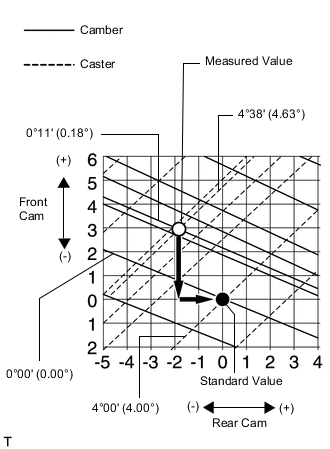
Read the adjustment chart (example).
-
Find the wheel alignment standard value applicable for the particular model.
-
Mark the selected standard value on the adjustment chart.
Standard Value (Reference) Camber Caster 0°00' (0.00°) 4°00' (4.00°) -
Mark the alignment value measured when the vehicle is unloaded on the adjustment chart.
Measured Value (Reference) Camber Caster 0°11' (0.18°) 4°38' (4.63°) -
As shown in the chart, read the distance from the marked point to 0, and adjust the front and/ or rear adjusting cams accordingly.
Amount to Turn Adjusting Cams (by Gradation) Front Adjusting Cam Rear Adjusting Cam +3.0 -2.0 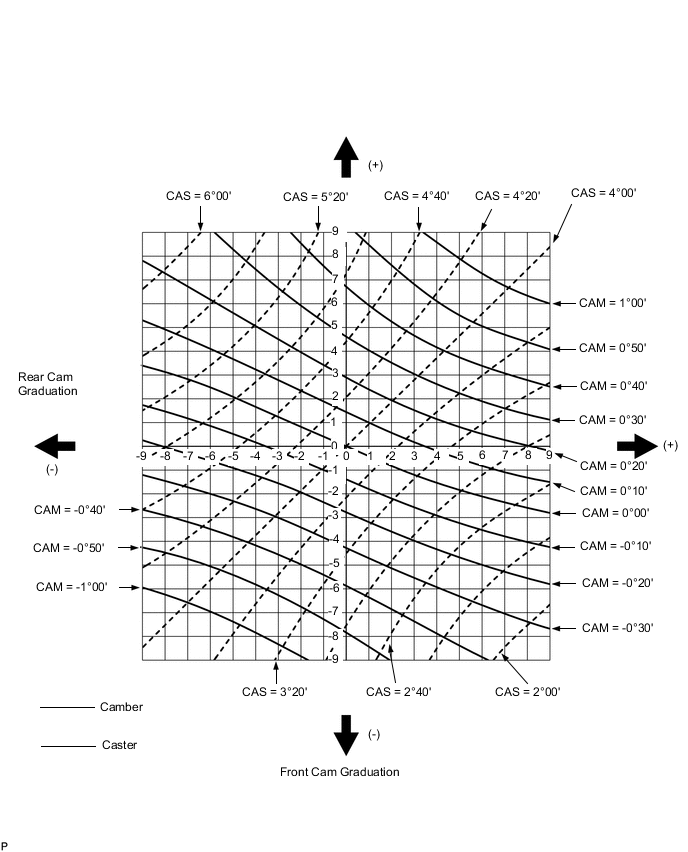
-
-
-
INSPECT TOE-IN
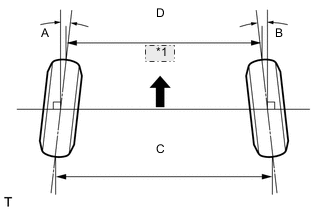
*1 Front
-
Bounce the vehicle up and down at the corners to stabilize the suspension and inspect the toe-in.
Standard Toe-in (Unloaded Vehicle) Suspension Package Option Item A + B
C - D
Active Height Control
STD
Toe-in
(total)
A + B: 0°00' +/-10' (0.00° +/-0.17°)
C - D: 0 +/-2 mm (0 +/-0.0787 in.)
-
If the toe-in is not as specified, adjust it at the rack ends.
Tech Tips
The toe-in can be measured using either A + B or C - D.
-
-
-
ADJUST TOE-IN
-
Release the rack boot set clips.
-
Loosen the tie rod end lock nuts.
-
Turn the right and left rack ends by an equal amount to adjust the toe-in to the center value.
-
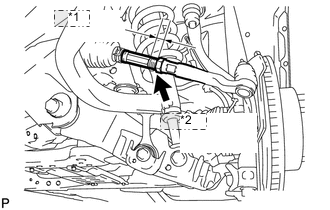
*1 Length *2 Lock Nut Check that the length of the right and left rack ends are approximately the same.
Standard difference 0 +/-1 mm (0 +/-0.0394 in.) or less -
Tighten the tie rod end lock nuts.
- Torque:
- 82 N*m { 836 kgf*cm, 60 ft.*lbf }
-
Place the boots on the seats and install the clips.
Tech Tips
Make sure that the boots are not twisted.
-
Perform the VGRS system calibration Click here.
-
-
INSPECT WHEEL ANGLE
-
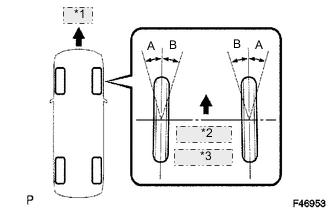
*1 Front *2 A: Inside *3 B: Outside Turn the steering wheel to the left and right full lock positions, and measure the turning angle.
Standard Wheel Turning Angle (Unloaded Vehicle) Suspension Package Option Inside Wheel Angle Outside Wheel Angle : Reference Active Height Control
STD
33°28' to 36°28'
(33.46° to 36.46°)
32°02'
(32.03°)
If the right and left inside wheel angles differ from the specified range, check the right and left rack end lengths.
-
-
PLACE FRONT WHEELS FACING STRAIGHT AHEAD
-
DISCONNECT CABLE FROM NEGATIVE BATTERY TERMINAL
Note
Disconnect the cable from the negative battery terminal for 2 seconds or more.
-
CONNECT CABLE TO NEGATIVE BATTERY TERMINAL
Note
When disconnecting the cable, some systems need to be initialized after the cable is reconnected Click here.
-
PERFORM YAW RATE AND DECELERATION SENSOR ZERO POINT CALIBRATION
-
Perform the yaw rate and deceleration sensor zero point calibration Click here.
-