TRANSFER SYSTEM Center Differential Lock Switch Circuit
WIRING DIAGRAM
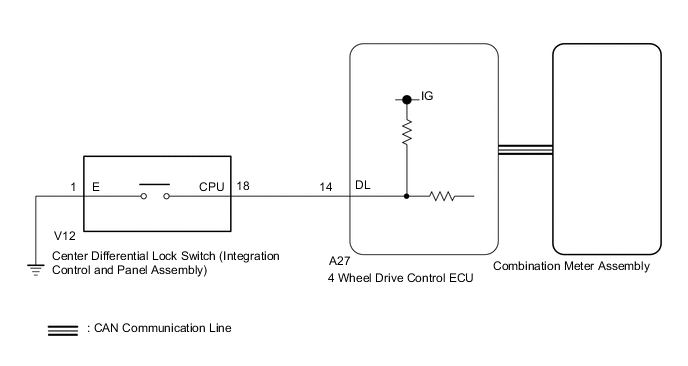
PROCEDURE
-
CHECK CENTER DIFFERENTIAL LOCK INDICATOR LIGHT
-
Turn the engine switch on (IG).
-
Check the center differential lock indicator light.
-
Press the center differential lock switch.
-
After 60 seconds, check the center differential lock indicator light.
Result Result Proceed to The center differential lock indicator light blinks, turns off or illuminates A Center differential lock indicator light remains off regardless of switch operation B Center differential lock indicator remains illuminated regardless of switch operation C Center differential lock indicator light rapidly blinks D
-
Blinking: Blinks at 0.5 second intervals (0.5 seconds on and 0.5 seconds off)
-
Rapidly blinking: Blinks at 0.25 second intervals (0.25 seconds on and 0.25 seconds off)
-
A 
END
C 
CHECK CAN COMMUNICATION LINE Click here
D
Go to P17D0 Click here
B 
-
-
CHECK CAN COMMUNICATION LINE
-
Select "Bus Check" from the System Selection Menu screen, and follow the prompts on the screen to inspect the CAN bus (for LHD: See page , for RHD: Click here.
OK "Bus Check" indicates no malfunctions in CAN communication. Result Result Proceed to DTC is not output A DTC is output for LHD B for RHD C
B
CHECK CAN COMMUNICATION SYSTEM Click here
C
CHECK CAN COMMUNICATION SYSTEM Click here
A
-
-
READ VALUE USING GTS (CENTER DIFFERENTIAL LOCK SWITCH)
-
Turn the engine switch off.
-
Connect the GTS to the DLC3.
-
Turn the GTS on.
-
Turn the engine switch on (IG).
-
Enter the following menus: Powertrain / Four Wheel Drive / Data List.
-
According to the display on the GTS, read the Data List.
Four Wheel Drive Tester Display Measurement Item/Range Normal Condition Diagnostic Note Center Differential Lock Control SW Center differential lock switch (integration control and panel assembly) status/
ON or OFF
ON: Switch pressed and held
OFF: Switch not pressed
- OK Display changes according to center differential lock switch (integration control and panel assembly) operation.
NG
INSPECT INTEGRATION CONTROL AND PANEL ASSEMBLY Click here
OK
-
-
INSPECT COMBINATION METER ASSEMBLY
-
Turn the engine switch off.
-
Perform an Active Test of the combination meter assembly using the GTS Click here.
-
Check the combination meter assembly.
OK The center differential lock indicator light turns on or off in accordance with the GTS. Result Result Proceed to OK for LHD A for RHD B NG C
A
REPLACE 4 WHEEL DRIVE CONTROL ECU Click here
B
REPLACE 4 WHEEL DRIVE CONTROL ECU Click here
C
INSPECT METER / GAUGE SYSTEM Click here
-
-
INSPECT INTEGRATION CONTROL AND PANEL ASSEMBLY
-
Remove the center differential lock switch (integration control and panel assembly) Click here.
-
Inspect the center differential lock switch (integration control and panel assembly) Click here.
OK The center differential lock switch (integration control and panel assembly) operates normally.
NG
REPLACE INTEGRATION CONTROL AND PANEL ASSEMBLY Click here
OK
-
-
CHECK HARNESS AND CONNECTOR (4 WHEEL DRIVE CONTROL ECU - INTEGRATION CONTROL AND PANEL ASSEMBLY)
-
Disconnect the A27 4 wheel drive control ECU connector.
-
Disconnect the V12 center differential lock switch (integration control and panel assembly) connector.
-
Measure the resistance according to the value(s) in the table below.
Standard Resistance Tester Connection Condition Specified Condition A27-14 (DL) - V12-18 (CPU) Always Below 1 Ω V12-1 (E) - Body ground Always Below 1 Ω Result Result Proceed to OK for LHD A for RHD B NG C
A
REPLACE 4 WHEEL DRIVE CONTROL ECU Click here
B
REPLACE 4 WHEEL DRIVE CONTROL ECU Click here
C
REPAIR OR REPLACE HARNESS OR CONNECTOR
-
-
CHECK CAN COMMUNICATION LINE
-
Select "Bus Check" from the System Selection Menu screen, and follow the prompts on the screen to inspect the CAN bus (for LHD: See page , for RHD: Click here.
OK "Bus Check" indicates no malfunctions in CAN communication. Result Result Proceed to DTC is not output A DTC is output for LHD B for RHD C
B
CHECK CAN COMMUNICATION SYSTEM Click here
C
CHECK CAN COMMUNICATION SYSTEM Click here
A
-
-
READ VALUE USING GTS (CENTER DIFFERENTIAL LOCK INDICATOR LIGHT)
-
Turn the engine switch off.
-
Connect the GTS to the DLC3.
-
Turn the GTS on.
-
Turn the engine switch on (IG).
-
Enter the following menus: Powertrain / Four Wheel Drive / Data List.
-
According to the display on the GTS, read the Data List.
Four Wheel Drive Tester Display Measurement Item/Range Normal Condition Diagnostic Note Center Differential Lock Indicator Request Center differential lock indicator light request/
Blink3, Blink2, Blink1, ON or OFF
-
Blink3: Indicator light rapidly blinks
-
Blink2: Indicator light blinks 3 times
-
Blink1: Indicator light blinks
-
ON: Indicator light illuminates
-
OFF: Indicator light turns off
-
Blinking: 0.5 second intervals (0.5 seconds on and 0.5 seconds off)
-
Rapidly blinking: 0.25 second intervals (0.25 seconds on and 0.25 seconds off)
-
Turn the center differential lock switch (integration control and panel assembly) on and off several times and check the GTS display condition of the center differential lock indicator light.
Result Result Proceed to Data List continues to display ON even when center differential lock switch (integration control and panel assembly) is operated for LHD A for RHD B Data List display changes according to center differential lock switch (integration control and panel assembly) operation C
-
A
REPLACE 4 WHEEL DRIVE CONTROL ECU Click here
B
REPLACE 4 WHEEL DRIVE CONTROL ECU Click here
C
INSPECT METER / GAUGE SYSTEM Click here
-