ROAD SIGN ASSIST SYSTEM SYSTEM DESCRIPTION
-
ROAD SIGN ASSIST SYSTEM DESCRIPTION
-
The road sign assist system uses the forward recognition camera to recognize traffic signs and provides information to the driver on the multi-information display.
-
-
ROAD SIGN ASSIST SYSTEM CONTROL
-
Control Pattern 1:
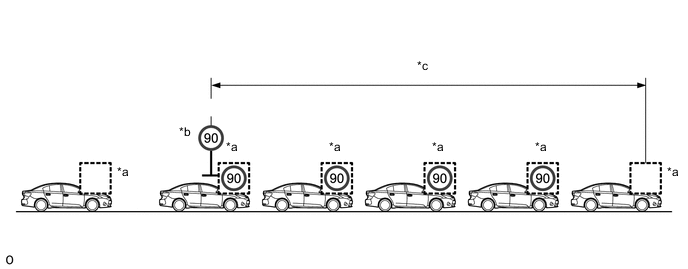
Text in Illustration *a Multi-information Display *b Traffic Sign *c Distance - - After a sign is recognized by the forward recognition camera and the vehicle passes by, the sign is displayed on the multi-information display. If no new signs are recognized while a sign is displayed, the system assesses the reliability of the currently displayed sign and clears the display.
-
Control Pattern 2:
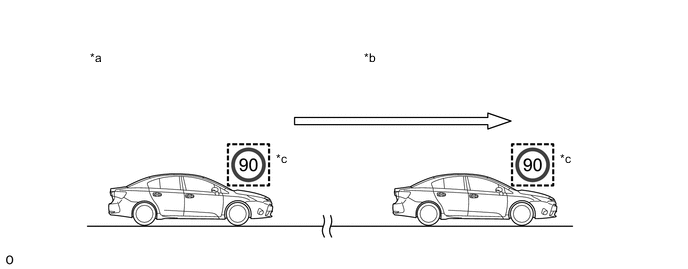
Text in Illustration *a Engine Switch off *b Engine switch on (IG) *c Multi-information Display - - If a speed limit sign was displayed when the previous trip ended, when the engine switch is turned on (IG), the same sign is displayed again.
-
Control Pattern 3:
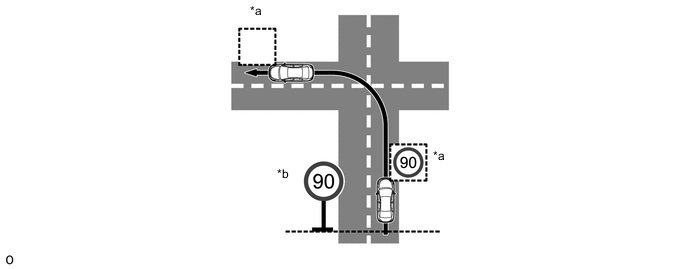
Text in Illustration *a Multi-information Display *b Traffic Sign While a sign is displayed, if the currently traveled road changes due to a left or right turn, etc., the displayed sign is cleared.
-
-
DISPLAY SPECIFICATIONS
-
Road signs recognized by the forward recognition camera are divided into the following categories and displayed on the multi-information display.
Supported Road Sign Multi-information Display Notification Function Operation Category Type Multi-information Display Buzzer Speed Limit Maximum speed limit/End of speed limit 

Excess speed notification
(Display inverts)
Sounds*1 No Overtaking No overtaking/End of no overtaking 

No overtaking notification
(Blinks)
Sounds*1 End of prohibition 
- - Supplemental Signs (display simultaneously with speed limit) Wet 
- - Rain 
- - Ice 
- - Time restriction 
- - Ramp way*2 
- - Blank*3 
- -
-
*1: Through the customization settings, the buzzer can be made to sound during warnings. However, a buzzer warning will not occur when exceeding the speed limit with a supplemental sign present.
-
*2: This sign is not displayed when performing a lane change without operating the turn signal.
-
*3: The display is blank when the system is unable to recognize a meaning of supplemental sign.
-
-
The display format for signs displayed on the multi-information display can be changed using the steering pad switch assembly.
-