ECD SYSTEM(w/ DPF), Diagnostic DTC:P1271, P1272
| DTC Code | DTC Name |
|---|---|
| P1271 | Fuel Regulator Circuit Malfunction (EDU Drive) |
| P1272 | Fuel Pressure Regulator Malfunction |
DESCRIPTION
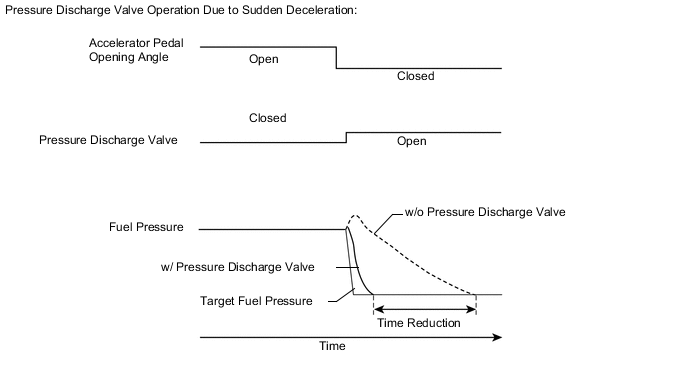
The ECM controls the internal fuel pressure of the common rail assembly by opening and closing the pressure discharge valve. When sudden deceleration occurs, the internal fuel pressure will temporarily become higher than usual and combustion noise may result. Therefore the ECM will open the valve temporarily to discharge the excess pressure inside the common rail assembly. Also, the pressure discharge valve opens when the engine switch is turned off to allow prompt discharge of the common rail internal pressure and so that the engine stops smoothly.
Tech Tips
-
For more information on the pressure discharge valve and common rail system, refer to System Description Click here.
-
For more information on the injector driver, refer to System Description Click here.
-
If P1271 and/or P1272 is present, refer to the DTC chart for the fuel system Click here.
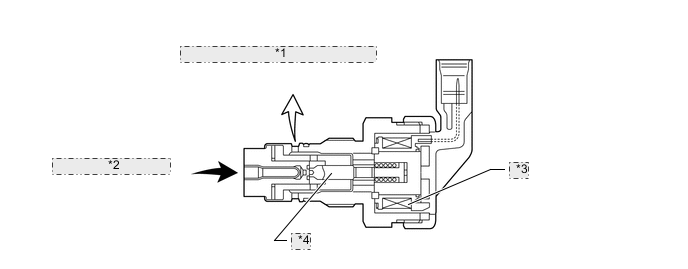
| *1 | Return to Fuel Tank (Low Pressure) |
| *2 | From Common Rail (High Pressure) |
| *3 | Solenoid |
| *4 | Valve |
| DTC Detection Drive Pattern | DTC Detection Condition | Trouble Area |
|---|---|---|
| Engine switch on (IG) to OFF and Drive the vehicle at 50 km/h (31 mph) in third gear, and then decelerate by releasing the accelerator pedal |
When either condition below is met a certain number of times (0.5 seconds) (1 trip detection logic):
|
|
| DTC Detection Drive Pattern | DTC Detection Condition | Trouble Area |
|---|---|---|
| Engine switch on (IG) to OFF | Pressure discharge valve does not open. Actual pressure decreasing rate deviates from the simulated pressure decreasing rate after the engine switch is turned off (2 trip detection logic). |
|
| DTC No. | Data List |
|---|---|
| P1271 P1272 |
|
Tech Tips
-
After confirming DTC P1271 and/or P1272, check the fuel pressure inside the common rail by entering the following menus: Engine and ECT / Data List / Common Rail Pressure.
-
P1271:
After clearing the DTC, drive the vehicle at 50 km/h (31 mph) in third gear, and then decelerate by releasing the accelerator pedal. Check that P1271 is not output.
-
P1272:
After clearing the DTC, start and stop the engine twice (wait 30 seconds or more after turning the engine switch off before starting the engine the second time), and then confirm that P1272 is not stored.
| Engine Speed | Common Rail Pressure (kPa) |
|---|---|
| Idling | Common Rail Pressure is within 5000 kPa of Target Common Rail Pressure |
| 2500 rpm (No engine load) |
| Condition | Common Rail Pressure (Idling) | Common Rail Pressure (1 Second after Engine Stopped) |
|---|---|---|
| Pressure discharge valve normal | 35000 kPa | 500 kPa |
| Open in pressure discharge valve circuit | 35000 kPa | 30000 kPa |
MONITOR DESCRIPTION
- P1271 (Open or short in pressure discharge valve circuit):
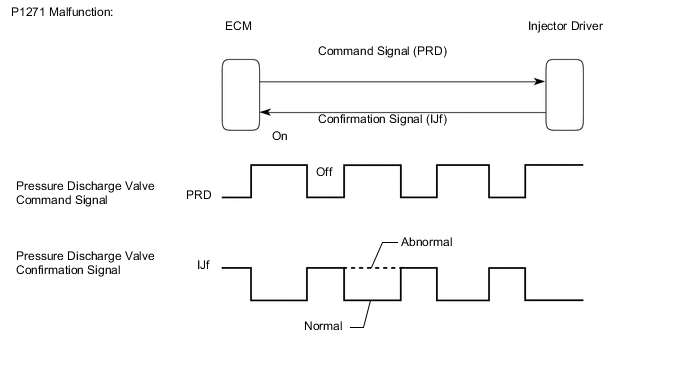
This DTC will be stored if there is no valve opening confirmation (IJf) signal sent from the injector driver to the ECM despite the ECM commanding the injector driver to open the pressure discharge valve. This DTC refers to an open or short circuit malfunction of the pressure discharge valve circuit, not a malfunction in which a valve is stuck open or closed.
The injector driver monitors the current supplied to the pressure discharge valve to verify that the current flows into the valve. If the current exceeds the specified level, the injector driver interprets this as the IJf signal being low. If this DTC is stored, the ECM enters fail-safe mode and limits engine power. The ECM continues operating in fail-safe mode until the engine switch is turned off.
- P1272 (Pressure discharge valve stuck closed):
The pressure discharge valve will open and discharge the internal fuel pressure from the common rail to the fuel tank when the engine switch is turned off. In this event, the ECM compares the actual drop rate of the internal fuel pressure and the target drop rate. If the ECM judges that the actual drop rate is smaller than the target, the ECM then determines that the valve is stuck closed and stores this DTC. This DTC will be stored if the internal fuel pressure does not drop to the target after the engine switch has been turned off.
If this DTC is stored, the ECM enters fail-safe mode and limits engine power. The ECM continues operating in fail-safe mode until the engine switch is turned off.
MONITOR STRATEGY
| Required sensors | Injector driver |
| Frequency of operation | Continuous |
| Duration | 3 seconds |
| MIL operation | 1 driving cycle |
| Required sensors | Fuel pressure sensor |
| Frequency of operation | Once per driving cycle |
| Duration | 1 second |
| MIL operation | 2 driving cycles |
TYPICAL ENABLING CONDITIONS
| Specification |
|---|
| The vehicle is driven at 50 km/h (31 mph) in 3rd gear, and then decelerated by complete release of the accelerator pedal 3 times. |
| Item | Specification | |
|---|---|---|
| Minimum | Maximum | |
| Common Rail Pressure | 30000 kPa (306 kgf/cm2, 4350 psi) |
- |
| Fuel temperature | 0°C (32°F) | - |
| Battery voltage | 11 V | - |
| The monitor will not run if the fuel pressure sensor, pressure discharge valve circuit or fuel temperature sensor is malfunctioning. | ||
TYPICAL MALFUNCTION THRESHOLDS
| Specification |
|---|
| There are no confirmation signals from the injector driver for a specific number of times consecutively, despite the ECM sending command signals regularly during deceleration. |
| Specification |
|---|
| The internal pressure stays beyond the specified level after the engine switch is turned off. |
CAUTION / NOTICE / HINT
Note
-
After replacing the ECM, the new ECM needs registration (See page ) and initialization Click here.
-
After replacing the fuel supply pump assembly, the ECM needs initialization Click here.
-
After replacing an injector assembly, the ECM needs registration Click here.
Tech Tips
-
After completing repairs, confirm that P1271 and/or P1272 does not recur.
-
If P062D (No. 1 injector driver) and P1271 are present simultaneously, there is an open in the INJF wire harness between the injector driver and ECM, or there is an open in the wire harness for both an injector assembly and the pressure discharge valve.
-
Read freeze frame data using the GTS. Freeze frame data records the engine condition when malfunctions are detected. When troubleshooting, freeze frame data can help determine if the vehicle was moving or stationary, if the engine was warmed up or not, and other data from the time the malfunction occurred.
PROCEDURE
-
CHECK IF DTC OUTPUT RECURS
-
Connect the GTS to the DLC3.
-
Clear the DTCs Click here.
-
Turn the engine switch off for 30 seconds or more.
-
Turn the engine switch on (IG).
-
Drive the vehicle at 50 km/h (31 mph) in 3rd gear, and then decelerate by completely releasing the accelerator pedal. Perform this 3 times.
-
Enter the following menus: Engine and ECT / Trouble Codes.
-
Read the pending DTCs.
Result Result Proceed to P1272 is output A P1271 is output B P1271 and P1272 are output B Other DTCs are output C
B 
INSPECT COMMON RAIL ASSEMBLY (FOR BANK 2) (PRESSURE DISCHARGE VALVE RESISTANCE) Click here
C 
GO TO DTC CHART Click here
A 
-
-
PERFORM ACTIVE TEST USING GTS (PRESSURE DISCHARGE VALVE CHECK)
-
Connect the GTS to the DLC3.
-
Turn the engine switch on (IG).
-
Turn the GTS on.
-
Enter the following menus: Engine and ECT / Utility / Pressure Discharge Valve Check.
-
Select the check type for "Valve Check for Graph".
-
Press "Start" and perform "Pressure Discharge Valve Check".
Tech Tips
For more information about "Pressure Discharge Valve Check / Valve Check for Graph", refer to System Check Click here.
-
Check the engine speed and fuel pressure when the pressure discharge valve is turned from off to on.
OK Pressure Discharge Valve OFF ON Engine Speed Idling: 550 to 650 rpm Changes to 0 rpm Fuel Pressure Idling: 27000 to 49000 kPa Changes to 0 kPa Tech Tips
When the system is normal, the following changes will be displayed on the GTS.
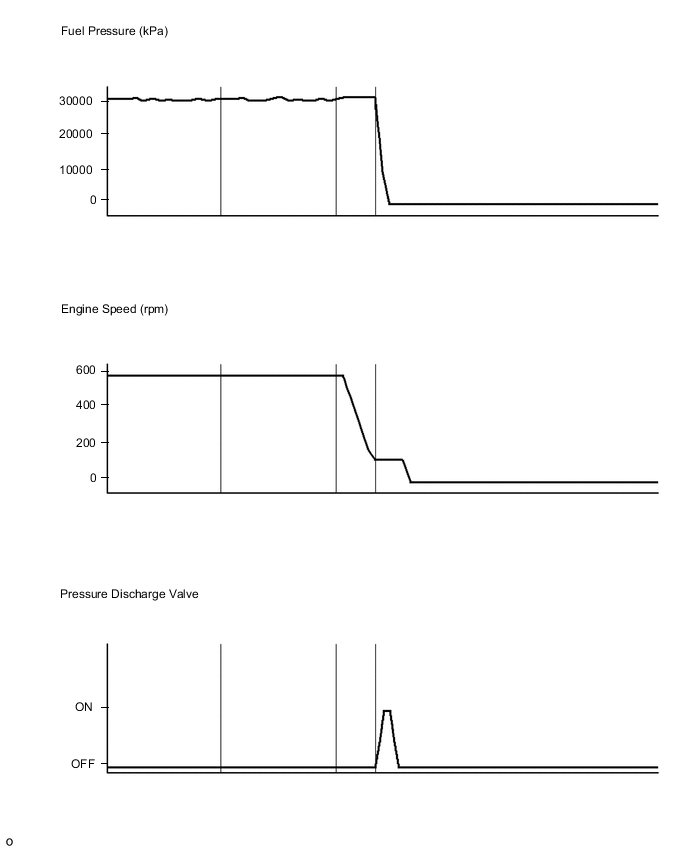
OK
CONFIRM WHETHER MALFUNCTION HAS BEEN SUCCESSFULLY REPAIRED Click here
NG
REPLACE COMMON RAIL ASSEMBLY (FOR BANK 2) (PRESSURE DISCHARGE VALVE) Click here
-
-
INSPECT COMMON RAIL ASSEMBLY (FOR BANK 2) (PRESSURE DISCHARGE VALVE RESISTANCE)
-
Inspect the common rail assembly (for bank 2) Click here.
NG
REPLACE COMMON RAIL ASSEMBLY (FOR BANK 2) (PRESSURE DISCHARGE VALVE) Click here
OK
-
-
CHECK HARNESS AND CONNECTOR (PRESSURE DISCHARGE VALVE - NO. 1 INJECTOR DRIVER)
-
Disconnect the No. 1 injector driver connector.
-
Disconnect the pressure discharge valve connector.
-
Measure the resistance according to the value(s) in the table below.
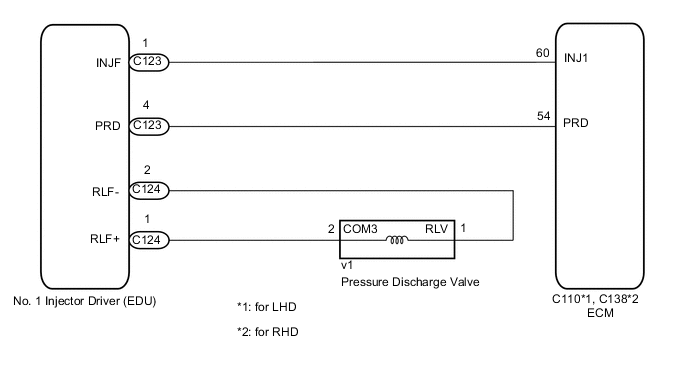
Standard Resistance Tester Connection Condition Specified Condition v1-2 (COM3) - C124-2 (RLF+) Always Below 1 Ω v1-1 (RLV) - C124-1 (RLF-) Always Below 1 Ω v1-2 (COM3) or C124-2 (RLF+) - Body ground Always 10 kΩ or higher v1-1 (RLV) or C124-1 (RLF-) - Body ground Always 10 kΩ or higher -
Reconnect the No.1 injector driver connector.
-
Reconnect the pressure discharge valve connector.
NG
REPAIR OR REPLACE HARNESS OR CONNECTOR Click here
OK
-
-
CHECK HARNESS AND CONNECTOR (NO. 1 INJECTOR DRIVER - ECM)
-
Disconnect the No. 1 injector driver connector.
-
Disconnect the ECM connector.
-
Measure the resistance according to the value(s) in the table below.
Standard Resistance for LHD Tester Connection Condition Specified Condition C123-4 (PRD) - C110-54 (PRD) Always Below 1 Ω C123-1 (INJF) - C110-61 (INJ1) Always Below 1 Ω C123-4 (PRD) or C110-54 (PRD) - Body ground Always 10 kΩ or higher C123-1 (INJF) or C110-61 (INJ1) - Body ground Always 10 kΩ or higher for RHD Tester Connection Condition Specified Condition C123-4 (PRD) - C138-54 (PRD) Always Below 1 Ω C123-1 (INJF) - C138-61 (INJ1) Always Below 1 Ω C123-4 (PRD) or C138-54 (PRD) - Body ground Always 10 kΩ or higher C123-1 (INJF) or C138-61 (INJ1) - Body ground Always 10 kΩ or higher -
Reconnect the No. 1 injector driver connector.
-
Reconnect the ECM connector.
NG
REPAIR OR REPLACE HARNESS OR CONNECTOR Click here
OK
-
-
INSPECT NO. 1 INJECTOR DRIVER (POWER SOURCE CIRCUIT)
-
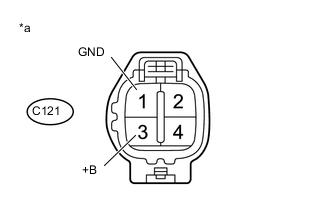
Text in Illustration *a Front view of wire harness connector
(to No. 1 injector Driver)
Disconnect the No. 1 injector driver connector.
-
Measure the voltage according to the value(s) in the table below.
Standard Voltage Tester Connection Switch Condition Specified Condition C121-3 (+B) - C121-1 (GND) Engine switch on (IG) 11 to 14 V -
Reconnect the No. 1 injector driver connector.
NG
GO TO INJECTOR CIRCUIT Click here
OK
-
-
REPLACE NO. 1 INJECTOR DRIVER
-
Replace the No. 1 injector driver Click here.
NEXT
-
-
CHECK IF DTC OUTPUT RECURS (DTC P1271 OR P1272)
-
Connect the GTS to the DLC3.
-
Clear the DTCs Click here.
-
Turn the engine switch off for 30 seconds or more.
-
Turn the engine switch on (IG).
-
Drive the vehicle at 50 km/h (31 mph) in 3rd gear, and then decelerate by completely releasing the accelerator pedal. Perform this 3 times.
-
Enter the following menus: Engine and ECT / Trouble Codes.
-
Read the pending DTCs.
Tech Tips
-
If no pending DTCs are output, proceed to the next step to check "All Readiness".
-
Perform the following procedure using the GTS to determine whether or not the DTC judgment has been carried out.
-
Enter the following menus: Engine and ECT / Utility / All Readiness.
-
Input DTC P1271 and P1272.
-
Check the DTC judgment result.
Result GTS Display Result Proceed to Pending DTC P1271 or P1272 is output B All Readiness NORMAL A ABNORMAL B Tech Tips
If STATUS is INCOMPLETE or N/A, perform the following procedure 3 times: drive the vehicle at 50 km/h (31 mph) in 3rd gear, and then decelerate by completely releasing the accelerator pedal.
-
A
END
B
REPLACE ECM Click here
-
-
REPAIR OR REPLACE HARNESS OR CONNECTOR
-
Repair or replace the harness or connector.
NEXT
CONFIRM WHETHER MALFUNCTION HAS BEEN SUCCESSFULLY REPAIRED Click here
-
-
GO TO INJECTOR CIRCUIT
-
Go to injector circuit Click here.
NEXT
CONFIRM WHETHER MALFUNCTION HAS BEEN SUCCESSFULLY REPAIRED Click here
-
-
REPLACE ECM
-
Replace the ECM Click here.
NEXT
CONFIRM WHETHER MALFUNCTION HAS BEEN SUCCESSFULLY REPAIRED Click here
-
-
REPLACE COMMON RAIL ASSEMBLY (FOR BANK 2) (PRESSURE DISCHARGE VALVE)
-
Replace the common rail assembly (for bank 2) Click here.
NEXT
-
-
BLEED AIR FROM FUEL SYSTEM
-
Bleed the air from the fuel system Click here.
-
Perform PM forced regeneration Click here.
Tech Tips
When fuel lines are disconnected, air may enter the fuel lines, leading to engine starting trouble. Therefore, perform forced regeneration and bleed the air from the fuel lines.
NEXT
-
-
CONFIRM WHETHER MALFUNCTION HAS BEEN SUCCESSFULLY REPAIRED
-
Connect the GTS to the DLC3.
-
Clear the DTCs Click here.
-
Turn the engine switch off for 30 seconds or more.
-
Turn the engine switch on (IG).
-
Drive the vehicle at 50 km/h (31 mph) in 3rd gear, and then decelerate by completely releasing the accelerator pedal. Perform this 3 times.
-
Enter the following menus: Engine and ECT / Trouble Codes.
-
Confirm that the pending DTC is not output again.
Tech Tips
Perform the following procedure using the GTS to determine whether or not the DTC judgment has been carried out.
-
Enter the following menus: Engine and ECT / Utility / All Readiness.
-
Input DTC P1271 and P1272.
-
Check the DTC judgment result.
Tech Tips
If STATUS is INCOMPLETE or N/A, perform the following procedure 3 times: drive the vehicle at 50 km/h (31 mph) in 3rd gear, and then decelerate by completely releasing the accelerator pedal.
-
NEXT
END
-