PUSH-BUTTON START DATA LIST / ACTIVE TEST
-
DATA LIST
Tech Tips
Using the GTS to read the Data List allows the values or states of switches, sensors, actuators and other items to be read without removing any parts. This non-intrusive inspection can be very useful because intermittent conditions or signals may be discovered before parts or wiring is disturbed. Reading the Data List information early in troubleshooting is one way to save diagnostic time.
Note
In the table below, the values listed under "Normal Condition" are reference values. Do not depend solely on these reference values when deciding whether a part is faulty or not.
-
Connect the GTS to the DLC3.
-
Turn the power switch on (IG).
-
Turn the GTS on.
-
Enter the following menus: Body Electrical / (desired system) / Data List.
-
According to the display on the GTS, read the Data List.
Power Source Control Tester Display Measurement Item/Range Normal Condition Diagnostic Note Shift P Signal Shift position P/ON or OFF ON: Shift lever in P
OFF: Shift lever not in P
-
Use this item to determine if the shift position switch is malfunctioning.
-
The hybrid control system cannot be started when this item is OFF.
Steering Unlock Switch State of steering unlock sensor signal output from steering lock actuator assembly/ON or OFF ON: Steering unlocked
OFF: Steering locked
-
When the shift lever is in P and the power switch is off, if any door is opened then closed, the steering is locked.
-
When the electrical key transmitter sub-assembly is inside the vehicle and the power switch is turned on (ACC) or on (IG), the steering unlocks.
-
The hybrid control system cannot be started when the steering unlock signal is off.
Stop Light Switch1 State of brake pedal/ON or OFF ON: Brake pedal depressed
OFF: Brake pedal released
-
Use this item to determine whether the stop light switch is malfunctioning.
-
The hybrid control system cannot be started when this item is OFF.
-
When this item is malfunctioning, the hybrid control system can be started by pressing and holding the power switch for a certain period of time.
Start Switch1 Power switch 1 status/ON or OFF ON: Power switch pressed
OFF: Power switch not pressed
-
If the power switch is pressed for a short time, the display may not change.
-
Use this item to determine whether the power switch input signal is malfunctioning.
Start Switch2 Power switch 2 status/ON or OFF ON: Power switch pressed
OFF: Power switch not pressed
-
Backup for power switch 1. However, when the power switch is pressed and held, the control functions only when both power switch 1 and 2 are normal.
-
Behaves the same way as power switch 1.
Latch Circuit Status of IG related backup circuits/ON or OFF ON: Power switch on (IG)
OFF: Power switch off
-
Displays in almost the same manner as the IG1 and IG2 relays.
-
When the power switch is on (ACC), OFF is displayed.
IG1 Relay Monitor(Outside) IG1 relay coil voltage monitor status/ON or OFF ON: Power switch on (IG)
OFF: Power switch off
-
Use this item to determine whether the IG1 relay is malfunctioning.
-
When the power switch is on (ACC), OFF is displayed.
IG1 Relay Monitor(Inside) IG1 relay activation/ON or OFF ON: Power switch on (IG)
OFF: Power switch off
-
Use this item to determine whether the IG1 relay is malfunctioning.
-
When the power switch is on (ACC), OFF is displayed.
IG2 Relay Monitor(Outside) IG2 relay coil voltage monitor status/ON or OFF ON: Power switch on (IG)
OFF: Power switch off
-
Use this item to determine whether the IG2 relay is malfunctioning.
-
When the power switch is on (ACC), OFF is displayed.
IG2 Relay Monitor(Inside) IG2 relay activation/ON or OFF ON: Power switch on (IG)
OFF: Power switch off
-
Use this item to determine whether the IG2 relay is malfunctioning.
-
When the power switch is on (ACC), OFF is displayed.
Starter Request Signal Hybrid control system start request signal status/ON or OFF ON: With the shift lever in P and brake pedal depressed, the power switch is pressed and held
OFF: After approx. 1 sec. has elapsed, the power switch is released
-
When the hybrid control system cannot be started due to a start request signal malfunction, OFF is displayed.
-
When the power switch is pressed, the duration of time that ON is displayed will be extremely short. As such, the power switch needs to be pressed and held for a certain amount of time.
ACC Relay Monitor ACC relay activation/ON or OFF ON: Power switch on (ACC)
OFF: Power switch off
When the power switch is on (IG), ON is displayed. Ready Signal Ready signal/ON or OFF ON: Hybrid control system on (on (READY))
OFF: Hybrid control system off
- Vehicle Speed Signal Vehicle being driven or stopped/Stop or Run Stop: Vehicle stopped
Run: Vehicle being driven at 5 km/h (3 mph) or more
- Power Supply Condition Power supply state/IG2 ON, ST ON, All OFF, IG1 ON or ACC ON All OFF: Power switch off (ACC and IG)
ACC ON: Power switch on (ACC) (ACC relay on)
IG1 ON: Power switch on (IG) (IG1 relay on)
IG2 ON: Power switch on (IG) (IG2 relay on)
ST ON: Sending hybrid control system start request signal
Since the IG1 and IG2 relays turn on at approximately the same time, IG1 ON may not be displayed (the IG1 relay turns on for a very short time). Powertrain Type Vehicle identification/HV-AT, Cnv-MT, Cnv-AT, Cnv-MMT, S&S-MT, S&S-AT or S&S-MMT HV-AT - IG1 Circuit IG1 relay coil circuit malfunction/OK or NG OK: Circuit normal
NG: Circuit malfunctioning
-
Use this item to determine whether the IG1 relay is malfunctioning.
-
When the hybrid control system cannot be started due to an IG1 relay malfunction, NG is displayed.
IG2 Circuit IG2 relay coil circuit malfunction/OK or NG OK: Circuit normal
NG: Circuit malfunctioning
-
Use this item to determine whether the IG2 relay is malfunctioning.
-
When the hybrid control system cannot be started due to an IG2 relay malfunction, NG is displayed.
Starter SW Sig Mismatch Power switch signal 1 and 2 do not match/Yes or No Yes: Switch malfunctioning (power switch signal 1 and 2 do not match)
No: Switch normal
The hybrid control system can be started even if the result is Yes. However, emergency hybrid control system off while driving by pressing and holding the power switch and, when the brakes are malfunctioning, emergency hybrid control system by pressing and holding the power switch cannot be performed. Park Signal Mismatch P position signal malfunction/Yes or No Yes: Signal malfunction (CAN communication and direct line signal do not match)
No: Signal normal
Even when Yes is displayed, it is still possible to turn the power switch off (the power source mode will not be stuck in on (ACC) or on (IG)). Str Lock/Unlock Wait T-Out Steering lock or unlock malfunction/Yes or No Yes: Lock or unlock malfunction (e.g. steering lock is stuck etc.)
No: Lock and unlock normal
When the hybrid control system cannot be started due to a steering lock or unlock malfunction, Yes is displayed. Key Certif Wait T-Out Key verification malfunction/Yes or No Yes: Verification error (detected due to the electrical key transmitter sub-assembly ID code and the ID code stored in the certification ECU (smart key ECU assembly) not matching)
No: Verification normal
When the hybrid control system cannot be started due to a key verification error, Yes is displayed. Number of Diagnosis Code Number of DTCs/0 to 255 - - 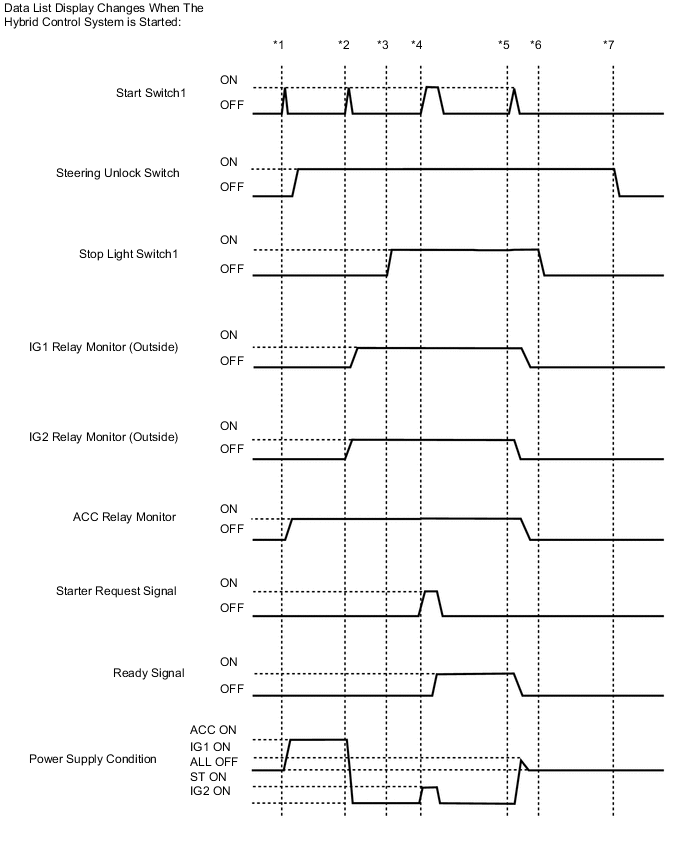
Tech Tips
To check if the Data List display changes, get into the vehicle while carrying an electrical key transmitter sub-assembly and perform the following operations with the power switch off and the shift lever in P.*1: Press the power switch with the brake pedal released and check that the power switch is turned on (ACC).
*2: Press the power switch with the brake pedal released and check that the power switch is turned on (IG).
*3: Depress the brake pedal (stop light switch is on).
*4: Press the power switch with the brake pedal depressed and check that the hybrid control system starts.
*5: Press the power switch with the brake pedal depressed and check that the power switch is turned off.
*6: Release the brake pedal.
*7: Open a door.
Entry & Start Tester Display Measurement Item/Range Normal Condition Diagnostic Note Key Low Battery Transmitter battery depleted No: Transmitter battery not depleted
Yes: Transmitter battery depleted
The electrical key transmitter sub-assembly sends voltage information to the certification ECU (smart key ECU assembly) when it is transmitting. The certification ECU (smart key ECU assembly) displays "Yes" for the "Key Low Battery" item of the Data List when this voltage information indicates 2.1 V or less. This Data List item should be checked when the electrical key transmitter sub-assembly is at room temperature (example: at -20°C (-4°F), "Yes" may be displayed even if the transmitter battery is new). Ignition Switch Certification ECU (smart key ECU assembly) IG power supply input status/ON or OFF ON: Power switch on (IG)
OFF: Power switch off
When the power switch is on (ACC), OFF is displayed. #Codes Number of DTCs/0 to 255 - - Immobiliser Engine immobiliser system determined by certification ECU (smart key ECU assembly)/ Set or Unset Set: Engine immobiliser system set (hybrid control system start prohibited) (power switch off)
Unset: Engine immobiliser system unset (hybrid control system start permitted) (power switch on (ACC) or on (IG))
The hybrid control system cannot be started when Set is displayed.
Tech Tips
-
The security indicator light blinks when Set is displayed.
-
The security indicator light is linked with set/unset of the immobiliser and not linked with steering lock/unlock.
Steering Lock Sleep Cond Steering lock ECU (steering lock actuator assembly) sleep availability/Yes or No Yes: Sleep available
No: Sleep not available
- Steering Lock Start Cond Steering lock ECU (steering lock actuator assembly) wake up signal status/Yes or No Yes: Wake up signal sent
No: Wake up signal not sent
- Engine Start Condition Status of hybrid control system start permission signal determined by steering lock ECU (steering lock actuator assembly) and sent to certification ECU (smart key ECU assembly)/OK or NG OK: Hybrid control system start permitted
NG: Hybrid control system start prohibited
-
When Permitted is displayed, the certification ECU (smart key ECU assembly) receives an unlock confirmation signal from the steering lock ECU (steering lock actuator assembly) and starting of the hybrid control system is possible.
-
The hybrid control system cannot be started when Prohibited is displayed.
Sensor Value History of malfunction of position sensor in steering lock ECU (steering lock actuator assembly) (DTC B2781 is stored)/OK or NG(Past) OK: History of malfunction for the lock or unlock sensor in the steering lock ECU (steering lock actuator assembly) does not exist.
NG(Past): History of both the lock and unlock sensors in the steering lock ECU (steering lock actuator assembly) being on exists (Under normal operation, neither sensor is on).
When NG (Past) is displayed, either the position sensor in the steering lock ECU (steering lock actuator assembly) or the assembly itself may be malfunctioning. Power Supply Short History of signal error (short) sent from certification ECU (smart key ECU assembly) to steering lock ECU (steering lock actuator assembly) (DTC B2782 is stored)/OK or NG(Past) OK: History of motor power source short does not exist
NG(Past): History of motor power source short exists
This item displays history when a malfunction exists in the circuit between the certification ECU (smart key ECU assembly) and the steering lock ECU (steering lock actuator assembly). Motor Driver Short History of malfunction (short) in the steering lock ECU (steering lock actuator assembly) motor circuit (DTC B2781 is stored)./OK or NG(Past) OK: History of short in the motor circuit does not exist
NG(Past): History of short in the motor circuit exists
History of a malfunction in the steering lock motor circuit in the steering lock ECU (steering lock actuator assembly). Lock/Unlock Receive History of receiving an unlock request signal/Yes or No Yes: History of receiving an unlock request signal exists
No: History of receiving an unlock request signal does not exist
- Lock Bar Stuck Error History of the steering wheel not being able to unlock properly when the steering lock operates for a certain amount of time/OK or NG(Past) OK: History of steering lock being stuck does not exist
NG(Past): History of steering lock being stuck exists
- Push Start Error History of push start malfunction due to steering lock ECU (steering lock actuator assembly)/OK or NG(Past) OK: History of push start malfunction does not exist
NG(Past): History of push start malfunction exists
- Engine Start Request Status of hybrid control system start permission signal determined by steering lock ECU (steering lock actuator assembly) and sent to certification ECU (smart key ECU assembly)/OK or NG OK: Signal received
NG: Signal not received
-
When OK is displayed, the certification ECU (smart key ECU assembly) receives an unlock confirmation signal from the steering lock ECU (steering lock actuator assembly) and hybrid control system start is possible.
-
The hybrid control system cannot be started when NG is displayed.
S Code Check Verification result between certification ECU (smart key ECU assembly) and ID code box (immobiliser code ECU)/OK or NG OK: Verification result normal
NG: Verification result abnormal
-
The ID code for the certification ECU (smart key ECU assembly) or ID code box (immobiliser code ECU) is not registered or the certification ECU (smart key ECU assembly) or ID code box (immobiliser code ECU) is malfunctioning.
-
The steering cannot be locked.
-
The steering cannot be unlocked (the hybrid control system cannot be started).
When NG is displayed:
L Code Check Verification result between ID code box (immobiliser code ECU) and steering lock ECU (steering lock actuator assembly)/OK or NG OK: Verification result normal
NG: Verification result abnormal
-
The ID code for the ID code box (immobiliser code ECU) or steering lock ECU (steering lock actuator assembly) is not registered or the ID code box (immobiliser code ECU) or steering lock ECU (steering lock actuator assembly) is malfunctioning.
-
The steering cannot be locked.
-
The steering cannot be unlocked (the hybrid control system cannot be started).
When NG is displayed:
Unlock Request Receive Unlock request signal received state/OK or NG OK: Within 10 seconds of turning the power switch on (IG) or on (ACC), or of a hybrid control system start operation being performed
NG: Power switch on (IG) or on (ACC), or hybrid control system start operation not performed
-
The hybrid control system cannot be started when an unlock request signal cannot be received.
-
If OK is not displayed even though the steering unlock conditions are met, the certification ECU (smart key ECU assembly) may be malfunctioning.
Lock Request Receive Lock request signal received state/OK or NG
Tech Tips
-
The reception state is maintained for 10 seconds.
-
When 10 seconds or more elapse after receiving the signal, the item changes to "NG".
OK: Lock request signal received for 10 sec. of any of the doors being opened with shift lever in P and power switch off.
NG: Except above
If OK is not displayed even though the steering lock conditions are met, the certification ECU (smart key ECU assembly) may be malfunctioning. S Code Check(Past) Verification result history between the certification ECU (smart key ECU assembly) and ID code box (immobiliser code ECU)/OK or NG(Past) OK: History of abnormal verification result does not exist
NG(Past): History of abnormal verification result exists
- L Code Check(Past) Verification result history between the ID code box (immobiliser code ECU) and steering lock ECU/OK or NG(Past) OK: History of abnormal verification result does not exist
NG(Past): History of abnormal verification result exists
- Steering Lock Steering lock ECU (steering lock actuator assembly) lock confirmation status/Set or Unset Set: Lock confirmed
Unset: Lock not confirmed
When Unset is displayed, the steering wheel is not locked. Steering Unlock Steering lock ECU (steering lock actuator assembly) unlock confirmation status/Set or Unset Set: Unlock confirmed
Unset: Unlock not confirmed
When Unset is displayed, the steering wheel is not unlocked (the hybrid control system cannot be started). B Code Difference B code mismatch/No or Yes No: Communication normal
Yes: Communication malfunction
- B Code B code registration status/No Regd or Regd No Regd: B code not registered correctly
Regd: B code registered correctly
- Engine Start Indicator Entry warming light/ON or OFF Customization status displayed - Open in IG2 History of IG2 input of the steering lock ECU (steering lock actuator assembly)/OK or NG(Past) OK: History of open in IG2 exists
NG(Past): No history of open in IG2 exists
When OK is displayed, the steering lock ECU (steering lock actuator assembly) has an IG2 input circuit malfunction. 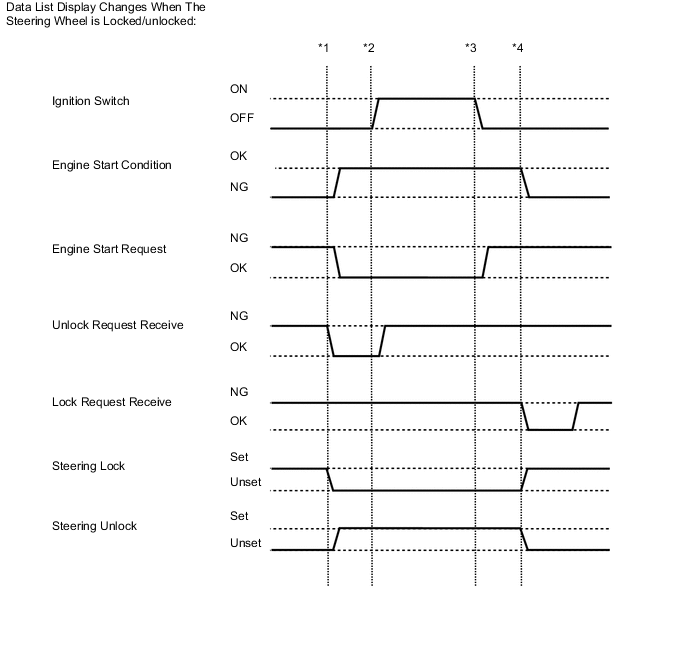
Tech Tips
To check if the Data List display changes, get into the vehicle while carrying an electrical key transmitter sub-assembly and perform the following operations with the power switch off and the shift lever in P.*1: Press the power switch with the brake pedal released and check that the power switch is turned on (ACC).
*2: Press the power switch with the brake pedal released and check that the power switch is turned on (IG).
*3: Press the power switch and check that the power switch is turned off.
*4: Open any of the doors (steering locked).
Combination Meter Tester Display Measurement Item/Range Normal Condition Diagnostic Note Vehicle Speed Meter Vehicle speed/Min.: 0 km/h (0 mph), Max.: 255 km/h (158 mph) Almost same as actual vehicle speed (Speedometer tester) - -
-
-
ACTIVE TEST
Tech Tips
Using the GTS to perform Active Tests allows relays, VSVs, actuators and other items to be operated without removing any parts. This non-intrusive functional inspection can be very useful because intermittent operation may be discovered before parts or wiring is disturbed. Performing Active Tests early in troubleshooting is one way to save diagnostic time. Data List information can be displayed while performing Active Tests.
-
Connect the GTS to the DLC3.
-
Turn the power switch on (IG).
-
Turn the GTS on.
-
Enter the following menus: Body Electrical / (desired system) / Active Test.
-
According to the display on the GTS, perform the Active Test.
Power Source Control Tester Display Test Part Control Range Diagnostic Note P Supply for Steering Lock Certification ECU (smart key ECU assembly) ON/OFF
Tech Tips
ON: Power is supplied.
OFF: Power is not supplied.
When performing this Active Test, make sure the following condition is met:
The power switch is on (IG).
Entry & Start Tester Display Test Part Control Range Diagnostic Note Overhead Tuner Power Supply ON Door control and tire pressure monitoring system receiver assembly OFF/ON - Power/Engine SW Light Power switch light OFF/ON When performing this Active Test, make sure the following condition is met:
The power switch illumination is off (15 seconds or more have elapsed since it turned from on to off) and the power switch is on (ACC) or on (IG), or the hybrid control system is running.
-