ENTRY AND START SYSTEM(for Entry Function) CUSTOMIZE PARAMETERS
PROCEDURE
-
CUSTOMIZE ENTRY AND START SYSTEM (for Entry Function)
Tech Tips
The following items can be customized.
Note
-
When the customer requests a change in a function, first make sure that the function can be customized.
-
Record the current settings before customizing.
-
Customizing with the GTS
-
Connect the GTS to the DLC3.
-
Turn the power switch on (IG).
-
Turn the GTS on.
-
Enter the following menus: Customize Setting / Wireless Door Lock, Entry & Start or Warning.
-
Select the setting by referring to the table below.
Wireless Door Lock Display Default Content Setting Relevant ECU Wireless Control ON Function that turns wireless door lock OFF or ON Main body ECU (Multiplex network body ECU) Hazard Answer Back ON When the doors are locked by wireless operation, the hazard warning lights flash once.
When the doors are unlocked by wireless operation, the hazard warning lights flash twice.
OFF or ON Main body ECU (Multiplex network body ECU) Open Door Warning
*1
ON The buzzer sounds when lock is pressed when any of the doors are ajar. OFF or ON Main body ECU (Multiplex network body ECU) Unlock 2 Operation ON*2
OFF*3
Function that unlocks driver door when unlock switch on electrical key transmitter sub-assembly is pressed once, and unlocks all doors when pressed twice. If setting is OFF, pressing unlock switch once makes all doors unlock. OFF or ON Main body ECU (Multiplex network body ECU) Panic Function
*2
ON Function to operate theft deterrent system by continuously pressing panic switch on electrical key transmitter sub-assembly for 0.8 seconds OFF or ON Main body ECU (Multiplex network body ECU) Trunk Lid Operation Long1 Function to change the operation method of opening the luggage compartment door by the electrical key transmitter sub-assembly.
1tim ON: Push the luggage open switch once
2tim ON: Push the luggage open switch twice
Long1: Push the luggage open switch for 0.8 seconds
Long2: Push the luggage open switch for 1.6 seconds
Prohibit: Wireless luggage compartment door open function is off
1tim ON, 2tim ON, Long1, Long2 or Prohibit Main body ECU (Multiplex network body ECU) Auto Lock Time 60 s Function that regulates the interval between unlocking and automatic relocking of doors 30 s, 60 s or 120 s Main body ECU (Multiplex network body ECU) Wireless Buzzer Resp
*2
ON Wireless door lock buzzer response OFF or ON Main body ECU (Multiplex network body ECU) Wireless Buzzer Vol
*2
Level 5 Wireless door lock buzzer volume Level 7, Level 6, Level 5, Level 4, Level 3, Level 2, Level 1 or Level0 Main body ECU (Multiplex network body ECU)
-
*1: except China
-
*2: except Europe and China
-
*3: for Europe and China
Entry & Start Display Default Content Setting Relevant ECU Park Wait Time (Waiting time to permit unlocking door after locking) 2.5s Function that sets the period of time (lock confirmation time) that the door is prevented from being unlocked by operating the front door outside handle assembly after an entry lock operation is performed. 0.5s, 1.5s, 2.5s or 5s Certification ECU (smart key ECU assembly) Ignition Available Area
(Entry ignition available area)
All Function that sets the area that the key must be in before the power switch can be operated. Front or All Certification ECU (smart key ECU assembly) Trunk Open Mode ON Function that opens the luggage compartment door when the driver has the electrical key transmitter sub-assembly and presses the luggage door opening switch assembly. OFF or ON Certification ECU (smart key ECU assembly) Door Unlock Mode Driver*1
All*2
Function that chooses the doors to be operated by entry unlock operation. All or Driver Certification ECU (smart key ECU assembly) Auto Entry Cancel SW OFF Function that enables or disables the entry and start system. OFF or ON Certification ECU (smart key ECU assembly) Touch Activation Over Threshold Active The function that limits the consecutive entry lock operation to only 2 times can be changed between Active and Not Active. When in Not Active mode, there is no limit for the number of times that the consecutive entry lock operation can be performed. Active or Not Active Certification ECU (smart key ECU assembly) Engine Start Indicator ON Function that turns the smart warning light on the combination meter assembly on or off. OFF or ON Certification ECU (smart key ECU assembly)
-
*1: for G.C.C. countries and Australia
-
*2: except G.C.C. countries and Australia
Warning Display Default Content Setting Relevant ECU Key Low Battery Warning (Warn when key battery becomes weak) ON Enables or disables the sounding of the buzzer when the transmitter battery is low and the power switch is turned off after being on (IG) for 20 minutes or more. OFF or ON Certification ECU (smart key ECU assembly) -
-
-
Customizing with the Accessory meter assembly*1 or Multi-display*2
-
*1: for 12.3 Inch
-
*2: 8 Inch
-
Turn the power switch on (IG).
-
Enter the following menus: SET UP / Vehicle / Vehicle Customization / Door Lock Settings.
-
Select the setting by referring to the table below.
Display Default Content Setting Remote 2-Press Unlock On*1
Off*2
Function that unlocks driver door when unlock switch on electrical key transmitter sub-assembly is pressed once, and unlocks all doors when pressed twice. If setting is Off, pressing unlock switch once makes all doors unlock. On or Off Select Doors to Unlock Driver's Door*3
All Doors*4
Function that sets which doors are unlocked by the entry unlock function. All Doors or Driver's Door Auto Relock Time Adjust 60 sec. Function that regulates the interval between unlocking and automatic relocking of doors 30 sec., 60 sec. or 120 sec. Lock/Unlock Answer Back
*1
On When the doors are locked by wireless operation, the hazard warning lights flash once.
When the doors are unlocked by wireless operation, the hazard warning lights flash twice.
On or Off Lock Feedback Volume
*1
5 Bars Wireless door lock buzzer volume 0, 1, 2, 3, 4, 5, 6 or 7 Bars Entry and start system On Function that enables or disables the entry and start system. On or Off
-
*1: except Europe and China
-
*2: for Europe and China
-
*3: for G.C.C. countries and Australia
-
*4: except G.C.C. countries and Australia
-
-
-
Entry unlock mode switching function (manual operation)
-
The following entry unlock modes can be selected when using the entry unlock mode switching function.
-
All door unlock mode: When the sensor of a front door outside handle assembly is touched, an entry unlock operation is performed simultaneously for all doors.
-
Driver door unlock mode: When the sensor of the driver side door outside handle assembly is touched, an entry unlock operation is performed for the driver door only. If any other door handle is touched, an entry unlock operation is performed simultaneously for all doors.
-
-
When customizing through manual operation:
-
Turn the power switch off.
-
Check that the LED of the electrical key transmitter sub-assembly is not illuminated, and then press and hold the lock and unlock switches of the electrical key transmitter sub-assembly for 5 seconds or more while the electrical key transmitter sub-assembly is in the actuation area.
-
Check the current setting.
Tech Tips
-
The mode changes from all door unlock mode to driver door unlock mode and then back to all door unlock mode.
-
The answer-back (wireless buzzer, buzzer in the combination meter assembly) operation for each mode is indicated in the table below.
Currently Selected Mode Answer-back (Wireless Buzzer) Answer-back (Buzzer in Combination Meter Assembly) All door unlock mode Buzzer sounds twice (short beeps) Buzzer sounds once Driver door unlock mode Buzzer sounds 3 times (short beeps) Buzzer sounds once
-
-
Release the lock and unlock switches of the electrical key transmitter sub-assembly.
-
Check that the LED of the electrical key transmitter sub-assembly is not illuminated, and then press and hold the lock and unlock switches of the electrical key transmitter sub-assembly for 5 seconds or more to change the mode.
Tech Tips
Repeat the procedure as necessary to select the desired mode.
-
Unlock the doors with the wireless operation, and then open any door.
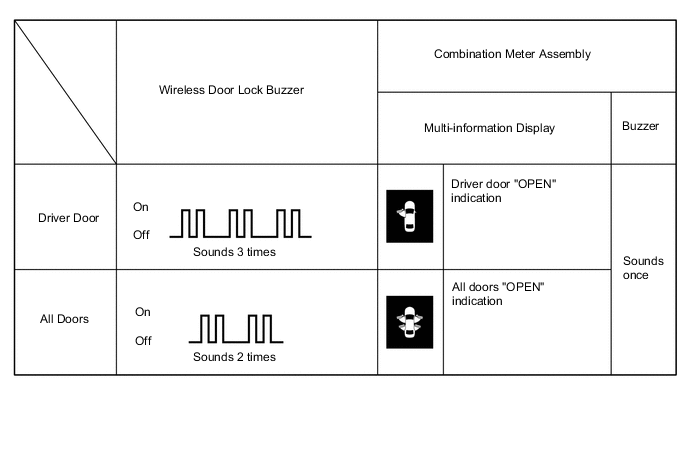
-
-
-
Entry cancel function (manual operation)
Tech Tips
While the entry and start system is canceled, it is possible to lock and unlock the doors with the wireless operation, and the start system can be operated by holding the electrical key transmitter sub-assembly near the power switch.
-
The following functions are disabled when the entry and start system is canceled.
-
Entry unlock/lock functions
-
Entry luggage compartment door open function
-
Push start function
-
Key lock-in prevention function
-
Entry warning functions
-
-
When canceling the system through manual operation:
-
Make sure the following conditions are met:
-
The power switch is off.
-
The driver door is closed.
-
The driver door is unlocked.
-
Press the unlock switch of the electrical key transmitter sub-assembly.
-
Open the driver door within 5 seconds of completing the step above (driver door: close condition → opened).
-
With the driver door open, press the unlock switch of the electrical key transmitter sub-assembly 2 times within 5 seconds of completing the step above.
Note
If the driver door is closed before or while pressing the unlock switch, the entry cancel setting mode will end.
-
Close and open the driver door twice completing the above step (driver door: open condition → closed → opened → closed → opened).
-
With the driver door open, press the unlock switch of the electrical key transmitter sub-assembly 2 times completing the step above.
Note
If the driver door is closed before or while pressing the unlock switch, the entry cancel setting mode will end.
-
Close and open the driver door completing the step above (driver door: open condition → closed → opened).
-
Close the driver door within 5 seconds of completing the above step.
-
Check that the wireless buzzer sounds twice (short beeps) to confirm that the entry and start system has been canceled.
Tech Tips
Finish the step 5 to 7 within 30 seconds.
-
-
Perform the following procedure to restore the entry and start system to the active state from the canceled state.
-
Perform the procedures to cancel the entry and start system again.
-
Check that the wireless buzzer sounds once (short beep) to confirm that the entry and start system has been restored to the active state.
Tech Tips
-
The system changes between the canceled state and the active state each time the procedure to cancel the system through manual operation is performed.
-
The buzzer sounds twice when the system changes from the active state to the canceled state, and sounds once when the system changes from the canceled state to the active state.
-
-
-
-