ULTRASONIC SENSOR(for Rear Side) REMOVAL
PROCEDURE
-
REMOVE REAR BUMPER COVER
-
REMOVE NO. 3 LUGGAGE ROOM WIRE
-
Disconnect the 4 connectors.
-
Detach the 4 clamps and remove the No. 3 luggage room wire.
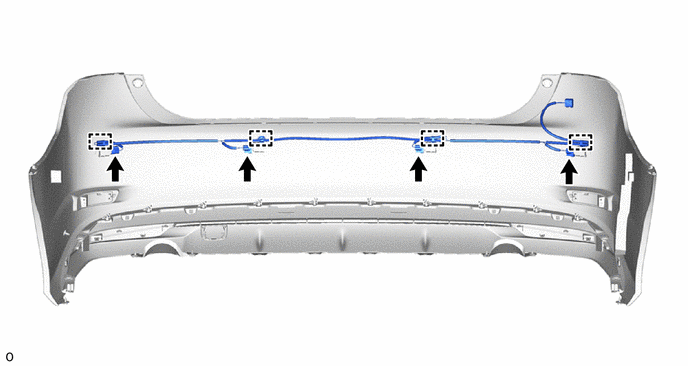
-
-
REMOVE NO. 2 ULTRASONIC SENSOR
Tech Tips
-
The illustration shows the ultrasonic sensor clip for the LH corner and back sensor RH and back sensor RH. The horizontal orientation of the ultrasonic sensor clip for the RH corner is opposite that of the image shown in the illustration.
-
Use the same procedure for all ultrasonic sensor clips.
-
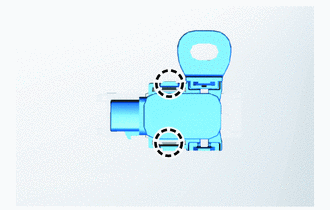
Detach the 2 claws and remove the No. 2 ultrasonic sensor.
-
-
REMOVE NO. 1 ULTRASONIC SENSOR RETAINER
-
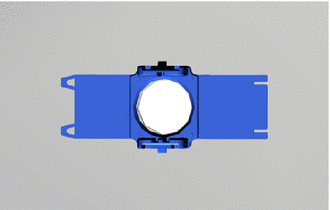
Remove the No. 1 ultrasonic sensor retainer from the rear bumper cover.
-
Remove the old double-sided tape from the rear bumper cover.
Tech Tips
Use the same procedure for both No. 1 ultrasonic sensor retainer.
-
-
REMOVE NO. 2 ULTRASONIC SENSOR CLIP
Tech Tips
Use the same procedure for all ultrasonic sensor clips.
-
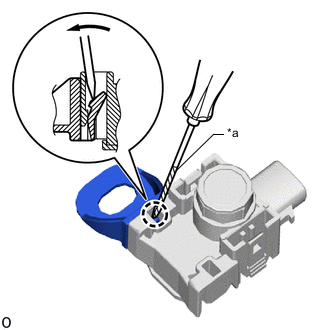
Text in Illustration *a Protective Tape Using a screwdriver, detach the claw and remove the ultrasonic sensor clip from the No. 2 ultrasonic sensor.
Tech Tips
Tape the screwdriver tip before use.
-