PARKING ASSIST MONITOR SYSTEM SYSTEM DESCRIPTION
-
GENERAL
-
*1: w/o Power Trunk Lid System
-
*2: w/ Power Trunk Lid System
-
*3: w/ LEXUS Parking Assist-sensor System
-
*4: w/ Variable Gear Ratio Steering System
-
*5: for 12.3 Inch
-
*6: for 8 Inch
-
This system has a rear television camera assembly mounted on the luggage compartment door to display the rear view of the vehicle on the accessory meter assembly*5 or multi-display*6. The display panel also shows a composite view consisting of the area behind the vehicle and parking guidelines to assist the driver in parking the vehicle by monitoring the area behind the vehicle.
-
This system consists of the following components:
-
Multi-media module receiver assembly
-
Rear television camera assembly
-
Accessory meter assembly*5
-
Multi-display*6
-
Multiplex network body ECU*1
-
Luggage closer motor assembly*2
-
ECM
-
Spiral with sensor cable sub-assembly
-
Skid control ECU assembly
-
Clearance warning ECU assembly*3
-
Front steering control ECU*4
-
-
This system is equipped with a self-diagnosis system, which is operated on a designated window that appears on the display panel, just as in the audio and visual system.
-
-
FUNCTION OF COMPONENTS
-
The multi-media module receiver assembly controls the system by using information from the following components.
Item Function Multi-media Module Receiver Assembly
-
Receives video signals, which contain an image of the area behind the vehicle taken with the rear television camera assembly.
-
Performs overall control of the system by receiving signals from the sensors.
-
Allows operation via the remote touch when the park assist monitor screen or diagnosis screen is displayed.
-
Creates images and displays adjustment screens performed on the diagnosis screen.
-
Stops displaying the guide line and buttons displays "Check surrounding for safety" when an open signal is received for the luggage compartment door.
-
Displays "Back door is open" on the back camera position setting screen when an open signal is received for the luggage compartment door.
-
Performs control of the system by receiving the reverse signal from the ECM.
Rear Television Camera Assembly
-
Mounted on the luggage compartment door to transmit an image of the area behind the vehicle to the multi-media module receiver assembly.
-
Has a color video camera that uses a Complementary Metal Oxide Semiconductor (CMOS) and a wide-angle lens.
Accessory Meter Assembly*5
Multi-display*6
Receives the video signals containing a composite of an image of the area behind the vehicle and parking assist guideline signals from the multi-media module receiver assembly, and displays them on the display panel. Multiplex Network Door ECU*1
Luggage Closer Motor Assembly*2
Sends the courtesy light switch signal to multi-media module receiver assembly through CAN communication. ECM Sends a shift state signal to the multi-media module receiver assembly through CAN communication. Spiral with Sensor Cable Sub-assembly Detects the angle of the steering wheel and sends the resulting signals to the multi-media module receiver assembly through CAN communication. Skid Control ECU Assembly Sends a vehicle speed signal to the multi-media module receiver assembly through CAN communication. Clearance Warning ECU Assembly*3 Sends a clearance detection data signal to the multi-media module receiver assembly through CAN communication. Front Steering Control ECU*4 Sends a VGRS relative angle signal to the multi-media module receiver assembly through CAN communication. -
-
-
OPERATION EXPLANATION
-
The reverse signal is sent to the multi-media module receiver assembly when the shift lever is moved to R.
for 12.3 Inch:
After receiving the reverse position signal, the multi-media module receiver assembly switches the display signal for the accessory meter assembly from the audio and visual system to the parking assist monitor system.
for 8 Inch:
After receiving the reverse position signal, the multi-media module receiver assembly switches the display signal for the multi-display from the audio and visual system to the parking assist monitor system.
-
In parallel parking assist mode, appropriate steering angle and timing information can be provided for the driver. This is based on the information from the steering angle sensor signal and the vehicle angle data signal that are sent to the multi-media module receiver assembly.
Tech Tips
The steering angle sensor signal is used to control parking assist only for estimated guide line mode.
-
-
DISPLAY MODE SETTING
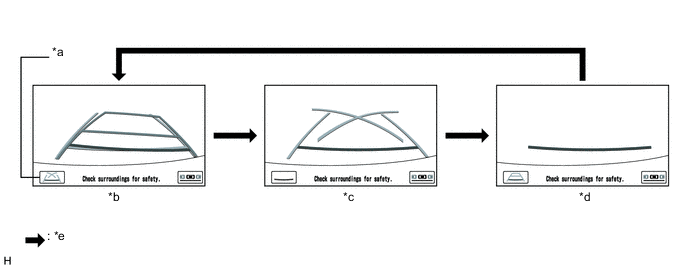
Text in Illustration *a Display Mode Switch Screen Button *b Estimated Course Line Display Mode *c Parking Assist Guide Line Display Mode *d Distance Guide Line Display Mode *e Display Mode Switch Screen Button Pressed - -
-
While the parking assist monitor is displayed, pressing the line mode button switches the parking assist monitor display mode.
Parking Assist Monitor Display Mode Parking Assist Monitor Display Mode Distance Guide Line
(Red)
Vehicle Width Extension Guide Line
(Blue)
Estimated Course Lines
(Yellow)
Parking Guide Line
(Blue)
Estimated Course Line Display Mode Displayed Displayed Displayed Not displayed Parking Assist Guide Line Display Mode Displayed Displayed Not displayed Displayed Distance Guide Line Display Mode Displayed Not displayed Not displayed Not displayed
-
-
DIAGNOSTIC FUNCTION OUTLINE
-
This parking assist monitor system has a diagnostic function displayed in the multi-media module receiver assembly. This function enables calibration (adjustment and verify) of the parking assist monitor system Click here.
-
The following items for the parking assist monitor system can be checked using the GTS.
Item Proceed to DTC
-