TELEMATICS SYSTEM(w/o Telematics Transceiver) SYSTEM DESCRIPTION
-
TELEMATICS SYSTEM OUTLINE
-
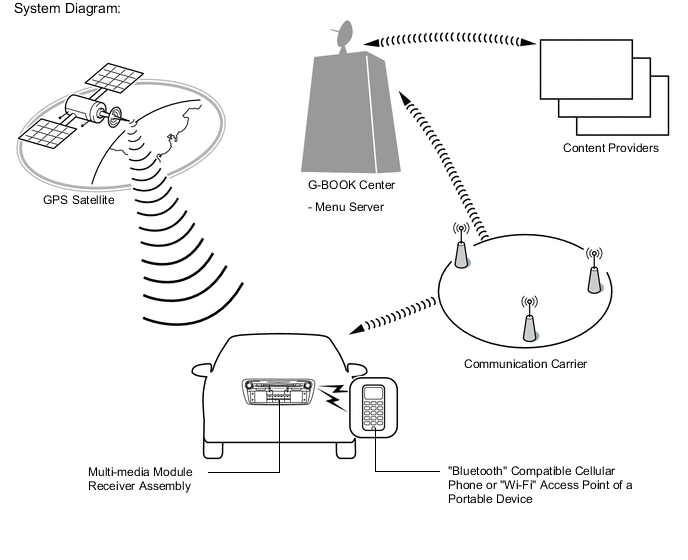
The telematics system is a telematics service that links the vehicle and G-BOOK network (provides information from the G-BOOK center or content providers).
-
To use the telematics system, it is necessary to connect the multi-media module receiver assembly to a "Bluetooth" compatible cellular phone or "Wi-Fi" network.
-
The user needs to follow the instructions on the multi-media module receiver assembly to start using the telematics system service after applying for the service at a dealership.
-
-
FUNCTION OF MAIN COMPONENTS
Component Function Map Light Assembly
-
Telephone Microphone Assembly
When the operator service is used: Sends the microphone voice signal to the multi-media module receiver assembly. Navigation Antenna Assembly Receives GPS radio waves and sends them to the multi-media module receiver assembly. Multi-media module receiver assembly
-
Use e data and voice signals used for the G-BOOK through a communication network.
-
Sends and receives the data used for the G-BOOK to and from a "Bluetooth" compatible cellular phone using cellular phone data signal.
-
When the operator service is used: Sends the sent voice signal from the telephone microphone assembly to a "Bluetooth" compatible cellular phone.
-
When the operator service is used: Sends the received voice signal from the "Bluetooth" compatible cellular phone to the vehicle speakers.
-
Sends and receives the data used for the G-BOOK to and from the "Wi-Fi" access point of a portable device using "Wi-Fi" communication.*
"Bluetooth" Compatible Cellular Phone Has a "Bluetooth" connection function and internet connection function to send and receive data and voice signals. "Wi-Fi" Access Point of a Portable Device Has a "Wi-Fi" connection function and internet connection function to send and receive data.
-
*: When a "Wi-Fi" connection is used
-
-
DEVICE USED FOR TELEMATICS SYSTEM COMMUNICATION
-
The multi-media module receiver assembly is used for data communication or operator service telephone calls.
-
Perform the following if the device used for telematics system communication is replaced.
Tech Tips
If the multi-media module receiver assembly is replaced on vehicles that do not have a contract for the G-BOOK, perform vehicle contract setting.
-
-
G-BOOK ID OUTLINE
-
On this model, the multi-media module receiver assembly functions as the G-BOOK device.
-
The multi-media module receiver assembly has a serial number (G-BOOK ID) which can be used to determine the individual device when servicing.
-
-
G-BOOK SUPPORT CENTER OUTLINE
-
The G-BOOK support center provides members with opportunities to ask questions and get information necessary for troubleshooting.
G-BOOK Support Center Main Service Outline Answering questions about the telematics system Answers questions from customers about the telematics system Contracting or canceling the G-BOOK online service Performs procedures to make or cancel a contract for customers Confirming server or communication conditions Confirms the G-BOOK center condition Re-registering a G-BOOK device Performs procedures for re-registration when the G-BOOK device is replaced
-
-
DIAGNOSIS DISPLAY DETAILED DESCRIPTION
Tech Tips
This section contains a detailed description of displays in diagnostic mode.
-
Enter diagnostic mode Click here.
-
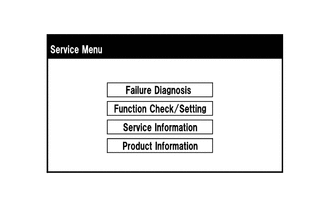
Select "Service Information" on the "Service Menu" screen.
-
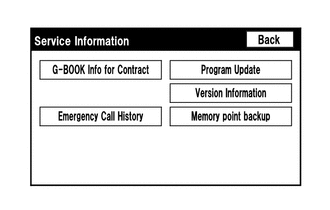
"Service Information" Screen
Screen Description Display Content G-BOOK Info for Contract The G-BOOK ID, flag information, etc. are displayed. Emergency Call History - -
Select "G-BOOK Info for Contract" on the "Service Information" screen.
-
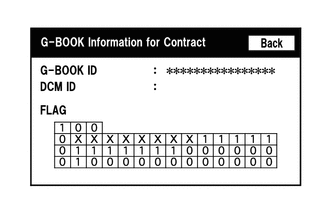
"G-BOOK Information for Contract" Screen
Screen Description Display Content G-BOOK ID The G-BOOK ID of the multi-media module receiver assembly is displayed. DCM ID - FLAG The G-BOOK contract flag or service flag of the multi-media module receiver assembly is displayed.
-