REAR BUMPER REASSEMBLY
PROCEDURE
-
REMOVE NO. 2 MOULDING TAPE
Tech Tips
When installing the No. 2 moulding tape, heat the rear bumper cover using a heat light.
Standard Item Temperature Rear Bumper Cover 20 to 30°C (68 to 86°F) Note
Do not heat the rear bumper cover excessively.
-
When using a new rear bumper cover:
-
Clean the surface of a new rear bumper cover.
-
Using a heat light, heat the rear bumper cover surface.
-
-
When reusing the rear bumper cover:
-
Using a heat light, heat the rear bumper cover surface.
-
Remove the double-sided tape from the rear bumper cover.
-
Wipe off any tape adhesive residue with cleaner.
-
-
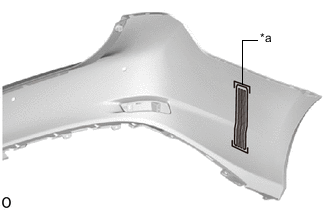
Text in Illustration *a Mark-off Line Install a new No. 2 moulding tape.
Tech Tips
Use the same procedure for both No. 2 moulding tapes.
-
Using a heat light, heat the rear bumper cover.
-
Remove the peeling paper from the face of the No. 2 moulding tape.
Tech Tips
After removing the peeling paper, keep the exposed adhesive free from foreign matter.
-
Align the No. 2 moulding tape with the mark-off line of the rear bumper cover and install it as shown in the illustration
Tech Tips
Press the No. 2 moulding tape firmly to install it.
-
-
-
INSTALL REAR BUMPER PROTECTOR
Tech Tips
-
Use the same procedure for both rear bumper protectors.
-
When installing the rear bumper protector, heat the rear bumper cover using a heat light.
Standard Item Temperature Rear Bumper Cover 20 to 30°C (68 to 86°F) Note
Do not heat the rear bumper cover excessively.
-
When using a new rear bumper cover:
-
Clean the surface of a new rear bumper cover.
-
Using a heat light, heat the rear bumper cover surface.
-
-
When reusing the rear bumper cover:
-
Using a heat light, heat the rear bumper cover surface.
-
Remove the double-sided tape from the rear bumper cover.
-
Wipe off any tape adhesive residue with cleaner.
-
-
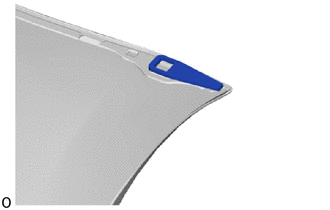
Install a new rear bumper protector.
Tech Tips
Use the same procedure for both rear bumper protectors.
-
Using a heat light, heat the rear bumper cover.
-
Remove the peeling paper from the face of the rear bumper protector.
Tech Tips
After removing the peeling paper, keep the exposed adhesive free from foreign matter.
-
-
Install the rear bumper protector.
Tech Tips
Press the rear bumper protector firmly to install it.
-
-
INSTALL REFLEX REFLECTOR ASSEMBLY LH
-
Attach the claw to install the reflex reflector assembly LH.
-
Install the screw.
-
-
INSTALL REFLEX REFLECTOR ASSEMBLY RH
Tech Tips
Use the same procedure described for the LH side.
-
INSTALL REAR BUMPER PROTECTOR LH
Tech Tips
When installing the rear bumper protector LH, heat the rear bumper cover using a heat light.
Standard Item Temperature Rear Bumper Cover 20 to 30°C (68 to 86°F) Note
Do not heat the rear bumper cover excessively.
-
When using a new rear bumper cover:
-
Clean the surface of a new rear bumper cover.
-
Using a heat light, heat the rear bumper cover surface.
-
-
When reusing the rear bumper cover:
-
Using a heat light, heat the rear bumper cover surface.
-
Remove the double-sided tape from the rear bumper cover.
-
Wipe off any tape adhesive residue with cleaner.
-
-
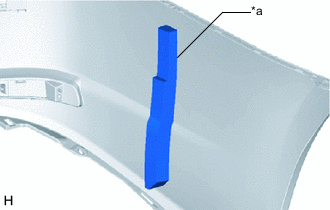
Text in Illustration *a Mark-off Line Install a new rear bumper protector LH.
-
Using a heat light, heat the rear bumper cover.
-
Remove the peeling paper from the face of the rear bumper protector LH.
Tech Tips
After removing the peeling paper, keep the exposed adhesive free from foreign matter.
-
Align the rear bumper protector LH with the mark-off line of the rear bumper cover.
Tech Tips
Press the rear bumper protector firmly to install it.
-
-
-
INSTALL REAR BUMPER PAD LH
Tech Tips
When installing the rear bumper pad LH, heat the rear bumper cover using a heat light.
Standard Item Temperature Rear Bumper Cover 20 to 30°C (68 to 86°F) Note
Do not heat the rear bumper cover excessively.
-
When using a new rear bumper cover:
-
Clean the surface of a new rear bumper cover.
-
Using a heat light, heat the rear bumper cover surface.
-
-
When reusing the rear bumper cover:
-
Using a heat light, heat the rear bumper cover surface.
-
Remove the double-sided tape from the rear bumper cover.
-
Wipe off any tape adhesive residue with cleaner.
-
-
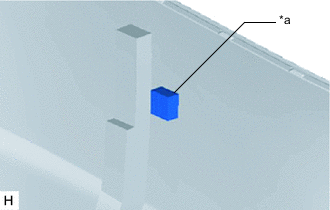
Text in Illustration *a Mark-off Line Install a new rear bumper pad LH.
-
Using a heat light, heat the rear bumper cover.
-
Remove the peeling paper from the face of the rear bumper pad LH.
Tech Tips
After removing the peeling paper, keep the exposed adhesive free from foreign matter.
-
Align the rear bumper pad LH with the mark-off line of the rear bumper cover.
Tech Tips
Press the rear bumper pad firmly to install it.
-
-
-
INSTALL REAR BUMPER CENTER EXTENSION SUB-ASSEMBLY
-
Attach the 2 guides to install the rear bumper center extension sub-assembly.
-
Install the 6 clips and 10 retainers.
-
-
INSTALL REAR BUMPER PLATE RH
-
Attach the 3 claws to install the rear bumper plate RH .
-
-
INSTALL NO. 2 ULTRASONIC SENSOR CLIP (w/ LEXUS Parking Assist-sensor System)
-
INSTALL NO. 1 ULTRASONIC SENSOR RETAINER (w/ LEXUS Parking Assist-sensor System)
-
INSTALL NO. 2 ULTRASONIC SENSOR (w/ LEXUS Parking Assist-sensor System)
-
INSTALL NO. 3 LUGGAGE ROOM WIRE (w/ LEXUS Parking Assist-sensor System)