OIL PUMP MOTOR CONTROLLER REMOVAL
PROCEDURE
-
PRECAUTION
-
REMOVE LUGGAGE COMPARTMENT FLOOR MAT
-
REMOVE LUGGAGE COMPARTMENT TRIM COVER LH
-
DISCONNECT CABLE FROM NEGATIVE AUXILIARY BATTERY TERMINAL
Note
When disconnecting the cable, some systems need to be initialized after the cable is reconnected Click here.
-
REMOVE ENGINE ROOM SIDE COVER
-
REMOVE COOL AIR INTAKE DUCT SEAL
-
REMOVE V-BANK COVER SUB-ASSEMBLY
-
REMOVE NO. 1 AIR CLEANER INLET
-
DISCONNECT NO. 2 VENTILATION HOSE
-
REMOVE AIR CLEANER CAP WITH AIR CLEANER HOSE
-
REMOVE AIR CLEANER FILTER ELEMENT SUB-ASSEMBLY
-
REMOVE AIR CLEANER CASE
-
DISCONNECT WIRE HARNESS
-
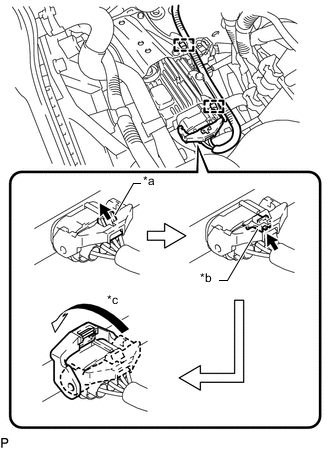
Text in Illustration *a Pull out the lock *b Release the lock *c Rotate the lever Release the lock of the connector.
-
Release the lock lever of the connector as shown in the illustration. Disconnect the connector from the oil pump motor controller.
-
Disconnect the 2 clamps.
-
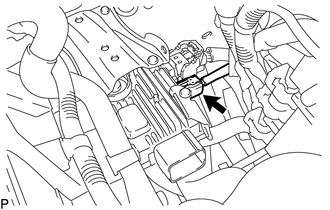
Disconnect the connector from the oil pump motor controller.
-
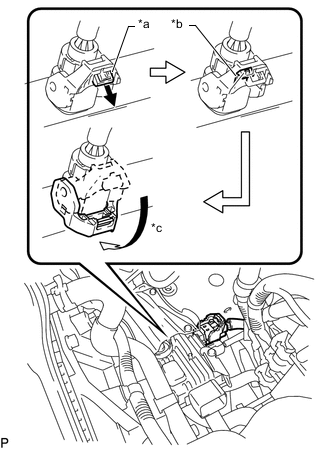
Text in Illustration *a Pull out the lock *b Release the lock *c Rotate the lever Release the lock of the connector.
-
Release the lock lever of the connector as shown in the illustration. Disconnect the connector from the oil pump motor controller.
-
-
REMOVE OIL PUMP MOTOR CONTROLLER
-
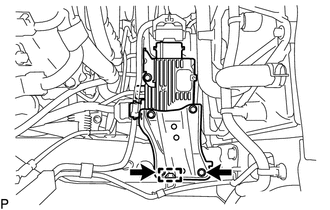
Remove the 2 bolts, clamp and oil pump motor controller with bracket.
Note
Do not drop the oil pump motor controller.
-
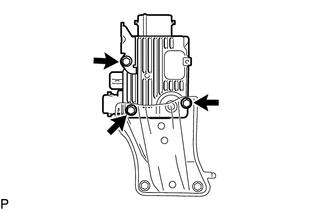
Remove the 3 bolts and 2 oil pump motor controller brackets.
-