MILLIMETER WAVE RADAR SENSOR INSTALLATION

CAUTION / NOTICE / HINT
Note
If the millimeter wave radar sensor assembly has been struck or dropped, replace the millimeter wave radar sensor assembly with a new one.
PROCEDURE
-
INSTALL MILLIMETER WAVE RADAR SENSOR ASSEMBLY
Note
If the millimeter wave radar sensor assembly has been struck or dropped, replace the millimeter wave radar sensor assembly with a new one.
-
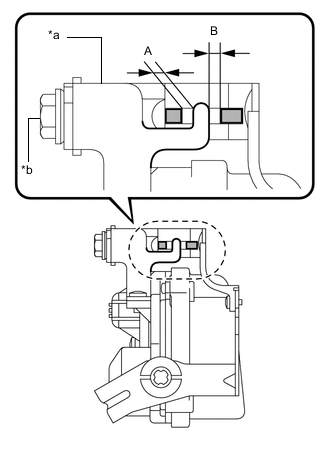
Text in Illustration *a Beam Axis Change Mechanism *b Bolt Set beam axis to the standard position.
-
Turn the bolt so that the beam axis change mechanism is positioned as shown in the illustration.
Specified Condition Difference between (A) and (B): 1 mm (0.0394 in.) or less
-
-
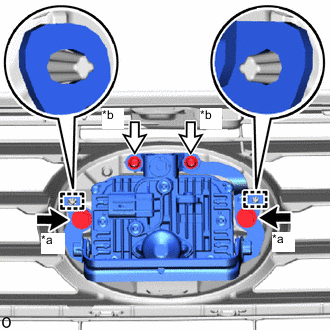
Text in Illustration *a Bolt *b Screw Attach the 2 guides to install the millimeter wave radar sensor assembly.
-
Install the 2 screws and 2 bolts.
- Torque:
- Bolt
- 2.5 N*m { 25 kgf*cm, 22 in.*lbf }
Tech Tips
Tighten the bolts in the order indicated in the illustration.
-
Connect the connector.
-
-
INSTALL COOL AIR INTAKE DUCT SEAL
-
INSTALL ENGINE ROOM SIDE COVER
-
ADJUST MILLIMETER WAVE RADAR SENSOR ASSEMBLY