HV BATTERY REMOVAL

PROCEDURE
-
PRECAUTION
CAUTION:
Be sure to read Precaution thoroughly before servicing Click here.
Note
After turning the power switch off, waiting time may be required before disconnecting the cable from the auxiliary battery negative (-) terminal. Therefore, make sure to read the disconnecting the cable from the auxiliary battery negative (-) terminal notices before proceeding with work Click here.
-
When disposing of an HV battery, make sure to return it through an authorized collection agent who is capable of handling it safely. If the HV battery is returned via the manufacturer specified route, it will be returned properly and in a safe manner by an authorized collection agent.
CAUTION:
-
Accidents such as electric shock may result if the HV battery is disposed of improperly or abandoned. Therefore, make sure to return all HV batteries through an authorized collection agent.
-
After removing the HV battery, keep it away from water. Exposure to water may cause the HV battery to produce heat, resulting in a fire.
-
-
-
READ OUTPUT DTC
-
Check for DTCs Click here.
Note
Confirm that P0AA6 (Hybrid Battery Voltage System Isolation Fault) is not output before performing removal or installation work on the internal parts of the battery. If the DTC is output, perform troubleshooting procedures first.
-
-
REMOVE LUGGAGE COMPARTMENT FLOOR MAT
-
REMOVE LUGGAGE COMPARTMENT TRIM COVER LH
-
DISCONNECT CABLE FROM AUXILIARY BATTERY TERMINAL
Note
When disconnecting the cable, some systems need to be initialized after the cable is reconnected Click here.
-
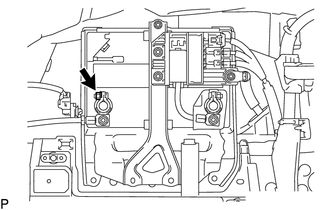
Disconnect the cable from the auxiliary battery negative (-) terminal.
Tech Tips
Both cables should be disconnected to prevent the AMD terminal from shorting to ground.
-
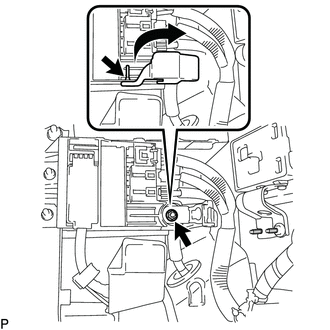
Remove the terminal cover.
-
Remove the nut and disconnect the cable from the auxiliary battery positive (+) terminal.
Tech Tips
Both cables should be disconnected to prevent the AMD terminal from shorting to ground.
-
-
REMOVE NO. 1 SEAT ARMREST CAP
-
REMOVE LOWER HYBRID VEHICLE BATTERY COVER PANEL
-
REMOVE SERVICE PLUG GRIP
-
REMOVE INVERTER COVER
-
REMOVE CONNECTOR COVER ASSEMBLY
-
CHECK TERMINAL VOLTAGE
-
INSTALL CONNECTOR COVER ASSEMBLY
-
INSTALL INVERTER COVER
-
REMOVE REAR SEAT ASSEMBLY
-
REMOVE REAR DOOR SCUFF PLATE LH
-
REMOVE REAR SEAT SIDE GARNISH LH
-
REMOVE INNER ROOF SIDE GARNISH LH
-
REMOVE REAR DOOR SCUFF PLATE RH
-
REMOVE REAR SEAT SIDE GARNISH RH
-
REMOVE INNER ROOF SIDE GARNISH RH
-
REMOVE PACKAGE TRAY TRIM PANEL ASSEMBLY
-
REMOVE CENTER STOP LIGHT COVER (w/ Rear Sunshade)
-
REMOVE NO. 2 PACKAGE TRAY TRIM PANEL ASSEMBLY (w/ Rear Sunshade)
-
REMOVE NO. 2 ROOM PARTITION PAD
-
REMOVE NO. 1 ROOM PARTITION PAD
-
REMOVE LUGGAGE COMPARTMENT TRIM COVER RH
-
REMOVE SIDE TRIM BOX
-
REMOVE LUGGAGE COMPARTMENT SIDE TRAY (w/ Spare Tire)
-
REMOVE LUGGAGE COMPARTMENT TRIM BOX (w/o Spare Tire)
-
REMOVE SPARE WHEEL COVER TRAY (w/o Spare Tire)
-
REMOVE ROPE HOOK ASSEMBLY
-
REMOVE REAR LUGGAGE COMPARTMENT TRAY BRACKET LH
-
REMOVE REAR LUGGAGE COMPARTMENT TRAY BRACKET RH
-
REMOVE NO. 1 LUGGAGE COMPARTMENT TRIM HOOK
-
REMOVE NO. 1 LUGGAGE COMPARTMENT LIGHT ASSEMBLY
-
REMOVE REAR LUGGAGE COMPARTMENT TRIM COVER
-
REMOVE REAR FLOOR FINISH PLATE
-
REMOVE FRONT LUGGAGE COMPARTMENT TRIM COVER
-
REMOVE ROPE HOOK
-
REMOVE INNER LUGGAGE COMPARTMENT TRIM COVER LH
-
REMOVE INNER LUGGAGE COMPARTMENT TRIM COVER RH
-
REMOVE NO. 6 HYBRID BATTERY INTAKE DUCT
-
REMOVE NO. 1 HYBRID BATTERY INTAKE DUCT
-
REMOVE NO. 3 HYBRID BATTERY INTAKE DUCT
-
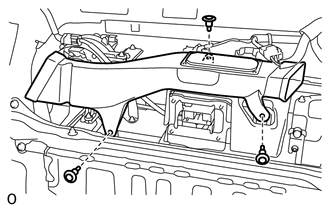
Remove the 3 clips.
-
Disconnect the No. 3 hybrid battery intake duct from the battery cooling blower assembly and remove it.
-
-
REMOVE NO. 4 HYBRID VEHICLE BATTERY SHIELD SUB-ASSEMBLY
CAUTION:
Perform work using insulated gloves and insulated tools.
-
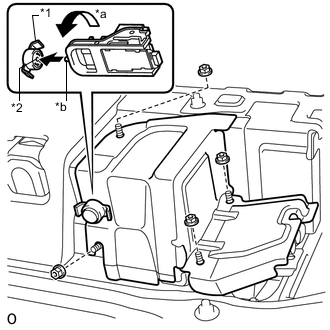
Text in Illustration *1 Battery Cover Lock Striker *2 Button *a Counterclockwise *b Protrusion Using the service plug grip, insert the protrusion part of the service plug grip, turn the button of the battery cover lock striker counterclockwise, and release the lock.
-
Remove the 4 nuts and No. 4 hybrid vehicle battery shield sub-assembly.
-
-
DISCONNECT NO. 4 FLOOR WIRE
CAUTION:
Perform work using insulated gloves and insulated tools.
-
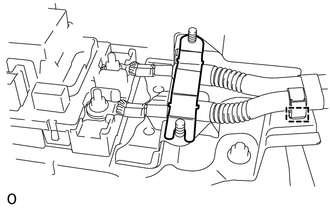
Remove the battery shield contact.
-
Detach the wire harness clamp.
-
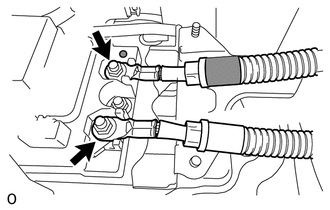
Remove the 2 nuts and disconnect the 2 wires of the No. 4 floor wire.
Note
Insulate the terminals of the disconnected high voltage wire with insulating tape.
-
-
REMOVE NO. 1 HYBRID BATTERY CARRIER BRACKET
CAUTION:
Be sure to wear insulated gloves.
-
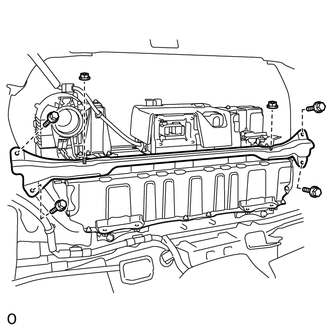
Remove the 2 nuts.
-
Remove the 4 bolts and No. 1 hybrid battery carrier bracket.
-
-
REMOVE HV BATTERY
CAUTION:
Be sure to wear insulated gloves.
-
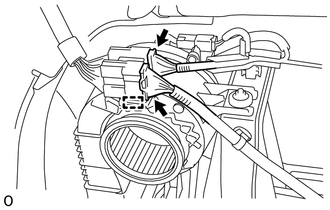
Disconnect the 2 connectors and detach the wire harness clamp from the upper part of the battery cooling blower assembly.
-
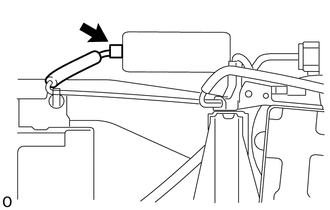
Disconnect the connector from the brake control power supply assembly.
-
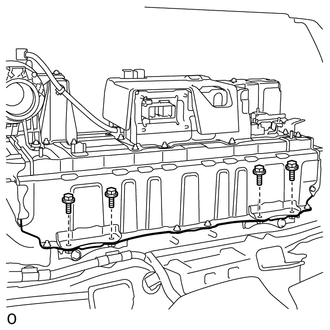
Remove the 4 bolts.
-
Install the luggage compartment floor mat upside down.
-
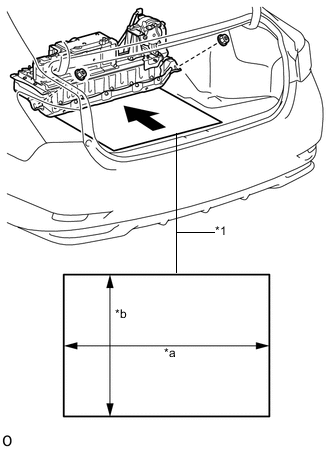
Text in Illustration *1 Cardboard *a 920 mm (3.01 ft.) *b 540 mm (1.77 ft.) Prepare 2 pieces of cardboard that are at least 540 mm (1.77 ft.) long and 920 mm (3.01 ft.) wide.
-
Remove the 2 nuts and lift the HV battery, alternating between the left and right sides. Then, place the 2 pieces of cardboard on top of one another and slide them under the HV battery.
-
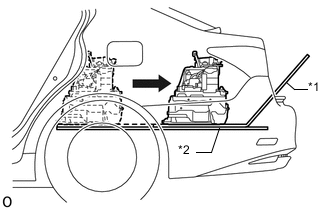
Text in Illustration *1 Top piece of cardboard *2 Bottom piece of cardboard Pull out the HV battery and top piece of cardboard together from the rear of the vehicle, sliding them over the bottom piece of cardboard.
Note
-
When pulling out the HV battery, 2 people are needed. One should work from the luggage compartment side and the other from the cabin side.
-
When pulling out the HV battery, do not allow the wire harnesses and the HV battery case to interfere with the vehicle body.
-
Make sure that the hybrid battery cover sheet attached to the underside of the HV battery does not come off.
-
-
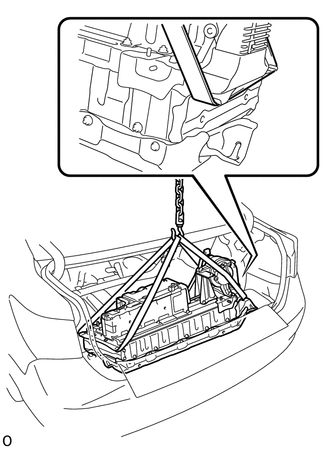
Using a rope or equivalent, remove the HV battery from the vehicle.
Note
-
Use cardboard or other similar material to protect the HV battery and vehicle body from damage.
-
Pass the rope or equivalent as shown in the illustration in order to prevent deformation.
-
-
-
REMOVE NO. 1 UPPER HYBRID VEHICLE BATTERY CARRIER BRACKET
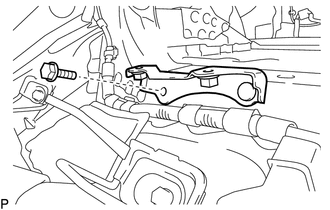
-
Remove the bolt and No. 1 upper hybrid vehicle battery carrier bracket.
-
-
REMOVE NO. 2 UPPER HYBRID VEHICLE BATTERY CARRIER BRACKET
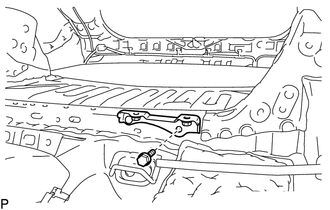
-
Remove the bolt and No. 2 upper hybrid vehicle battery carrier bracket.
-
-
REMOVE NO. 2 BATTERY PACK WIRE
CAUTION:
Be sure to wear insulated gloves.
-
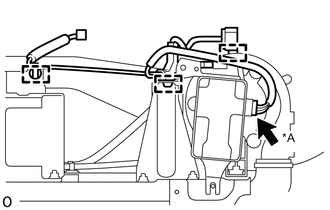
Text in Illustration *A w/ Voltage Inverter w/ Voltage Inverter:
Disconnect the connector.
-
Detach the 3 wire harness clamps and remove the No. 2 battery pack wire.
-
-
REMOVE VOLTAGE INVERTER ASSEMBLY (w/ Voltage Inverter)
-
REMOVE BATTERY COOLING BLOWER ASSEMBLY
CAUTION:
Perform work using insulated gloves and insulated tools.
-
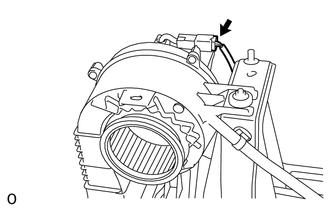
Disconnect the connector and detach the wire harness clamp.
-
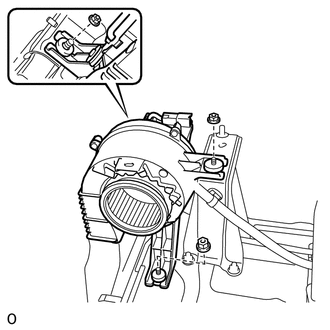
Remove the 3 nuts and battery cooling blower assembly.
Note
-
Hold the wire harness and fan, and do not remove them.
-
Make sure that foreign matter does not enter the battery cooling blower assembly.
-
-
-
REMOVE NO. 2 HYBRID BATTERY INTAKE DUCT
CAUTION:
Be sure to wear insulated gloves.
-
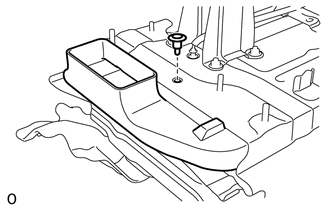
Using a clip remover, remove the clip.
-
Remove the No. 2 hybrid battery intake duct.
-
-
REMOVE NO. 1 HYBRID BATTERY SILENCER
CAUTION:
Be sure to wear insulated gloves.
-
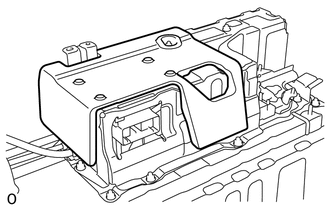
Remove the No. 1 hybrid battery silencer.
-
-
REMOVE UPPER HYBRID BATTERY COVER SUB-ASSEMBLY
CAUTION:
Perform work using insulated gloves and insulated tools.
-
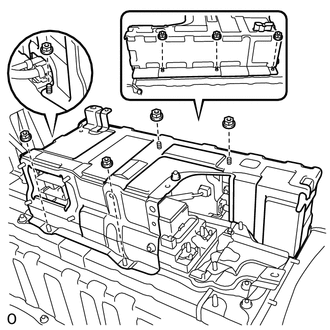
Remove the 8 nuts and upper hybrid battery cover sub-assembly.
-
-
REMOVE HYBRID BATTERY JUNCTION BLOCK ASSEMBLY
-
REMOVE BATTERY SMART UNIT
-
REMOVE NO. 2 HYBRID BATTERY PACK WIRE
CAUTION:
Be sure to wear insulated gloves.
-
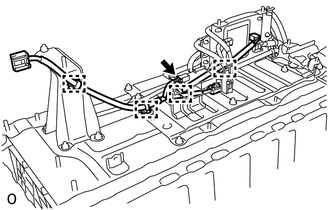
Disconnect the connector.
-
Detach the 4 wire harness clamps and remove the No. 2 hybrid battery pack wire.
-
-
REMOVE NO. 2 HYBRID BATTERY CARRIER BRACKET SUB-ASSEMBLY
CAUTION:
Perform work using insulated gloves and insulated tools.
-
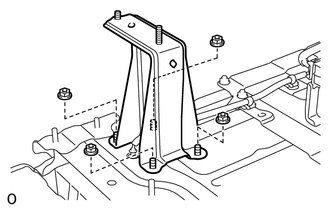
Remove the 4 nuts and No. 2 hybrid battery carrier bracket sub-assembly.
-