SFI SYSTEM MIL Circuit
DESCRIPTION
The Malfunction Indicator Lamp (MIL) is used to indicate vehicle malfunctions detected by the ECM. When the power switch is turned on (IG), power is supplied to the MIL circuit, and the ECM provides the circuit ground which illuminates the MIL.
The MIL operation can be checked visually: When the power switch is first turned on (IG), the MIL should be illuminated and should turn off after engine is started. If the MIL remains illuminated or is not illuminated, conduct the following troubleshooting procedure using the Techstream.
WIRING DIAGRAM
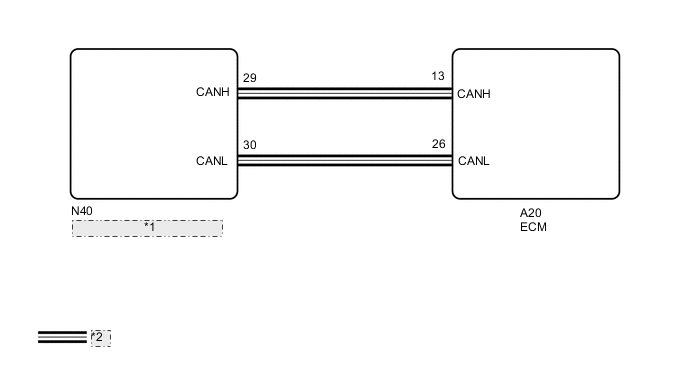
| *1 | Combination Meter Assembly |
| *2 | CAN Communication Line |
PROCEDURE
-
CHECK THAT MIL IS ILLUMINATED
-
Check the illumination condition of the MIL.
Result MIL Condition Proceed to Illuminates → Turns off Power switch on (IG) → Power switch on (READY) A Other than above - B
A 
CHECK FOR INTERMITTENT PROBLEMS Click here
B 
-
-
READ VALUE USING TECHSTREAM
-
Connect the GTS to the DLC3.
-
Turn the power switch on (IG).
-
Turn the GTS on.
-
Check the communication between the GTS and ECM.
Tech Tips
It can be checked using the "Engine" item of the Data List.
Result Result Proceed to Communication is possible A Communication is not possible B
B
GO TO VC OUTPUT CIRCUIT Click here
A
-
-
CHECK WHETHER DTC OUTPUT RECURS
-
Connect the GTS to the DLC3.
-
Turn the power switch on (IG).
-
Turn the GTS on.
-
Enter the following menus: System Select / Health Check.
-
Check if any DTCs have been detected. Note down any DTCs.
Result Result Proceed to DTCs are not output A Any DTCs is output B
B
REPAIR CIRCUITS INDICATED BY OUTPUT DTCS
A
-
-
PERFORM ACTIVE TEST USING TECHSTREAM
-
Connect the GTS to the DLC3.
-
Turn the power switch on (IG).
-
Turn the GTS on.
-
Enter the following menus: Body Electrical / Combination Meter / Active Test / Check Engine Indicator.
-
Check the status of the MIL while performing the Active Test.
Result Result Proceed to Changes A Does not change B
A
REPLACE ECM Click here
B
REPLACE COMBINATION METER ASSEMBLY Click here
-