INSTRUMENT PANEL SAFETY PAD REASSEMBLY
CAUTION / NOTICE / HINT
Tech Tips
-
Use the same procedure for RHD and LHD vehicles.
-
The procedure listed below is for LHD vehicles.
PROCEDURE
-
INSTALL INSTRUMENT PANEL SUB-ASSEMBLY
-
w/ Headup Display:
-
Install the No. 1 defroster nozzle garnish to the instrument panel sub-assembly with the 9 screws <A>.
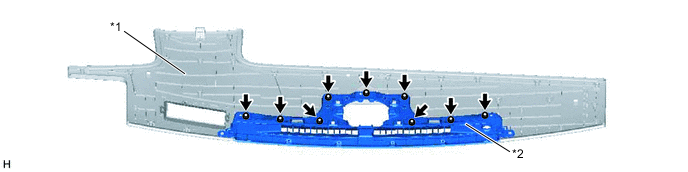
Text in Illustration *1 Instrument Panel Sub-assembly *2 No. 1 Defroster Nozzle Garnish -
Attach the 3 claws to install the instrument panel sub-assembly together with the No. 1 defroster nozzle garnish.
-
Install the 27 screws <A>.
-
-
w/o Headup Display:
-
Install the No. 1 defroster nozzle garnish to the instrument panel sub-assembly with the 9 screws <A>.
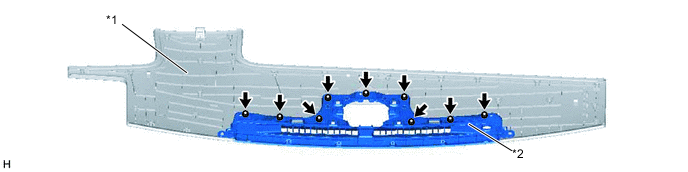
Text in Illustration *1 Instrument Panel Sub-assembly *2 No. 1 Defroster Nozzle Garnish -
Attach the 3 claws to install the instrument panel sub-assembly together with the No. 1 defroster nozzle garnish.
-
Install the 28 screws <A>.
-
-
Install the installation attachment for the instrument panel passenger airbag with the 8 nuts.
-
-
INSTALL NAVIGATION ANTENNA ASSEMBLY (w/ Navigation System)
-
for LHD:
-
for RHD:
-
-
INSTALL INSTRUMENT PANEL PASSENGER AIRBAG ASSEMBLY
-
INSTALL COMBINATION METER MIRROR ECU (w/ Headup Display)
-
Install the combination meter mirror ECU with the 4 screws.
-
-
INSTALL NO. 5 INSTRUMENT PANEL WIRE (w/ Headup Display)
-
Connect the connector to install the No. 5 instrument panel wire.
-
-
INSTALL AUTOMATIC LIGHT CONTROL SENSOR
-
INSTALL NO. 2 INSTRUMENT PANEL WIRE
-
Connect the connector to install the No. 2 instrument panel wire.
-
-
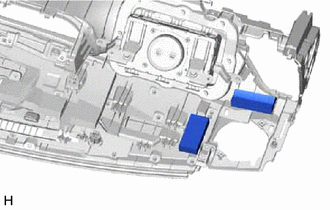
INSTALL NO. 5 INSTRUMENT PANEL CUSHION
-
Install new No. 5 instrument panel cushions in the locations shown in the illustration using double-sided tape.
-
-
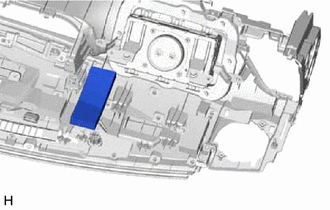
INSTALL NO. 4 INSTRUMENT PANEL CUSHION
-
Install a new No. 4 instrument panel cushion in the location shown in the illustration using double-sided tape.
-
-
INSTALL NO. 3 INSTRUMENT PANEL CUSHION
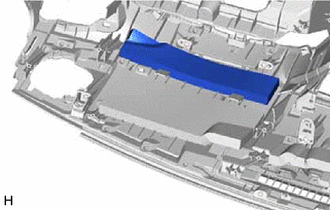
-
Install a new No. 3 instrument panel cushion in the location shown in the illustration using double-sided tape.
-
-
INSTALL NO. 2 INSTRUMENT PANEL CUSHION (w/o Headup Display)
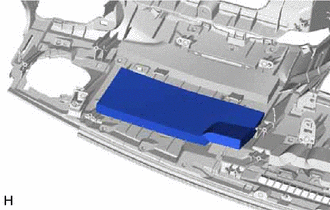
-
Install a new No. 2 instrument panel cushion in the location shown in the illustration using double-sided tape.
-
-
INSTALL NO. 1 INSTRUMENT PANEL CUSHION
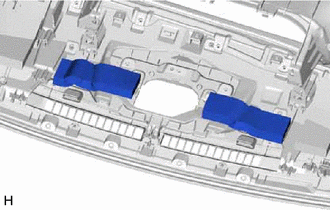
-
Install new No. 1 instrument panel cushions in the locations shown in the illustration using double-sided tape.
-
-
INSTALL INSTRUMENT PANEL SAFETY PAD RETAINER
-
Install the instrument panel safety pad retainer with the 5 screws <A>.
-
-
INSTALL NO. 3 INSTRUMENT PAD BRACKET
Tech Tips
Use the same procedure for both No. 3 instrument pad brackets.
-
Install the No. 3 instrument pad bracket with the screw <A>.
-
-
INSTALL NO. 2 INSTRUMENT PAD BRACKET
-
Install the No. 2 instrument pad bracket with the 2 screws <A>.
-
-
INSTALL NO. 1 INSTRUMENT PANEL PIN
-
Install the No. 1 instrument panel pin with the screw <A>.
-
-
INSTALL NO. 3 INSTRUMENT PANEL PIN
Tech Tips
Use the same procedure described for the No. 1 instrument panel pin.
-
INSTALL NO. 2 HEATER TO REGISTER DUCT
-
Install the No. 2 heater to register duct with the 2 screws <F>.
-
-
INSTALL AIR DUCT SUB-ASSEMBLY (w/ Ion Generator)
-
INSTALL NO. 1 HEATER TO REGISTER DUCT
-
Install the No. 1 heater to register duct with the 3 screws <F>.
-
-
INSTALL NO. 3 HEATER TO REGISTER DUCT
-
Install the No. 3 heater to register duct with the 3 screws <F>.
-
-
INSTALL DEFROSTER NOZZLE ASSEMBLY
-
Install the defroster nozzle assembly with the 3 screws <F>.
-
Attach the clamps.
-
-
INSTALL NO. 1 SIDE DEFROSTER NOZZLE DUCT
-
Attach the claw and 2 guides to install the No. 1 side defroster nozzle duct.
-
Install the screw <F>.
-
-
INSTALL NO. 2 SIDE DEFROSTER NOZZLE DUCT
-
Attach the claw and 2 guides to install the No. 2 side defroster nozzle duct.
-
Install the screw <F>.
-