PRE-CRASH SAFETY SYSTEM, Diagnostic DTC:U1119, U1120
| DTC Code | DTC Name |
|---|---|
| U1119 | Lost Communication with Object Recognition ECU (CAN) |
| U1120 | Lost Communication with Object Recognition Camera |
DESCRIPTION
The driving support ECU uses the front millimeter wave radar sensor, rear millimeter wave radar sensor, driver monitor camera and object recognition camera to detect obstacles in front of and behind the vehicle, and detect the direction that the driver's head is facing. Based on this information, the driving support ECU sends pre-crash control operation signals.
When a serial communication stop between the object recognition ECU and object recognition camera is detected, DTCs U1119 and U1120 are output.
When a CAN communication stop between the object recognition ECU and driving support ECU is detected, DTC U1119 is output.
| DTC Code | DTC Detection Condition | Trouble Area |
|---|---|---|
| U1119 | While power switch is ON (IG), serial communication stop between object recognition ECU and object recognition camera continues for 1 second or more |
|
| U1119 | While power switch is ON (IG), communication stop between object recognition ECU and driving support ECU continues for 1 second or more |
|
| U1120 | While power switch is ON (IG), serial communication stop between object recognition camera and object recognition ECU continues for 1 second or more |
|
WIRING DIAGRAM
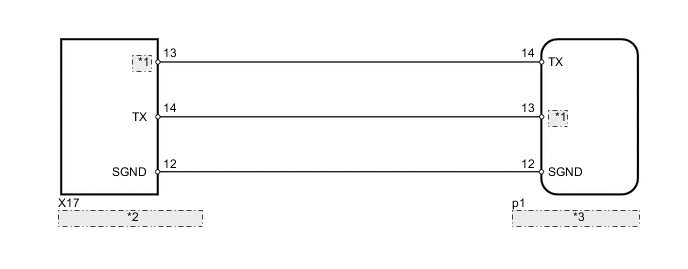
| *1 | RX |
| *2 | Object Recognition Camera |
| *3 | Object Recognition ECU |
PROCEDURE
-
READ VALUE USING INTELLIGENT TESTER (OBJECT RECOGNITION ECU)
-
Using the intelligent tester, enter the following menus: Powertrain / Radar Cruise. Then select "DATA LIST".
-
Check the condition of the "Communication with Object Recognition ECU" Data List item.
Radar Cruise Tester Display Measurement Item/Range Normal Condition Diagnostic Note Communication with Object Recognition ECU Communication with object recognition ECU signal/AVAIL or FAIL AVAIL: Communication is normal
FAIL: Communication is malfunctioning
- Tech Tips
As the "Communication with object recognition ECU" item monitors the CAN communication condition, distinguishing between a CAN communication malfunction and serial communication malfunction is possible. If a CAN communication malfunction may be present, proceed to the DIAGNOSTIC TROUBLE CODE CHART.
Result Result Proceed to "Communication with Object Recognition ECU" is "AVAIL" A "Communication with Object Recognition ECU" is "FAIL" (for LHD) B "Communication with Object Recognition ECU" is "FAIL" (for RHD) C
B 
GO TO CAN COMMUNICATION SYSTEM Click here
C
GO TO CAN COMMUNICATION SYSTEM Click here
A 
-
-
CHECK HARNESS AND CONNECTOR (OBJECT RECOGNITION ECU - OBJECT RECOGNITION CAMERA)
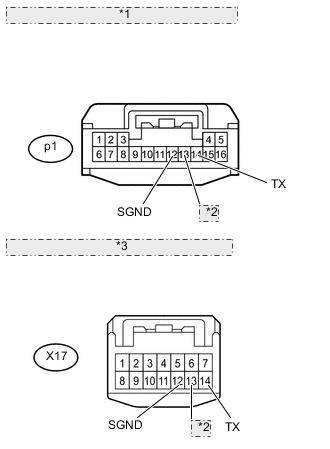
*1 Front view of wire harness connector: (to Object Recognition ECU) *2 RX *3 Front view of wire harness connector: (to Object Recognition Camera)
-
Disconnect the p1 ECU connector.
-
Disconnect the X3 camera connector.
-
Measure the resistance according to the value(s) in the table below.
Standard resistance Tester Connection Condition Specified Condition p1-12 (SGND) - X3-12 (SGND) Always Below 1 Ω p1-13 (RX) - X3-14 (TX) Always Below 1 Ω p1-14 (TX) - X3-13 (RX) Always Below 1 Ω p1-13 (RX) - Body ground Always 10 kΩ or higher p1-12 (SGND) - Body ground Always 10 kΩ or higher p1-14 (TX) - Body ground Always 10 kΩ or higher
NG
REPAIR OR REPLACE HARNESS OR CONNECTOR
OK
-
-
REPLACE OBJECT RECOGNITION CAMERA
-
Replace the object recognition camera Click here.
NEXT
-
-
ADJUST OBJECT RECOGNITION CAMERA
-
Adjust the object recognition camera Click here.
NEXT
-
-
CHECK FOR DTC
-
Using the intelligent tester, enter the following menus: Body / Pre-Crash2. Then select "DTC".
-
Select "Clear" and clear the data.
-
Based on the DTC detection conditions, try to simulate the malfunction.
-
Recheck for DTCs.
OK DTCs U1119 and U1120 are not output.
OK
END
NG
-
-
REPLACE OBJECT RECOGNITION ECU
-
Replace the object recognition ECU Click here.
NEXT
-
-
ADJUST OBJECT RECOGNITION CAMERA
-
Adjust the object recognition camera sensor Click here.
NEXT
-
-
CHECK FOR DTC
-
Using the intelligent tester, enter the following menus: Body / Pre-Crash2. Then select "DTC".
-
Select "Clear" and clear the data.
-
Based on the DTC detection conditions, try to simulate the malfunction.
-
Recheck for DTCs.
OK DTCs U1119 and U1120 are not output.
OK
END
NG
REPLACE DRIVING SUPPORT ECU Click here
-