LIN COMMUNICATION SYSTEM Rain Sensor LIN Communication Malfunction
DESCRIPTION
The LIN communication of the components related to the rain sensor occurs between the rain sensor and front controller.
WIRING DIAGRAM
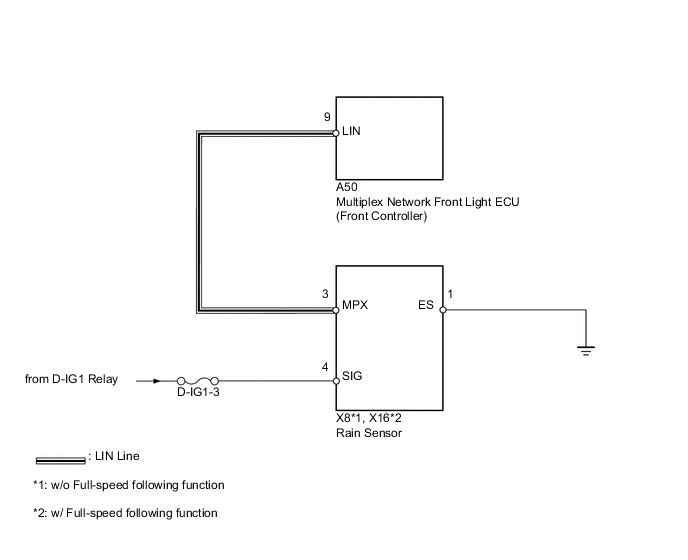
CAUTION / NOTICE / HINT
Note
-
When using the intelligent tester with the power switch off to troubleshoot:
Connect the intelligent tester to the vehicle, and turn a courtesy switch on and off at 1.5 second intervals until communication between the tester and vehicle begins.
-
Inspect the fuses for circuits related to this system before performing the following inspection procedure.
PROCEDURE
-
READ VALUE USING INTELLIGENT TESTER (LIN COMMUNICATION)
-
Using the intelligent tester, read the "Data List".
BODY No.5 (Front Controller): Tester Display Measurement Item/Range Normal Condition Diagnostic Note LIN COM Status of LIN communication / Without or With Without: No connection
With: Connection
- CURR COMM RAIN Current communication with rain sensor / OK or Stop OK: Connection
Stop: No connection
- OK Tester displays "With" or "OK".
OK 
USE SIMULATION METHOD TO CHECK Click here
NG 
-
-
CHECK HARNESS AND CONNECTOR (FRONT CONTROLLER - RAIN SENSOR)
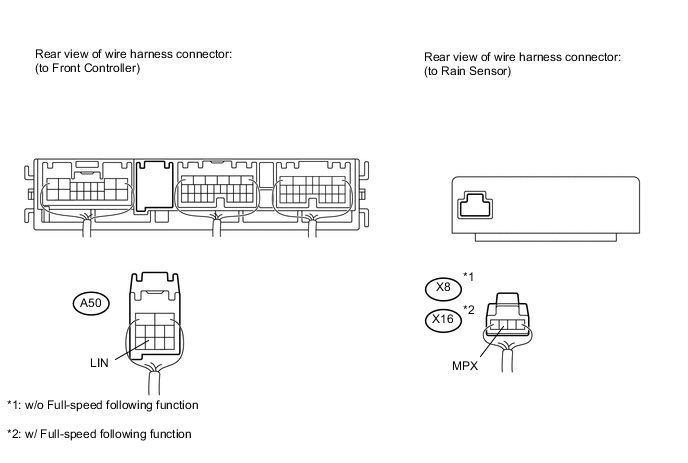
-
Disconnect the A50 controller connector.
-
Disconnect the X8 or X16 sensor connector.
-
Measure the resistance and voltage according to the value(s) in the table below.
-
w/o Full-speed following function
Standard resistance Tester Connection Condition Specified Condition A50-9 (LIN) - X8-3 (MPX) Always Below 1 Ω A50-9 (LIN) or X8-3 (MPX) - Body ground Always 10 kΩ or higher Standard voltage Tester Connection Switch Condition Specified Condition A50-9 (LIN) or X8-3 (MPX) - Body ground Power switch on (IG) Below 1 V -
w/ Full-speed following function
Standard resistance Tester Connection Condition Specified Condition A50-9 (LIN) - X16-3 (MPX) Always Below 1 Ω A50-9 (LIN) or X16-3 (MPX) - Body ground Always 10 kΩ or higher Standard voltage Tester Connection Switch Condition Specified Condition A50-9 (LIN) or X16-3 (MPX) - Body ground Power switch on (IG) Below 1 V
-
NG
REPAIR OR REPLACE HARNESS OR CONNECTOR
OK
-
-
CHECK HARNESS AND CONNECTOR (RAIN SENSOR - BATTERY AND BODY GROUND)
-
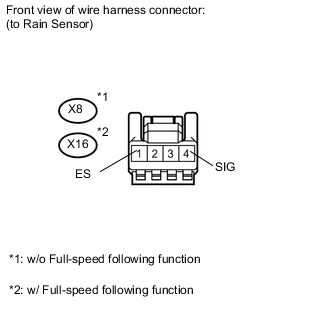
Disconnect the X8 or X16 sensor connector.
-
Measure the resistance and voltage according to the value(s) in the table below.
-
w/o Full-speed following function
Standard resistance Tester Connection Condition Specified Condition X8-1 (ES) - Body ground Always Below 1 Ω Standard voltage Tester Connection Switch Condition Specified Condition X8-4 (SIG) - Body ground Power switch off Below 1 V X8-4 (SIG) - Body ground Power switch on (IG) 11 to 14 V -
w/ Full-speed following function
Standard resistance Tester Connection Condition Specified Condition X16-1 (ES) - Body ground Always Below 1 Ω Standard voltage Tester Connection Switch Condition Specified Condition X16-4 (SIG) - Body ground Power switch off Below 1 V X16-4 (SIG) - Body ground Power switch on (IG) 11 to 14 V
-
NG
REPAIR OR REPLACE HARNESS OR CONNECTOR
OK
-
-
CHECK RAIN SENSOR (OPERATION)
-
Temporarily replace the rain sensor with a new or normally functioning one Click here.
NEXT
-
-
READ VALUE USING INTELLIGENT TESTER (LIN COMMUNICATION)
-
Using the intelligent tester, read the "Data List".
BODY No.5 (Front Controller): Tester Display Measurement Item/Range Normal Condition Diagnostic Note LIN COM Status of LIN communication / Without or With Without: No connection
With: Connection
- CURR COMM RAIN Current communication with rain sensor / OK or STOP OK: Connection
Stop: No connection
- OK Tester displays "With" or "OK".
OK
END (RAIN SENSOR IS DEFECTIVE)
NG
REPLACE MULTIPLEX NETWORK FRONT LIGHT ECU (FRONT CONTROLLER)
-