BLIND SPOT MONITOR SYSTEM, Diagnostic DTC:U0232
| DTC Code | DTC Name |
|---|---|
| U0232 | Lost Communication with Blind Spot Monitor Slave Module |
DESCRIPTION
This DTC is stored when the blind spot monitor sensor LH judges that there is a communication problem with the blind spot monitor sensor RH.
| DTC Code | DTC Detection Condition | Trouble Area |
|---|---|---|
| U0232 | The blind spot monitor sensor LH cannot receive signals from the blind spot monitor sensor RH. |
|
WIRING DIAGRAM
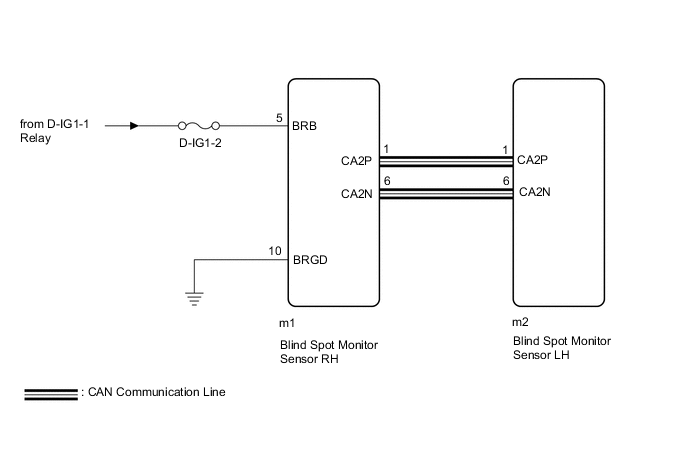
CAUTION / NOTICE / HINT
Note
-
When checking for DTCs, make sure that the blind spot monitor main switch (outer mirror switch assembly) is on.
-
Inspect the fuses for circuits related to this system before performing the following inspection procedure.
PROCEDURE
-
CHECK HARNESS AND CONNECTOR (BLIND SPOT MONITOR SENSOR RH - BLIND SPOT MONITOR SENSOR LH)
-
Disconnect the m1 blind spot monitor sensor RH connector.
-
Disconnect the m2 blind spot monitor sensor LH connector.
-
Measure the resistance according to the value(s) in the table below.
Standard Resistance Tester Connection Condition Specified Condition m1-1 (CA2P) - m2-1 (CA2P) Always Below 1 Ω m1-6 (CA2N) - m2-6 (CA2N) Always Below 1 Ω
NG 
REPAIR OR REPLACE CAN LINE OR CONNECTOR
OK 
-
-
CHECK HARNESS AND CONNECTOR (POWER SOURCE TERMINAL)
-
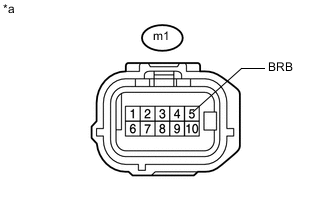
Measure the voltage according to the value(s) in the table below.
Standard Voltage Tester Connection Switch Condition Specified Condition m1-5 (BRB) - Body ground Power switch on (IG) 11 to 14 V
NG
REPAIR OR REPLACE HARNESS OR CONNECTOR
OK
-
-
CHECK HARNESS AND CONNECTOR (GROUND TERMINAL)
-
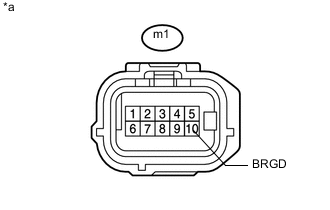
Measure the resistance according to the value(s) in the table below.
Standard Resistance Tester Connection Condition Specified Condition m1-10 (BRGD) - Body ground Always Below 1 Ω
NG
REPAIR OR REPLACE HARNESS OR CONNECTOR
OK
-
-
REPLACE BLIND SPOT MONITOR SENSOR RH
-
Replace the blind spot monitor sensor RH Click here.
NEXT
-
-
CHECK DTC
-
Clear the DTCs Click here.
-
Recheck for DTCs and check if the same DTC is output again.
OK No DTCs are output.
OK
END (BLIND SPOT MONITOR SENSOR RH IS DEFECTIVE)
NG
REPLACE BLIND SPOT MONITOR SENSOR LH Click here
-