LEXUS PARKING ASSIST-SENSOR SYSTEM OPERATION CHECK
-
INITIAL CHECK FUNCTION
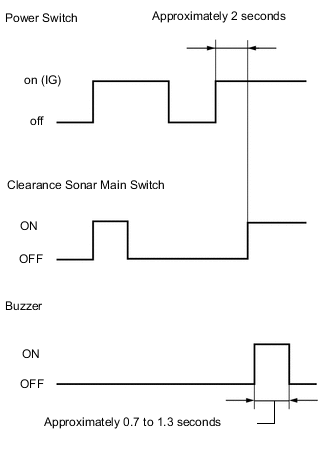
-
Turn the power switch on (IG).
-
After 2 seconds or more have passed, turn the clearance sonar main switch ON. Then check the buzzer sounding condition.
Tech Tips
-
If a malfunction is detected in the ultrasonic sensor circuits, the location of the malfunctioning sensor blinks on the display's vehicle graphic. However, after the sensor returns to normal, the display also returns to normal.
-
When the power switch is turned on (IG) while the clearance sonar main switch is ON, the buzzer will not sound.
-
-
-
MALFUNCTION OF MULTI-INFORMATION DISPLAY
-
Ultrasonic sensor open circuit
-
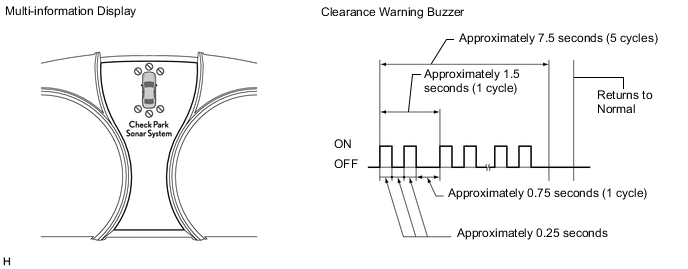
If there is an open circuit between the ultrasonic sensor and the ECU or a sensor is malfunctioning, the malfunction is displayed as shown in the illustration.
Tech Tips
-
If a sensor has an open circuit, check for DTCs and troubleshoot according to each inspection procedure Click here.
-
Buzzer sounding stops at 5 cycles. Also, blinking of (A) indicator stops, after the system returns to normal.
-
-
-
Ultrasonic sensor frozen
-
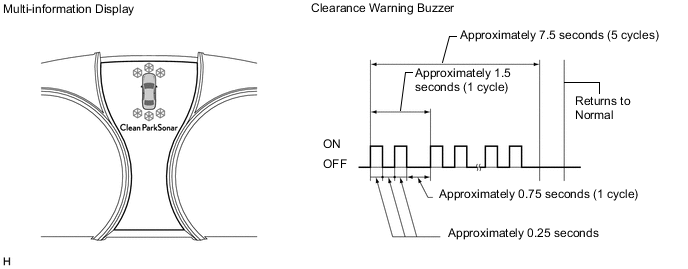
If a sensor is covered with foreign matter, such as mud or snow, the affected sensor is displayed as shown in the illustration.
Tech Tips
-
If a frozen indication is displayed, proceed to "Sensor Frozen Indication (Dirty or Frozen)" Click here.
-
Buzzer sounding stops at 5 cycles. Also, blinking of (A) indicator stops, after the system returns to normal.
-
-
-
-
MALFUNCTION OF DISPLAY
-
Ultrasonic sensor open circuit
-
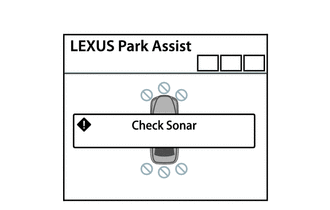
If there is an open circuit between the ultrasonic sensor and the ECU or a sensor is malfunctioning, the malfunction is displayed as shown in the illustration.
Tech Tips
If a sensor has an open circuit, check for DTCs and troubleshoot according to each inspection procedure Click here.
-
-
Ultrasonic sensor frozen
-
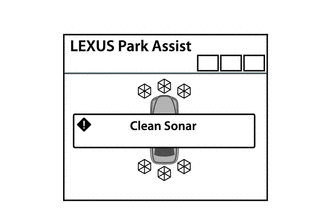
If a sensor is covered with foreign matter, such as mud or snow, the affected sensor is displayed as shown in the illustration.
Tech Tips
-
If a frozen indication is displayed, proceed to "Sensor Frozen Indication (Dirty or Frozen)" Click here.
-
Check for DTCs and troubleshoot according to each inspection procedure after confirming that the sensor is not covered with foreign matter Click here.
-
-
-
-
DETECTION RANGE MEASUREMENT AND DISPLAY INSPECTION
-
Detection range measurement
CAUTION:
Make sure the vehicle does not move by applying the parking brake firmly.
-
Turn the power switch on (IG).
-
Move the shift lever to R position to check the front side sensors, rear center sensors and rear corner sensors.
-
Move the shift lever to D, S and N position to check front side sensors, front corner sensors and front center sensors.
-
-
Turn the clearance sonar main switch ON.
-
Move a φ 60 mm (2.36 in.) pole near each sensor to measure its detection range.
-
Front center sensors detection range
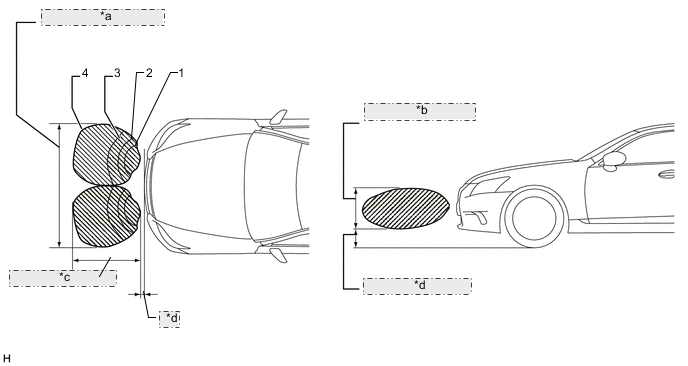
*a Approximately 1600 mm (63.0 in.) *b Approximately 400 mm (15.8 in.) *c Approximately 1000 +/-100 mm (39.4 +/-3.94 in.) *d Approximately 200 mm (7.87 in.) -
Front corner sensors detection range
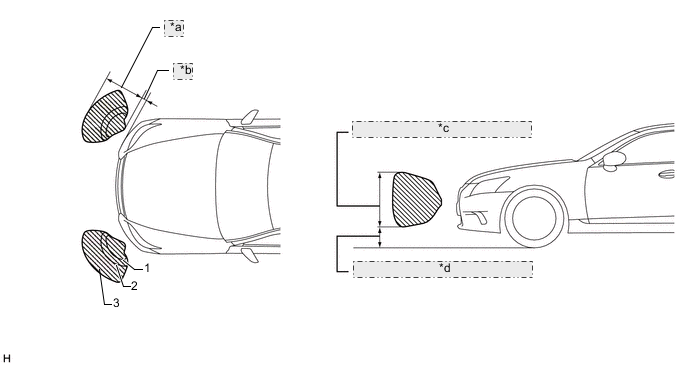
*a Approximately 600 +/-60 mm (23.6 +/-2.36 in.) *b Approximately 200 mm (7.87 in.) *c Approximately 350 mm (13.8 in.) *d Approximately 250 mm (9.84 in.) -
Front side sensors detection range
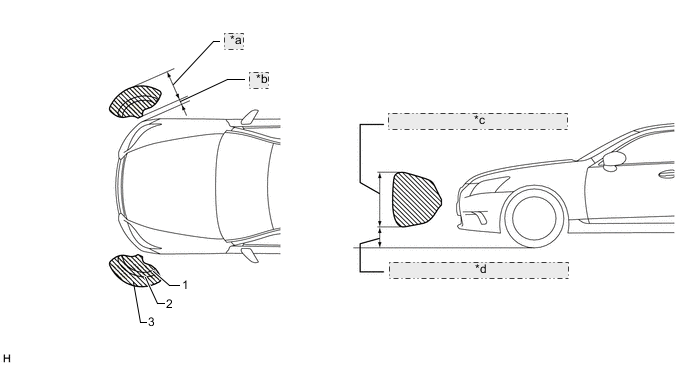
*a Approximately 500 +/-50 mm (19.7 +/-1.97 in.) *b Approximately 200 mm (7.87 in.) *c Approximately 400 mm (15.7 in.) *d Approximately 280 mm (11.0 in.) -
Rear center sensors detection range
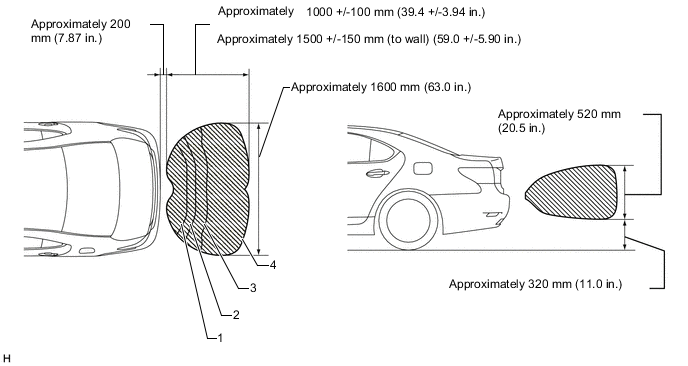
-
Rear corner sensors detection range
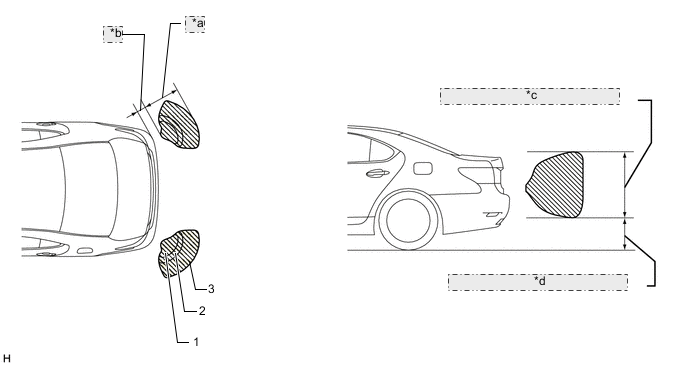
*a Approximately 600 +/-60 mm (23.6 +/-2.36 in.) *b Approximately 200 mm (7.87 in.) *c Approximately 420 mm (16.5 in.) *d Approximately 320 mm (12.6 in.) Note
These detection ranges are applicable when positioning the φ 60 mm (2.36 in.) pole parallel or perpendicular to the ground. The ranges vary depending on the measuring method and type of obstacle (such as walls).
-
-
When the ultrasonic sensors have detected an obstacle, check the multi-information display, accessory meter and buzzer sounds with the clearance sonar main switch ON.
Operation Condition Shift Lever Position Vehicle Speed Buzzer Detection, Multi-information Display Detection, Accessory Meter Detection Front Center LH
Front Center RH
Front Corner LH
Front Corner RH
Front Side LH
Front Side RH
Rear Center LH
Rear Center RH
Rear Corner LH
Rear Corner RH
P - Only perform check operation D, S 9 km/h (5 mph) or less ○ ○ ○ X X 13 km/h (8 mph) or more X X X X X R 9 km/h (5 mph) or less X X ○ ○ ○ 13 km/h (8 mph) or more X X ○ ○ ○ (N) 9 km/h (5 mph) or less ○ ○ ○ X X 13 km/h (8 mph) or more X X X X X
-
Check the buzzer sounds with the clearance sonar main switch ON.
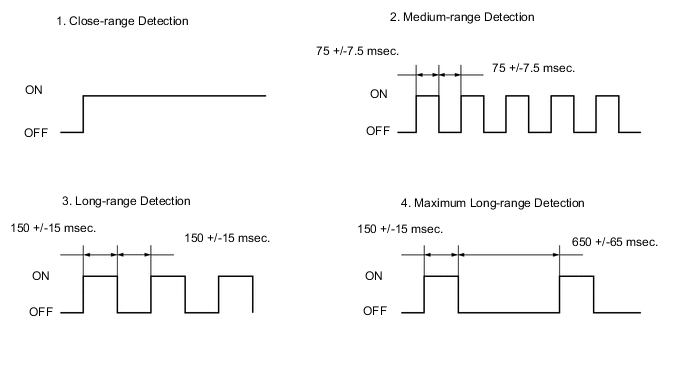
Front Corner Detection Range Detection Distance 1. Close-range detection Within 300 +/-30 mm (11.8 +/-1.18 in.) 2. Medium-range detection 300 +/-30 to 375 +/-40 mm (11.8 +/-1.18 to 14.8 +/-1.57 in.) 3. Long-range detection 375 +/-40 to 600 +/-60 mm (14.8 +/-1.57 to 23.6 +/-2.36 in.) Rear Corner Detection Range Detection Distance 1. Close-range detection Within 250 +/-30 mm (9.84 +/-1.18 in.) 2. Medium-range detection 250 +/-30 to 375 +/-40 mm (9.84 +/-1.18 to 14.8 +/-1.57 in.) 3. Long-range detection 375 +/-40 to 600 +/-60 mm (14.8 +/-1.57 to 23.6 +/-2.36 in.) Front Center Detection Range Detection Distance 1. Close-range detection Within 300 +/-30 mm (11.8 +/-1.18 in.) 2. Medium-range detection 300 +/-30 to 375 +/-40 mm (11.8 +/-1.18 to 14.8 +/-1.57 in.) 3. Long-range detection 375 +/-40 to 500 +/-50 mm (14.8 +/-1.57 to 19.7 +/-1.97 in.) 4. Maximum long-range detection 500 +/-50 to 1000 +/-100 mm (19.7 +/-1.97 to 39.4 +/-3.94 in.) Rear Center Detection Range Detection Distance 1. Close-range detection Within 350 +/-40 mm (13.8 +/-1.57 in.) 2. Medium-range detection 350 +/-40 to 450 +/-50 mm (13.8 +/-1.57 to 17.7 +/-1.97 in.) 3. Long-range detection 450 +/-50 to 600 +/-60 mm (17.7 +/-1.97 to 23.6 +/-2.36 in.) 4. Maximum long-range detection 600 +/-60 to 1000 +/-100 mm (23.6 +/-2.36 to 39.4 +/-3.94 in.)
600 +/-60 to 1500 +/-150 mm (23.6 +/-2.36 to 59.1 +/-5.91 in.) (To the wall)
Front Side Detection Range Detection Distance 1. Close-range detection Within 300 +/-30 mm (11.8 +/-1.18 in.) 2. Medium-range detection 300 +/-30 to 375 +/-40 mm (11.8 +/-1.18 to 14.8 +/-1.57 in.) 3. Long-range detection 375 +/-40 to 500 +/-50 mm (14.8 +/-1.57 to 19.7 +/-1.97 in.) Tech Tips
Ultrasonic waves are used to measure the detection range. However, the detection range may vary depending on the ambient temperature.
-
Check the accessory meter, multi-information display and buzzer, when the front corner sensors and front center sensors have detected an obstacle.
Operation Condition Power Switch Clearance Sonar Main Switch Shift Lever Position Vehicle Speed on (IG) ON D, S, N 9 km/h (5 mph) or less 
Multi-information Display Detection Range Buzzer Number of bars displayed 1. Close-range detection Sounds continuously 1 (blinking) 2. Medium-range detection Sounds intermittently
(ON: 75 msec. / OFF: 75 msec.)
2 (illuminated) 3. Long-range detection Sounds intermittently
(ON: 150 msec. / OFF: 150 msec.)
3 (illuminated) 4. Maximum long-range detection Sounds intermittently
(ON: 150 msec. / OFF: 650 msec.)
4 (illuminated) 
Accessory Meter Detection Range Buzzer Number of bars displayed 1. Close-range detection Sounds continuously 1 (red illumination) 2. Medium-range detection Sounds intermittently
(ON: 75 msec. / OFF: 75 msec.)
2 (yellow illumination) 3. Long-range detection Sounds intermittently
(ON: 150 msec. / OFF: 150 msec.)
3 (yellow illumination) 4. Maximum long-range detection Sounds intermittently
(ON: 150 msec. / OFF: 650 msec.)
4 (yellow illumination) Tech Tips
Ultrasonic waves are used to measure the detection range. However, the detection range may vary depending on the ambient temperature.
-
Check the accessory meter, multi-information display and buzzer, when the rear center sensors and rear corner sensors have detected an obstacle.
Operation Condition Power Switch Clearance Sonar Main Switch Shift Lever Position on (IG) ON R position 
Multi-information Display Detection Range Buzzer Number of bars displayed 1. Close-range detection Sounds continuously 1 (blinking) 2. Medium-range detection Sounds intermittently
(ON: 75 msec. / OFF: 75 msec.)
2 (illuminated) 3. Long-range detection Sounds intermittently
(ON: 150 msec. / OFF: 150 msec.)
3 (illuminated) 4. Maximum long-range detection
(for Rear center sensors)
Sounds intermittently
(ON: 150 msec. / OFF: 650 msec.)
4 (illuminated) 
Accessory Meter Detection Range Buzzer Number of bars displayed 1. Close-range detection Sounds continuously 1 (red illumination) 2. Medium-range detection Sounds intermittently
(ON: 75 msec. / OFF: 75 msec.)
2 (yellow illumination) 3. Long-range detection Sounds intermittently
(ON: 150 msec. / OFF: 150 msec.)
3 (yellow illumination) 4. Maximum long-range detection
(for Rear center sensors)
Sounds intermittently
(ON: 150 msec. / OFF: 650 msec.)
4 (yellow illumination) Tech Tips
Ultrasonic waves are used to measure the detection range. However, the detection range may vary depending on the ambient temperature.
-
Check the accessory meter, multi-information display and buzzer, when the front side sensors have detected an obstacle.
Operation Condition Power Switch Clearance Sonar Main Switch Shift Lever Position on (IG) ON R position
Multi-information Display Detection Range Buzzer Number of bars displayed 1. Close-range detection Sounds continuously 1 (blinking) 2. Medium-range detection Sounds intermittently
(ON: 75 msec. / OFF: 75 msec.)
2 (illuminated) 3. Long-range detection Sounds intermittently
(ON: 150 msec. / OFF: 150 msec.)
3 (illuminated) 
Accessory Meter Detection Range Buzzer Number of bars displayed 1. Close-range detection Sounds continuously 1 (red illumination) 2. Medium-range detection Sounds intermittently
(ON: 75 msec. / OFF: 75 msec.)
2 (yellow illumination) 3. Long-range detection Sounds intermittently
(ON: 150 msec. / OFF: 150 msec.)
3 (yellow illumination) Tech Tips
Ultrasonic waves are used to measure the detection range. However, the detection range may vary depending on the ambient temperature.
-
-