TELEMATICS SYSTEM(w/ Telematics Transceiver for G-BOOK) Vehicle Status Alerts Function Malfunction
PROCEDURE
-
CHECK PROBLEM SYMPTOM (VEHICLE STATUS ALERTS FUNCTION)
-
Check problem symptom
-
Confirm the details of the problem symptom for the vehicle status alerts function and proceed to the following section.
Vehicle Status Alerts Delivery Conditions Vehicle status alerts email delivery conditions When the following conditions are met according to the information stored at the G-BOOK center:
-
Hood, luggage compartment door and all doors closed
-
Electrical key transmitter not detected inside vehicle
-
When one or more of the following occurs: Doors unlock (excluding whether the luggage compartment door locks/unlocks), hazard lights flash, headlights illuminate, clearance light illuminates, windows open or sliding roof opens.
Note
-
Even when the electrical key transmitter is inside the interior key detection area, the electrical key transmitter may not be detected if inside a metallic bag, the battery is depleted, etc.
-
Even when the electrical key transmitter is outside the vehicle, the electrical key transmitter may be determined to be inside the vehicle depending on whether the entry and start system is canceled, where the electrical key transmitter is placed, etc.
Result Result Proceed to The vehicle status alerts delivery conditions are met, but an email is not sent A Although the vehicle status alerts delivery conditions are not met, an email is sent B Contents of a delivered email differ from the vehicle information Multiple emails with the same content are delivered C Tech Tips
-
Once a fixed amount of time elapses after turning the power switch off, the vehicle status is sent to the G-BOOK center. If the vehicle status alerts delivery conditions are met when this occurs, an email is delivered to the customer's cellular phone.
-
Once a fixed amount of time elapses after turning the power switch off and the vehicle status is sent to the G-BOOK center, if the vehicle status is the same as the first time it was sent to the center, it is not sent again (even after door lock/unlock operations are performed).
-
Carefully confirm the conditions that caused the malfunction in order to determine if a temporary problem with the radio wave signal conditions caused the malfunction.
-
-
B 
CHECK CAN COMMUNICATION SYSTEM Click here
C
CHECK NAVIGATION SYSTEM Click here
A 
-
-
CHECK FOR SERVICE FLAG
-
Check for service flags.
-
Enter diagnostic mode Click here.
-
Select "Service Information" on the "Service Menu" screen.
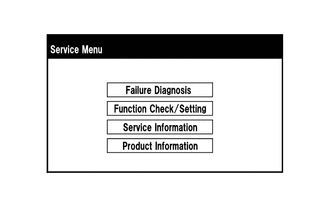
-
Select "G-BOOK Info for Contract" on the "Service Information" screen.
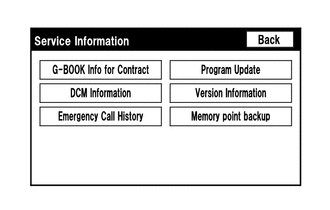
-
Check if the flag information indicates "1" as shown in the illustration.
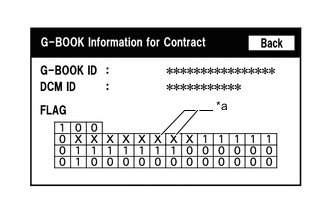
Text in Illustration *a Cells to be Checked Result Result Proceed to "1" is indicated A "1" is not indicated B
-
B
RENEW DATA Click here
A
-
-
CHECK CONNECTION
-
Select G-BOOK.com and check that the G-BOOK.com screen is displayed.
Result Result Proceed to G-BOOK.com can be accessed A G-BOOK.com cannot be accessed B
B 
GO TO PROBLEM SYMPTOMS TABLE (Emergency Call Service Function) Click here
A
-
-
CHECK CAN COMMUNICATION SYSTEM
-
Connect the GTS to the DLC3.
-
Turn the power switch on (IG).
-
Turn the GTS on.
-
Enter the following menus: Bus Check.
-
Check that all ECUs and sensors that use CAN communication are connected Click here.
Result Result Proceed to There are no connection problems A There is a connection problem B
B
GO TO CAN COMMUNICATION SYSTEM Click here
A
-
-
CHECK DTC OUTPUT
-
Connect the GTS to the DLC3.
-
Turn the power switch on (IG).
-
Turn the GTS on.
-
Enter the following menus: Health Check.
-
Check for DTCs.
Result Result Proceed to No DTCs are output A DTCs are output B DTCs cannot be checked
B
CHECK EACH ECU SYSTEM
A
-
-
CHECK ENTRY AND START SYSTEM (FOR ENTRY FUNCTION)
-
Check if the entry and start system (for entry function) is operating and functioning normally.
OK The entry and start system (for entry function) is normal. Tech Tips
The vehicle status alerts function operates using the key reminder information signal sent by the entry and start system (for entry function). Therefore, when the entry and start system (for entry function) does not operate normally, this function also does not operate normally.
NG
GO TO ENTRY AND START SYSTEM (FOR ENTRY FUNCTION) Click here
OK
-
-
CHECK POWER DOOR LOCK CONTROL SYSTEM
-
Check if the power door lock control system is operating and functioning normally.
OK The power door lock control system is normal. Tech Tips
The vehicle status alerts function operates using the door lock position signal sent and received by the power door lock control system. Therefore, when the power door lock control system does not operate normally, this function also does not operate normally.
NG
GO TO POWER DOOR LOCK CONTROL SYSTEM Click here
OK
-
-
CHECK LIGHTING SYSTEM (INT)
-
Check if the illuminated entry function is operating and functioning normally.
OK The illuminated entry function is normal. Tech Tips
The remote check function operates using the door courtesy signal sent and received by the lighting system. Therefore, when the lighting system does not operate normally, this function also does not operate normally.
NG
GO TO LIGHTING SYSTEM (INT) Click here
OK
-
-
CHECK LIGHTING SYSTEM (EXT)
-
When the hazard warning switch is operated, check that the hazard lights flash normally.
OK Flash normally. -
When the light control switch is operated, check that the clearance light and headlights illuminate normally.
OK Illuminate normally. Tech Tips
The vehicle status alerts function operates using the hazard light, clearance light and headlight condition signals sent and received by the lighting system. Therefore, when the lighting system does not operate normally, this function also does not operate normally.
NG
GO TO LIGHTING SYSTEM (EXT) Click here
OK
-
-
CHECK POWER TRUNK LID SYSTEM
-
Check if the power trunk lid system is operating and functioning normally.
OK The power trunk lid system is normal. Tech Tips
The vehicle status alerts function operates using the luggage compartment door opening and closing signals sent and received by the power trunk lid system. Therefore, when the power trunk lid system does not operate normally, this function also does not operate normally.
NG
GO TO POWER TRUNK LID SYSTEM Click here
OK
-
-
CHECK SLIDING ROOF SYSTEM
-
Check if the sliding roof system is operating and functioning normally.
OK The sliding roof system is normal. Tech Tips
The vehicle status alerts function operates using the sliding roof opening and closing signals sent and received by the sliding roof system. Therefore, when the sliding roof system does not operate normally, this function also does not operate normally.
NG
GO TO SLIDING ROOF SYSTEM Click here
OK
-
-
CHECK POWER WINDOW CONTROL SYSTEM
-
Check if the power window control system is operating and functioning normally.
OK The power window control system is normal. Tech Tips
The vehicle status alerts function operates using the window opening and closing signals sent and received by the power window control system. Therefore, when the power window control system does not operate normally, this function also does not operate normally.
NG
GO TO POWER WINDOW CONTROL SYSTEM Click here
OK
-
-
CHECK ENGINE HOOD CONDITION
-
Check the hood condition.
Result Result Proceed to Hood is closed A Hood is open B Tech Tips
The vehicle status alerts function does not deliver emails when the hood is open.
B
CLOSE HOOD
A
-
-
CHECK THEFT DETERRENT SYSTEM (CHECK SECURITY HORN OPERATION)
-
Check if the theft deterrent system is operating and functioning normally.
OK The theft deterrent system is normal. Tech Tips
The vehicle status alerts function operates using the security condition signal and intrusion sensor operation condition signal sent and received by the theft deterrent system. Therefore, when the theft deterrent system does not operate normally, this function also does not operate normally.
NG
GO TO THEFT DETERRENT SYSTEM Click here
OK
-
-
CHECK NAVIGATION SYSTEM
-
Check if the navigation system is operating and functioning normally.
OK The navigation system is normal.
NG
GO TO NAVIGATION SYSTEM Click here
OK
-
-
RENEW DATA
-
Renew the data.
-
Perform "Download necessary data" again Click here.
Result Result Proceed to Data can be renewed A Data cannot be renewed B
-
B
CONTACT G-BOOK SUPPORT CENTER
A
-
-
CHECK VEHICLE STATUS ALERTS FUNCTION
-
Obtain the customer's consent and check the vehicle status alerts function.
Tech Tips
When checking the vehicle status alerts function, perform the procedure taking security into consideration to prevent theft.
Result Result Proceed to The vehicle status alerts function operates normally A The vehicle status alerts function does not operate normally B
A
END
B
-
-
CHECK PROBLEM SYMPTOM (VEHICLE STATUS ALERTS FUNCTION)
-
Check problem symptom
-
Confirm the details of the problem symptom for the vehicle status alerts function and proceed to the following section.
Vehicle Status Alerts Delivery Conditions Vehicle status alerts email delivery conditions When the following conditions are met according to the information stored at the G-BOOK center:
-
Hood, luggage compartment door and all doors closed
-
Electrical key transmitter not detected inside vehicle
-
When one or more of the following occurs: Doors unlock (excluding whether the luggage compartment door locks/unlocks), hazard lights flash, headlights illuminate, clearance light illuminates, windows open or sliding roof opens.
Note
-
Even when the electrical key transmitter is inside the interior key detection area, the electrical key transmitter may not be detected if it is inside a metallic bag, or the battery is depleted, etc.
-
Even when the electrical key transmitter is outside the vehicle, the electrical key transmitter may be determined to be inside the vehicle if the entry and start system is canceled, or depending on where the electrical key transmitter is placed, etc.
Result Result Proceed to The vehicle status alerts delivery conditions are met, but an email is not sent A Other than the above B -
-
B
CONTACT G-BOOK SUPPORT CENTER
A
-
-
CHECK CELLULAR PHONE COMMUNICATION
-
Check that the reception of the customer's cellular phone is normal.
OK Incoming signal strength is normal. Tech Tips
When the cellular phone has a malfunction, ask the customer to check the cellular phone.
-
Using the customer's cellular phone, check that the internet can be accessed.
OK Can access normally. Tech Tips
When the cellular phone has a malfunction, ask the customer to check the cellular phone.
NG
CELLULAR PHONE MALFUNCTION
OK
-
-
CHECK SETTINGS (CELLULAR PHONE)
-
Ask the customer whether they restrict the reception of email messages.
Result Result Proceed to Message reception restriction is not activated A Message reception restriction is activated B
B
CHANGE CELLULAR PHONE SETTING (MESSAGE RECEPTION RESTRICTION CANCEL)
A
-
-
CHECK VEHICLE STATUS ALERTS CANCEL SETTING
-
Obtain the customer's consent and check the vehicle status alerts cancel setting.
Result Result Proceed to Cancel is set A Cancel is not set B Tech Tips
Perform this procedure taking appropriate security precautions.
A
END (EXPLAIN VEHICLE STATUS ALERTS CANCEL FUNCTION TO CUSTOMER)
B
CONTACT G-BOOK SUPPORT CENTER
-