REMOTE TOUCH INSTALLATION
CAUTION / NOTICE / HINT
Tech Tips
-
Use the same procedure for RHD and LHD vehicles.
-
The procedure listed below is for LHD vehicles.
PROCEDURE
-
INSTALL REMOTE OPERATION SWITCH
-
Install the remote operation switch with the 4 screws.
-
-
INSTALL INTEGRATION PANEL SUB-ASSEMBLY
-
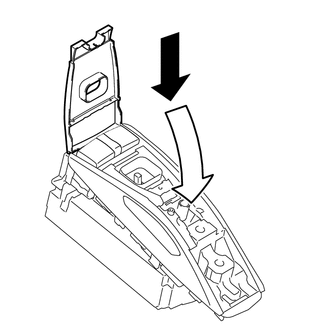
Move the remote touch assembly in the direction of the arrow in the illustration.
-
Install the 2 screws.
-
-
INSTALL COVER
-
Attach the 2 clips to install the cover.
-
-
INSTALL SWITCH KNOB
-
Push on the switch knob to install it.
Tech Tips
Make sure the orientation of the switch knob is correct when installing it.
-
-
INSTALL REMOTE OPERATION BOARD
-
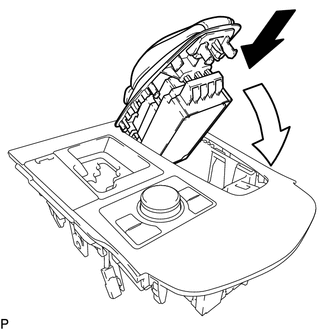
Move the remote touch assembly in the direction of the arrow in the illustration and set it on the upper console panel sub-assembly.
-
Attach the 7 claws to install the remote operation board.
-
-
INSTALL UPPER REAR CONSOLE PANEL SUB-ASSEMBLY
-
INSTALL NO. 3 BOX PANEL
-
INSTALL SHIFT LEVER KNOB SUB-ASSEMBLY
-
INSTALL INSTRUMENT PANEL FINISH PANEL END LH
-
INSTALL INSTRUMENT PANEL FINISH PANEL END RH