REAR SEAT ENTERTAINMENT SYSTEM A Remote Control System does not Operate
PROCEDURE
-
CHECK SYSTEM
-
Check that the remote control operation of the rear system is not locked by the multi-media module receiver assembly.
-
Check if "Rear System Locked" appears on the television display.
OK The message does not appear. Tech Tips
If the rear system is locked and the remote control is used in the rear seat area, an operation not possible message (for example, "Rear System Locked") is displayed. If the message is displayed, enter the accessory meter assembly settings screen and change "Rear System Lock" to Off.
-
NG 
RELEASE LOCK
OK 
-
-
CLEAN INFRARED RAY RECEIVING PORTION
-
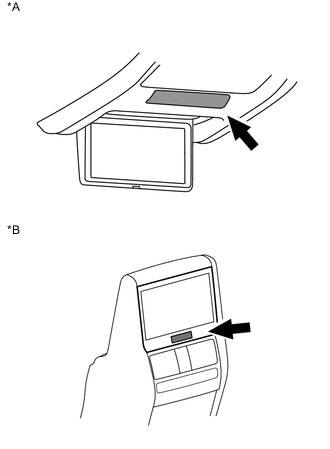
Text in Illustration *A for Roof *B for Center Console Side Clean the infrared ray receiving portion on the television display assembly.
-
Check whether the same malfunction occurs.
OK The function returns to normal.
OK
END
NG
-
-
CHECK TELEVISION SWITCH AND VOLUME ASSEMBLY (DRY-CELL BATTERY)
-
Check that the dry-cell battery of the television switch and volume assembly is not depleted.
OK Dry-cell battery is not depleted.
NG
REPLACE TELEVISION SWITCH AND VOLUME ASSEMBLY (DRY-CELL BATTERY)
OK
-
-
CHECK TELEVISION SWITCH AND VOLUME ASSEMBLY
-
Replace the television switch and volume assembly with a new or known good one.
-
Check that the television display assembly can be operated using the television switch and volume assembly.
OK The television display assembly can be operated.
OK
END (TELEVISION SWITCH AND VOLUME ASSEMBLY IS DEFECTIVE)
NG
PROCEED TO NEXT SUSPECTED AREA SHOWN IN PROBLEM SYMPTOMS TABLE Click here
-