TILT AND TELESCOPIC MANUAL SWITCH REMOVAL
CAUTION / NOTICE / HINT
Tech Tips
-
Use the same procedures for the RHD and LHD.
-
The procedures listed below are for the LHD.
PROCEDURE
-
REMOVE LUGGAGE COMPARTMENT MAT SUB-ASSEMBLY (w/ Spare Tire)
-
REMOVE DECK BOARD ASSEMBLY (w/o Spare Tire)
-
REMOVE DECK TRIM SIDE BOARD LH (w/o Spare Tire)
-
REMOVE BATTERY SERVICE HOLE COVER LH
-
PRECAUTION
Note
After turning the power switch off, waiting time may be required before disconnecting the cable from the negative (-) auxiliary battery terminal. Therefore, make sure to read the disconnecting the cable from the negative (-) auxiliary battery terminal notices before proceeding with work Click here.
-
DISCONNECT CABLE FROM NEGATIVE AUXILIARY BATTERY TERMINAL
-
Disable the AUTO TILT AWAY function by changing the customize parameter Click here.
Note
Record the current customize parameter setting (whether the AUTO TILT AWAY function is enabled or disabled) in order to restore the current setting after finishing the operation.
Tech Tips
Performing the above operation causes the AUTO TILT AWAY function to be disabled when the power switch is turned off.
-
Turn the power switch on (IG). Operate the tilt and telescopic switch to fully extend and lower the steering column assembly.
-
Turn the power switch off and disconnect the cable from the negative auxiliary battery terminal.
Note
When disconnecting the cable, some systems need to be initialized after the cable is reconnected Click here.
-
-
REMOVE STEERING COLUMN COVER
-
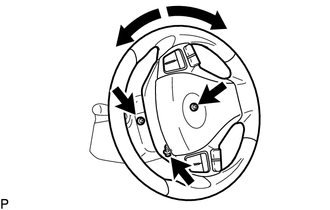
Remove the 3 screws.
Tech Tips
Turn the steering wheel to the right and left as necessary to remove the 2 screws.
-
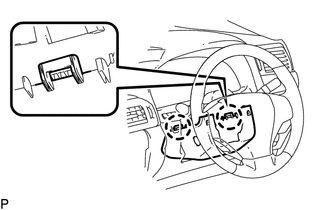
Detach the 2 claws and remove the steering column lower cover.
Note
Do not damage the tilt and telescopic switch.
-
-
REMOVE TILT AND TELESCOPIC MANUAL SWITCH
-
Disconnect the connector.
-
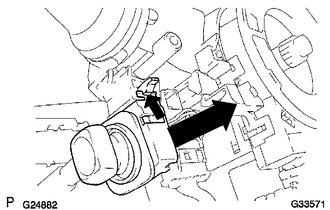
Using a screwdriver, detach the claw and pull out the switch.
Note
Pushing on the claw too hard will break the claw.
Tech Tips
Tape the screwdriver tip before use.
-