VARIABLE GEAR RATIO STEERING SYSTEM CALIBRATION

| DTC Code | DTC Name |
|---|---|
| CALIBRATION |
CAUTION / NOTICE / HINT
Note
Use this procedure to center the steering wheel if:
-
The steering actuator has been replaced.
-
The steering control ECU has been replaced.
-
The steering column or steering intermediate shaft has been disconnected.
-
The steering wheel is still off-center after completing the steering angle sensor initialization.
PROCEDURE
-
VGRS SYSTEM CALIBRATION PROCEDURE
Result Proceed to USING SST CHECK WIRE USING TECHSTREAM
USING TECHSTREAM 
FACE TIRES STRAIGHT AHEAD Click here
USING SST CHECK WIRE 
-
FACE TIRES STRAIGHT AHEAD
Note
Drive the vehicle to confirm that the steering wheel is centered.
Result Proceed to NEXT
NEXT
-
CHECK DTC
-
Check for DTCs.
Result Result Proceed to DTC C1591/51 is not output A DTC C1591/51 is output B
B
GO TO STEP 5 Click here
A
-
-
PERFORM ACTUATOR ANGLE INITIALIZATION
- SST
- 09843-18040
Note
If the procedures from *1 to *2 are not completed within 1 minute, or if errors are made during these procedures, perform the initialization again from the beginning.
-
Turn the power switch ON (READY).
-
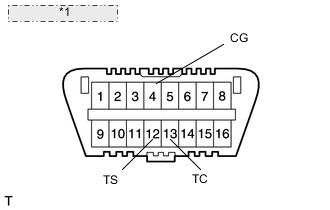
*1 Front view of DLC3: Center the steering wheel.
-
Using SST, connect terminals 12 (TS) and 4 (CG), and 13 (TC) and 4 (CG) of the DLC3. (*1)
-
Disconnect SST from terminal 12 (TS) of the DLC3, and turn the steering wheel to the left 180° or more.
-
Connect SST to terminal 12 (TS) of the DLC3.
-
Disconnect SST from terminal 13 (TC) of the DLC3, and turn the steering wheel to the right 180° or more.
-
Connect SST to terminal 13 (TC) of the DLC3. (*2)
Tech Tips
When the master warning light comes on, DTC C1591/51 is memorized.
-
Disconnect SST from the DLC3.
-
Turn the power switch OFF.
Result Proceed to NEXT
NEXT
-
FACE TIRES STRAIGHT AHEAD
-
Confirm that the steering wheel is centered when facing the tires straight ahead.
Note
Drive the vehicle to confirm that the steering wheel is centered.
Result Result Proceed to Steering wheel is off-center A Steering wheel is centered B
B
GO TO STEP 9 Click here
A
-
-
UNLOCK STEERING ACTUATOR
Note
Do not turn the power switch ON (READY).
-
Turn the power switch OFF.
-
Disconnect the negative (-) terminal cable from the auxiliary battery.
-
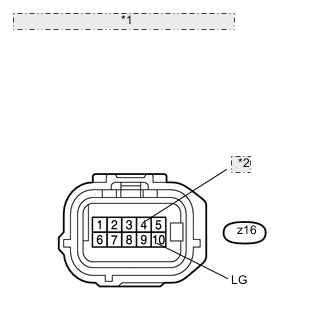
*1 Front view of wire harness connector: (to Steering Actuator) *2 LV Disconnect the z16 connector from the steering actuator.
-
Connect a jumper wire from terminal LV to the positive (+) 12 V battery terminal and another jumper wire from terminal LG to the negative (-) 12 V battery terminal.
Note
Do not apply voltage for more than 3 minutes.
Result Proceed to NEXT
NEXT
-
-
STEERING CENTER ADJUSTMENT
-
Center the steering wheel.
Note
If the centering of the spiral cable was not confirmed when the steering wheel was installed, confirm the centering of the spiral cable.
Result Proceed to NEXT
NEXT
-
-
LOCK STEERING ACTUATOR
-
Disconnect the positive (+) and negative (-) 12 V battery terminal cables from the steering actuator.
-
Connect the z16 connector to the steering actuator.
-
Connect the negative (-) terminal cable to the auxiliary battery.
-
Turn the steering wheel approximately 3° to the left and right. Confirm that the reaction force can be felt.
Note
-
If the above procedures are not followed correctly, a DTC will be detected. If a DTC is detected, perform the above procedures again and then check for DTCs.
-
Perform these procedures with the power switch OFF.
Result Proceed to NEXT -
NEXT
-
-
ADJUST ACTUATOR ANGLE
Tech Tips
Activating and ending test mode will complete actuator angle adjustment.
-
Make sure the power switch is OFF.
Note
Do not touch the steering wheel during these procedures.
-
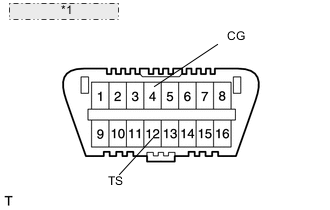
*1 Front view of DLC3: Using SST, connect terminals 12 (TS) and 4 (CG) of the DLC3.
- SST
- 09843-18040
-
Turn the power switch ON (IG).
-
Confirm that the "VGRS TEST MODE" is displayed on the multi-information display when test mode is activated.
Tech Tips
Wait approximately 5 seconds.
-
Turn the power switch OFF.
-
Disconnect SST from terminals 12 (TS) and 4 (CG) of the DLC3.
-
Turn the power switch ON (IG) again.
Result Proceed to NEXT
NEXT
-
-
CHECK MASTER WARNING LIGHT
-
Confirm that the master warning light is off.
-
Turn the power switch OFF, then ON (IG).
-
Confirm that the master warning light is operating normally.
Result Proceed to NEXT
NEXT
-
-
CHECK STEERING WHEEL OPERATION
-
Turn the power switch ON (READY).
-
Perform the steering angle sensor initialization.
-
Turn the steering wheel from lock to lock and check that it rotates approximately 2.7 turns.
-
Drive the vehicle and confirm that the steering wheel is centered.
Result Proceed to NEXT
NEXT 
END
-
-
FACE TIRES STRAIGHT AHEAD
Note
Drive the vehicle to confirm that the steering wheel is centered.
Result Proceed to NEXT
NEXT
-
PERFORM VGRS SYSTEM CALIBRATION
-
Connect the intelligent tester to the DLC3.
-
Turn the power switch ON (IG).
-
Turn the tester on.
-
Enter the menu items in this order: Chassis / VGRS / Utility / Steering Angle Adjust. Then, press "Next".
-
Follow the instructions on the tester, and press "Next".
Note
Press the "Next" key even if DTC C15B4/71 is output.
-
Follow the instructions on the tester, and press "Next".
-
Follow the instructions on the tester, and press "Next".
Note
Ensure that the power switch is OFF.
-
Follow the instructions on the tester, and press "Next".
-
Follow the instructions on the tester, and press "Next".
Note
If the centering of the spiral cable was not confirmed when the steering wheel was installed, confirm the centering of the spiral cable.
-
Follow the instructions on the tester, and press "Next".
Note
Do not touch the steering wheel during these procedures.
-
Follow the instructions on the tester, and press "Next".
-
Follow the instructions on the tester, and press "Next".
Note
Do not touch the steering wheel during these procedures.
-
"NOW CALIBRATING" is displayed and the display switches automatically to the next screen.
Note
Do not touch the steering wheel during these procedures.
-
"Steering Angle Adjust is complete." is displayed. Then, check that the VGRS system calibration is completed normally.
-
Select "Exit" to return the display to the "MENU" screen.
Result Proceed to NEXT
NEXT
-
-
CHECK MASTER WARNING LIGHT
-
Confirm that the master warning light is off.
-
Turn the power switch OFF.
-
Disconnect the intelligent tester from the DLC3.
-
Turn the power switch ON (IG).
-
Confirm that the master warning light is operating normally.
Result Proceed to NEXT
NEXT
-
-
CHECK STEERING WHEEL OPERATION
-
Turn the power switch ON (READY).
-
Perform the steering angle sensor initialization.
-
Turn the steering wheel from lock to lock and check that it rotates approximately 2.7 turns.
-
Drive the vehicle and confirm that the steering wheel is centered.
Result Proceed to NEXT
NEXT
END
-