REAR BRAKE INSTALLATION
CAUTION / NOTICE / HINT
Tech Tips
-
Use the same procedures for the LH side and RH side.
-
The procedures listed below are for the LH side.
Note
While the battery is connected, even if the power switch is off, the brake control system activates when the brake pedal is depressed or the door courtesy switch turns on. Therefore during servicing of the brake system components, do not operate the brake pedal or open/close the doors while the battery is connected.
PROCEDURE
-
INSTALL REAR DISC
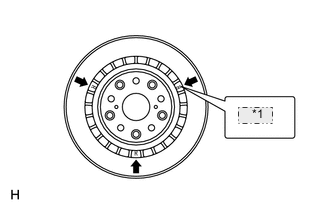
*1 L or R Note
The disc has an identification mark. Make sure of the identification mark when installing the disc.
Item Identification Mark LH L RH R
-
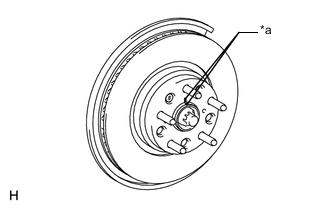
Text in Illustration *a Matchmark While aligning the matchmarks, install the rear disc.
Tech Tips
When replacing the rear disc with a new one, select the installation position where the rear disc has the minimum runout.
-
-
ADJUST PARKING BRAKE SHOE CLEARANCE
-
INSTALL PARKING BRAKE SHOE ADJUSTING HOLE PLUG
-
INSTALL REAR DISC BRAKE CALIPER ASSEMBLY LH
-
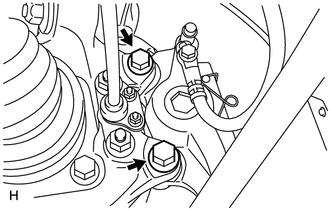
Install the disc brake caliper with 2 new bolts.
- Torque:
- 86 N*m { 877 kgf*cm, 63 ft.*lbf }
-
-
CONNECT REAR BRAKE FLEXIBLE HOSE
-
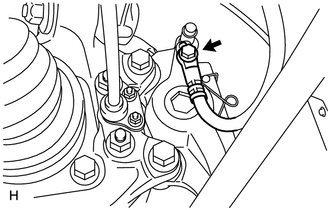
Connect the flexible hose with a new union bolt and a new gasket.
- Torque:
- 39 N*m { 400 kgf*cm, 29 ft.*lbf }
Note
Install the flexible hose lock securely in the lock hole in the disc brake caliper.
-
-
INSTALL REAR DISC BRAKE PAD KIT
Note
-
When replacing worn pads, the anti-squeal shims must be replaced together with the pad.
-
Install each shim in the correct position and direction.
-
Install each pad as shown in the illustration below.
-
There should be no oil or grease on the friction surface of the pads and the disc.
-
When replacing the brake pad on ECB (Electronically Controlled Brake) system equipped vehicles, retracting the caliper's piston and attaching a new brake pad will greatly increase the clearance between the brake pad and disc rotor, which will likely cause a DTC(s) to be set the next time the brake pedal is pressed.
As there is no malfunction, delete the DTC(s).
Refer to the following DTC chart for details on which DTC(s) to delete if DTC(s) is set.
DTC Meaning of DTC C1343 Rear Hydraulic System RH malfunction C1344 Rear Hydraulic System LH malfunction
-
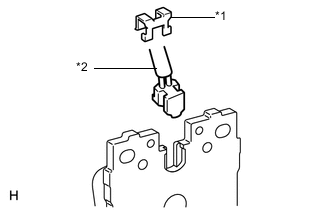
Text in Illustration *1 Retainer *2 Pad Wear Indicator Wire Install the pad wear indicator wire and a new retainer to the inner pad.
-
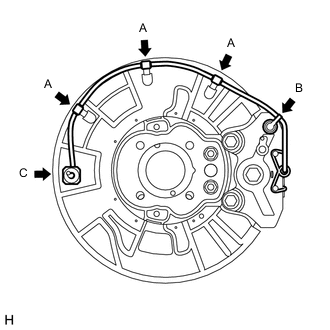
Attach the 3 clamps (labeled A) and bleeder plug cap (labeled B).
-
Connect the pad wear indicator wire connector (labeled C).
-
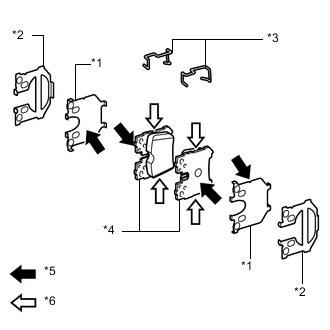
Text in Illustration *1 No. 1 Anti-squeal Shim *2 No. 2 Anti-squeal Shim *3 Anti-rattle Spring *4 Disc Brake Pad *5 Disc brake grease *6 Disc brake pad kit grease Install the anti-rattle spring to each pad.
Tech Tips
Install the spring lock securely in the groove of the pad.
-
Apply disc brake grease to the sides of the 2 No. 1 anti-squeal shims that contact the disc brake pad.
Note
Do not apply grease to the sides of the 2 No. 1 anti-squeal shims that contact the No. 2 anti-squeal shims.
-
When replacing the parts with new ones, apply disc brake pad kit grease to the sides of the disc brake pads.
-
Install the No. 1 and No. 2 anti-squeal shims to each pad.
-
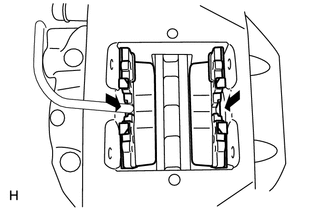
Install the 2 pads to the disc brake caliper.
-
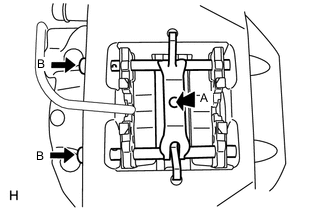
Install the rear disc brake anti-rattle spring to the disc brake caliper. Then while pressing the area labeled A, install the 2 rear disc brake anti-rattles with hole pins (labeled B).
Note
The anti-rattle springs can be used again if they have sufficient rebound; no deformation, cracks or wear; and has had all rust, dirt and foreign particles cleaned off.
-
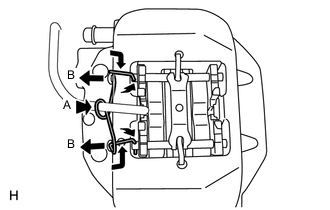
While pressing the area labeled A, slightly pull out the hole pin (labeled B) from the brake caliper, and install the pin hold clip.
Note
The pin hold clip can be used again if it has sufficient rebound; no deformation or wear; and has had all rust, dirt and foreign particles cleaned off.
-
-
CONNECT CABLE TO NEGATIVE AUXILIARY BATTERY TERMINAL
Note
When disconnecting the cable, some systems need to be initialized after the cable is reconnected Click here.
-
INSTALL BATTERY SERVICE HOLE COVER LH
-
INSTALL DECK TRIM SIDE BOARD LH (w/o Spare Tire)
-
INSTALL DECK BOARD ASSEMBLY (w/o Spare Tire)
-
INSTALL LUGGAGE COMPARTMENT MAT SUB-ASSEMBLY (w/ Spare Tire)
-
BLEED BRAKE LINE
-
INSTALL REAR WHEEL
- Torque:
- 140 N*m { 1428 kgf*cm, 103 ft.*lbf }
-
CLEAR THE DTC
-
CHECK FOR DTC
-
Check for DTC. If any DTC is output, perform the troubleshooting for that DTC Click here.
-
-
PERFORM PARKING BRAKE BEDDING