AIR SUSPENSION SYSTEM INITIALIZATION
-
DESCRIPTION
-
If the suspension control ECU is replaced with a new one, enter test mode and perform registration of vehicle identification information.
-
If replacing the suspension control ECU and/or height control sensor, perform the vehicle height offset calibration.
-
-
REGISTRATION OF VEHICLE IDENTIFICATION INFORMATION
Note
-
The CAN communication system must be functioning normally.
-
Make sure that the hybrid vehicle control ECU and AFS ECU are the correct type, and that they are normally functioning and correctly installed.
Tech Tips
Vehicle identification information is obtained automatically through CAN communication when in test mode.
-
Turn the power switch OFF.
-
Connect the intelligent tester to the DLC3.
-
Turn the power switch ON (IG).
-
Turn the tester ON.
-
Enter the following menus: Chassis / Air suspension / Utility / Signal Check.
-
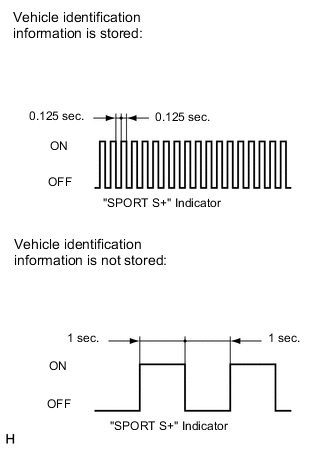
Confirm that the system is in test mode by checking that the "SPORT S+" indicator in the combination meter blinks at 0.125 second intervals (0.125 seconds on and 0.125 seconds off).
Tech Tips
-
When the vehicle identification information is stored, the "SPORT S+" indicator blinks at 0.125 second intervals (0.125 seconds on and 0.125 seconds off).
-
When vehicle identification information is not stored, the "SPORT S+" indicator blinks at 1 second intervals (1 second on and 1 second off).
-
-
-
VEHICLE HEIGHT OFFSET CALIBRATION
Note
-
Make sure that the pressure of the tires is normal.
-
Make sure that the vehicle is empty.
-
Make sure that the parking brake is released and that the shift lever is in N.
-
-
1.PERFORM VEHICLE HEIGHT INSPECTION
-
Adjust the pressure of the tires.
-
Stabilize the suspension by releasing the parking brake and bouncing the corners of the vehicle up and down.
-
Turn the power switch OFF.
-
Connect the intelligent tester to the DLC3.
-
Turn the power switch ON (READY) and turn the tester ON.
-
Enter the following menus: Chassis / Air suspension / Data List.
-
Press the height control switch and adjust the vehicle height to "HEIGHT HIGH".
-
Press the height control switch and return the vehicle height to NORMAL.
-
Using the Data List, confirm that the vehicle height control operation is complete.
Air Suspension Tester Display Measurement Item/Range Normal Condition Diagnosis Note Height Control Vehicle height control condition reading /
ON or OFF
ON: Vehicle height control is operating
OFF: Vehicle height control is not operating
- -
Turn the power switch OFF.
-
Move the shift lever to N and move the vehicle forward and rearward.
-
Turn the power switch ON (IG).
-
Using the intelligent tester, Enter the following menus: Chassis / Air suspension / Data List. Then read and write the values for "After Height Adjust" and "Height Adjust" for each wheel.
Air suspension Tester Display Measurement Item/Range Normal Condition Diagnosis Note FR Height Adjust Display of vehicle height offset recorded value of front right wheel /
min.: -3276.8 mm (-129 in.)
max.: 3276.7 mm (129 in.)
- - FL Height Adjust Display of vehicle height offset recorded value of front left wheel /
min.: -3276.8 mm (-129 in.)
max.: 3276.7 mm (129 in.)
- - RR Height Adjust Display of vehicle height offset recorded value of rear right wheel /
min.: -3276.8 mm (-129 in.)
max.: 3276.7 mm (129 in.)
- - RL Height Adjust Display of vehicle height offset recorded value of rear left wheel /
min.: -3276.8 mm (-129 in.)
max.: 3276.7 mm (129 in.)
- - FR After Height Adjust Display of after-calibration vehicle height value of front right wheel /
min.: -3276.8 mm (-129 in.)
max.: 3276.7 mm (129 in.)
except Sports Package:
When vehicle height normal: 0 +/-20 mm (0 +/-0.787 in.)
When vehicle height changing: Varies based on vehicle height
After HEIGHT HIGH adjustment: 20 +/-20 mm (0.787 +/-0.787 in.)
- for Sports Package:
When vehicle height normal: 0 +/-20 mm (0 +/-0.787 in.)
When vehicle height changing: Varies based on vehicle height
After HEIGHT HIGH adjustment: 30 +/-20 mm (1.181 +/-0.787 in.)
FL After Height Adjust Display of after-calibration vehicle height value of front left wheel /
min.: -3276.8 mm (-129 in.)
max.: 3276.7 mm (129 in.)
except Sports Package:
When vehicle height normal: 0 +/-20 mm (0 +/-0.787 in.)
When vehicle height changing: Varies based on vehicle height
After HEIGHT HIGH adjustment: 20 +/-20 mm (0.787 +/-0.787 in.)
- for Sports Package:
When vehicle height normal: 0 +/-20 mm (0 +/-0.787 in.)
When vehicle height changing: Varies based on vehicle height
After HEIGHT HIGH adjustment: 30 +/-20 mm (1.181 +/-0.787 in.)
RR After Height Adjust Display of after-calibration vehicle height value of rear right wheel /
min.: -3276.8 mm (-129 in.)
max.: 3276.7 mm (129 in.)
except Sports Package:
When vehicle height normal: 0 +/-20 mm (0 +/-0.787 in.)
When vehicle height changing: Varies based on vehicle height
After HEIGHT HIGH adjustment: 20 +/-20 mm (0.787 +/-0.787 in.)
- for Sports Package:
When vehicle height normal: 0 +/-20 mm (0 +/-0.787 in.)
When vehicle height changing: Varies based on vehicle height
After HEIGHT HIGH adjustment: 30 +/-20 mm (1.181 +/-0.787 in.)
RL After Height Adjust Display of after-calibration vehicle height value of rear left wheel /
min.: -3276.8 mm (-129 in.)
max.: 3276.7 mm (129 in.)
except Sports Package:
When vehicle height normal: 0 +/-20 mm (0 +/-0.787 in.)
When vehicle height changing: Varies based on vehicle height
After HEIGHT HIGH adjustment: 20 +/-20 mm (0.787 +/-0.787 in.)
- for Sports Package:
When vehicle height normal: 0 +/-20 mm (0 +/-0.787 in.)
When vehicle height changing: Varies based on vehicle height
After HEIGHT HIGH adjustment: 30 +/-20 mm (1.181 +/-0.787 in.)
-
Turn the power switch OFF.
-
Perform the vehicle height inspection Click here.
-
NEXT
-
-
2.PERFORM VEHICLE HEIGHT OFFSET CALIBRATION
Note
The possible vehicle height automatic adjustment value is 20 mm (0.787 in.). If the "Height Adjust value + (Standard value - Measurement value - After Height Adjust value)" is 20 mm (0.787 in.) or more, first perform the vehicle height adjustment (height control link adjustment) Click here.
-
Turn the power switch OFF.
-
Connect the intelligent tester to the DLC3.
-
Turn the power switch ON (IG) and the tester ON.
-
Enter the following menus: Chassis / Air suspension / Utility / Height Offset.
-
For each wheel, follow the instructions on the tester screen and input the input value to complete the vehicle height offset calibration.
Tech Tips
Input value = Measurement value
-
Turn the power switch ON (READY).
-
In the Data List, enter "Height Control".
-
Press the height control switch and adjust the vehicle height to "HEIGHT HIGH".
-
Press the height control switch and return the vehicle height to NORMAL.
-
Using the Data List, confirm that the vehicle height control operation is complete.
Air suspension Tester Display Measurement Item/Range Normal Condition Diagnosis Note Height Control Vehicle height control condition reading /
ON or OFF
ON: Vehicle height control is operating
OFF: Vehicle height control is not operating
- -
Turn the power switch OFF.
-
Perform the vehicle height inspection. Check that the result is within +/-14.3 mm (+/-0.563 in.) of the standard value.
-
NEXT
-
END
-