OIL PUMP MOTOR CONTROLLER REMOVAL
PROCEDURE
-
REMOVE LUGGAGE COMPARTMENT MAT SUB-ASSEMBLY (w/ Spare Tire)
-
REMOVE DECK BOARD ASSEMBLY (w/o Spare Tire)
-
REMOVE DECK TRIM SIDE BOARD LH (w/ Spare Tire)
-
REMOVE BATTERY SERVICE HOLE COVER LH
-
PRECAUTION
Note
After turning the power switch off, waiting time may be required before disconnecting the cable from the battery terminal. Therefore, make sure to read the disconnecting the cable from the battery terminal notice before proceeding with work Click here
-
DISCONNECT CABLE FROM NEGATIVE AUXILIARY BATTERY TERMINAL
Note
When disconnecting the cable, some systems need to be initialized after the cable is reconnected Click here
-
REMOVE V-BANK COVER SUB-ASSEMBLY
-
REMOVE AIR CLEANER INLET COVER SUB-ASSEMBLY
-
REMOVE NO. 1 AIR CLEANER INLET
-
REMOVE ENGINE ROOM SIDE COVER RH
-
REMOVE OIL PUMP MOTOR CONTROLLER
CAUTION:
Be sure to perform the procedure as described below. Do not turn the power switch on (READY) before reconnecting the cable to the negative battery terminal.
-
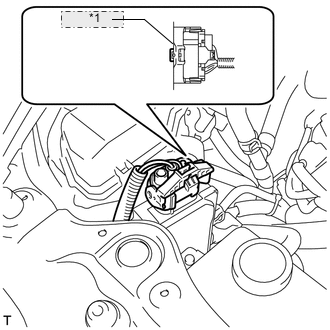
*1 Release the lock Release the lock on the connector.
-
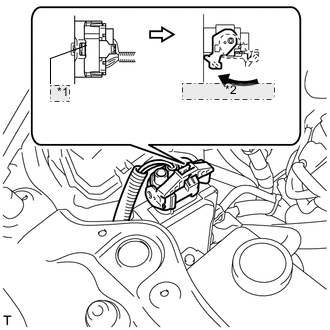
*1 Release the lock *2 Rotate the lever Release the lock lever on the connector as shown in the illustration. Disconnect the connector from the oil pump motor controller.
Note
When disconnecting the connector, do not apply excessive force to the wire harness.
-
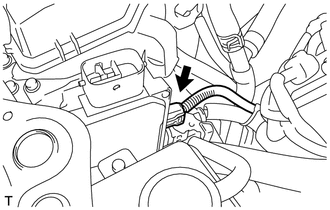
Disconnect the connector from the oil pump motor controller.
-
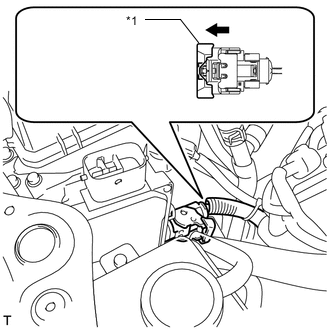
*1 Pull the lever to release the lock Pull the lever to release the lock on the connector.
-

*1 Release the lock *2 Rotate the lever Release the lock lever on the connector as shown in the illustration. Disconnect the connector from the oil pump motor controller.
Note
When disconnecting the connector, do not apply excessive force to the wire harness.
-
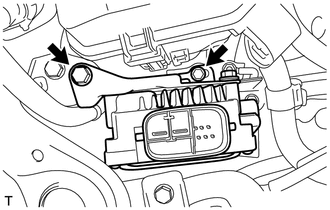
Remove the 2 bolts and separate the oil pump motor controller with bracket from the vehicle.
Note
-
Do not drop the oil pump motor controller.
-
When separating the oil pump motor controller, do not apply excessive force to the wire harness clamp located on the bracket.
-
-
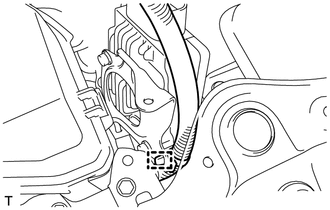
Disconnect the clamp.
Note
When disconnecting the clamp, do not apply excessive force to the wire harness.
-
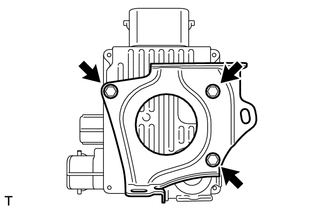
Remove the 3 bolts and oil pump motor controller.
-