HYBRID CONTROL SYSTEM, Diagnostic DTC:P0A78-282
| DTC Code | DTC Name |
|---|---|
| P0A78-282 | Drive Motor "A" Inverter Performance |
DESCRIPTION
For a description of the inverter, Click here.
| DTC No. | INF Code | DTC Detection Condition | Trouble Area |
|---|---|---|---|
| P0A78 | 282 | Motor inverter overvoltage signal detection (circuit malfunction) | Inverter with converter assembly |
PROCEDURE
-
CHECK CONNECTOR CONNECTION CONDITION (INVERTER WITH CONVERTER ASSEMBLY CONNECTOR)
Note
Before disconnecting the connector, confirm that it is properly connected by checking that the locking claws are engaged and that the connector does not pull out.
-
Check the connection of the low voltage connector of the inverter with converter assembly.
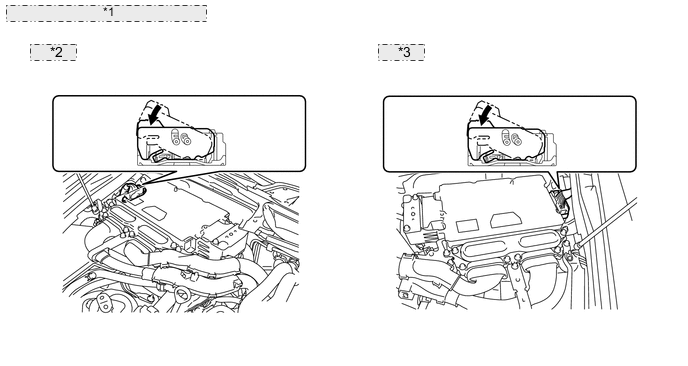
*1 Inverter with Converter Assembly *2 for LHD: *3 for RHD: OK The connector is connected securely and there are no contact problems. Tech Tips
When connecting the connector, insert it with the locking lever in the raised position. Rotate the lever downward and make sure that the connector is pulled into its socket. When the locking lever is in its fully closed position, a click will be heard as its locking claws engage. After the click is heard, pull up on the connector to confirm that it is properly connected.
Result Result Proceed to OK (for LHD) A OK (for RHD) B NG C
A 
REPLACE INVERTER WITH CONVERTER ASSEMBLY Click here
B
REPLACE INVERTER WITH CONVERTER ASSEMBLY Click here
C
CONNECT SECURELY
-