OBJECT RECOGNITION CAMERA REMOVAL

CAUTION / NOTICE / HINT
Note
-
Do not touch the camera lens or the front windshield glass in front of the camera.
-
Do not use a camera which has been dropped or subjected to an impact. Do not drop the camera or subject it to an impact.
Tech Tips
-
Use the same procedure for RHD and LHD vehicles.
-
The procedure listed below is for LHD vehicles.
PROCEDURE
-
REMOVE MAP LIGHT ASSEMBLY
-
REMOVE VISOR BRACKET COVER
-
REMOVE VISOR ASSEMBLY LH
-
REMOVE VISOR ASSEMBLY RH
-
REMOVE VISOR HOLDER
-
REMOVE RAIN SENSOR COVER
-
REMOVE INNER REAR VIEW MIRROR ASSEMBLY
-
w/o Automatic High Beam System, Adaptive High Beam System:
-
w/ Automatic High Beam System, Adaptive High Beam System:
-
-
REMOVE OBJECT RECOGNITION CAMERA
-
Partially remove the roof headlining assembly.
Tech Tips
It is not necessary to completely remove the roof headlining. Slightly lower the front section of the roof headlining so that the object recognition camera can be removed.
-
Disconnect the 3 connectors.
-
Detach the 2 wire harness clamps.
-
Detach the claw and disconnect the connector clamp.
-
Remove the 3 bolts.
-
Detach the clip and remove the object recognition camera.
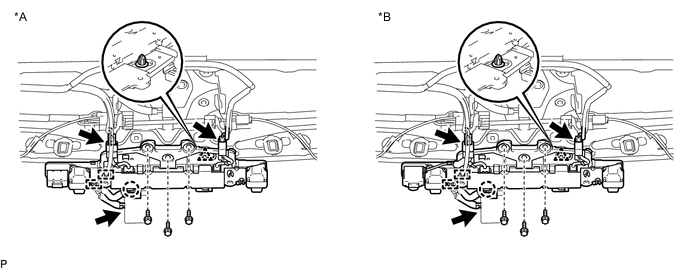
Text in Illustration *A w/o Night View System *B w/ Night View System
-