WIPER SWITCH REMOVAL
CAUTION / NOTICE / HINT
Tech Tips
-
Use the same procedures for LHD and RHD vehicle.
-
The procedure listed below are for LHD vehicle.
PROCEDURE
-
REMOVE STEERING COLUMN COVER (w/o Driver Monitor Camera)
-
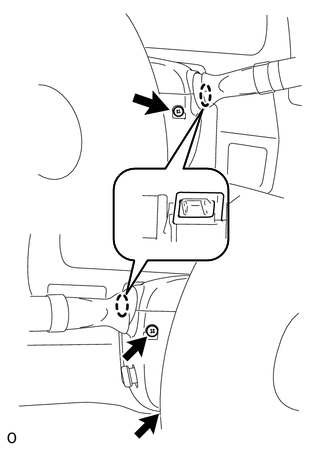
While turning the steering wheel to the right and left, remove the 3 screws.
-
Detach the 2 claws to remove the lower steering column cover.
Note
Do not damage the tilt and telescopic switch.
-
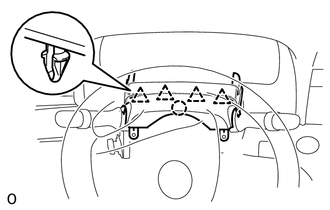
Detach the 4 clips.
-
Detach the claw to remove the upper steering column cover.
-
-
REMOVE STEERING COLUMN COVER (w/ Driver Monitor Camera)
-
While turning the steering wheel to the right and left, remove the 3 screws.
-
Detach the 2 claws to remove the lower steering column cover.
Note
Do not damage the tilt and telescopic switch.
-
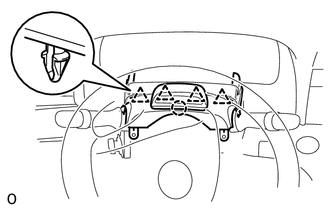
Detach the 4 clips.
-
Disconnect the connector.
-
Detach the claw to remove the upper steering column cover.
-
-
REMOVE WINDSHIELD WIPER SWITCH ASSEMBLY
-
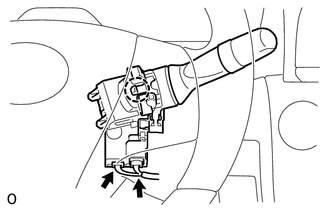
Disconnect the 2 connectors.
-
Detach the claw and remove the wiper switch.
Note
If the claw is pushed with excessive force, it may break.
-