TRIP SWITCH REMOVAL
CAUTION / NOTICE / HINT
Tech Tips
-
Use the same procedure for RHD and LHD vehicles.
-
The procedure listed below is for LHD vehicles.
PROCEDURE
-
DISABLE AUTOAWAY/RETURN FUNCTION
-
Disable the autoaway/return function by changing the customize parameter Click here.
Note
Record the current customize parameter setting (whether the autoaway/return function is enabled or disabled) in order to restore the current setting after finishing the operation.
Tech Tips
Performing the above operation causes the autoaway/return function to be disabled when the power switch is turned off.
-
Turn the power switch on (IG). Operate the tilt and telescopic switch to fully retract and tilt up the steering column assembly.
-
Turn the power switch off.
-
-
REMOVE INSTRUMENT SIDE PANEL LH
-
REMOVE INSTRUMENT PANEL ORNAMENT
-
REMOVE NO. 1 INSTRUMENT PANEL SAFETY PAD SUB-ASSEMBLY
-
REMOVE NO. 2 INSTRUMENT CLUSTER FINISH PANEL SUB-ASSEMBLY
-
REMOVE TRIP SWITCH
-
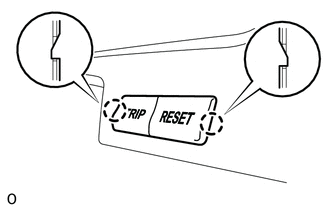
w/o Night View System:
Detach the 2 claws and remove the trip switch from the No. 2 instrument cluster finish panel sub-assembly.
-
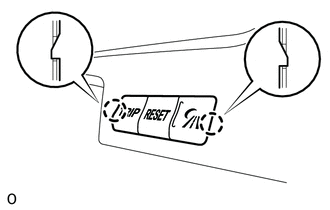
w/ Night View System:
Detach the 2 claws and remove the trip switch from the No. 2 instrument cluster finish panel sub-assembly.
-