INSTRUMENT PANEL SAFETY PAD REMOVAL
CAUTION / NOTICE / HINT
Tech Tips
-
Use the same procedure for RHD and LHD vehicles.
-
The procedure listed below is for LHD vehicles.
PROCEDURE
-
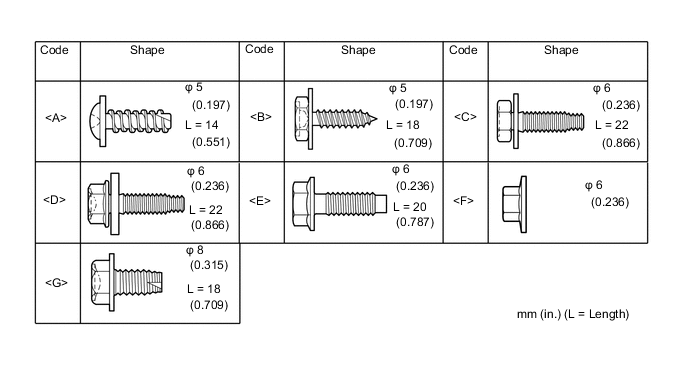
TABLE OF BOLT, SCREW AND NUT
Tech Tips
All bolts, screws and nuts relevant to installing and removing the instrument panel are shown along with their alphabet code in the table below.
-
PRECAUTION
Note
After turning the ignition switch off, waiting time may be required before disconnecting the cable from the battery terminal. Therefore, make sure to read the disconnecting the cable from the battery terminal notice before proceeding with work Click here.
-
DISCONNECT CABLE FROM NEGATIVE BATTERY TERMINAL
-
Disable the AUTO TILT AWAY function by changing the customize parameter Click here.
Note
Record the current customize parameter setting (whether the AUTO TILT AWAY function is enabled or disabled) in order to restore the current setting after finishing the operation.
Tech Tips
Performing the above operation causes the AUTO TILT AWAY function to be disabled when the engine switch is turned off.
-
Turn the engine switch on (IG). Operate the tilt and telescopic switch to fully extend and lower the steering column assembly.
-
Turn the engine switch off and disconnect the cable from the negative (-) battery terminal.
CAUTION:
Wait at least 90 seconds after disconnecting the cable from the negative (-) battery terminal to disable the SRS system.
Note
When disconnecting the cable, some systems need to be initialized after the cable is reconnected Click here.
-
-
REMOVE HEADLIGHT DIMMER SWITCH ASSEMBLY
-
Remove the headlight dimmer switch assembly Click here.
-
-
REMOVE FRONT SEAT ASSEMBLY LH
-
for Manual Seat:
Remove the front seat assembly Click here.
-
for Power Seat:
Remove the front seat assembly Click here.
-
-
REMOVE FRONT SEAT ASSEMBLY RH
-
for Manual Seat:
Tech Tips
Use the same procedure described for the LH side.
-
for Power Seat:
Tech Tips
Use the same procedure described for the LH side.
-
for Walk in Seat Type:
Remove the front seat assembly Click here.
-
-
REMOVE FRONT FLOOR FOOTREST
-
for LHD:
Remove the front floor footrest Click here.
-
for RHD:
Remove the front floor footrest Click here.
-
-
REMOVE REAR CONSOLE BOX ASSEMBLY
-
for Automatic Transmission:
Remove the rear console box assembly Click here.
-
for Manual Transmission:
Remove the rear console box assembly Click here.
-
w/ Refrigerated Cool Box:
Remove the rear console box assembly Click here.
-
for Bench Seat Type:
Remove the rear console box assembly Click here.
-
-
REMOVE DOOR SCUFF PLATE ASSEMBLY LH
-
REMOVE DOOR SCUFF PLATE ASSEMBLY RH
Tech Tips
Use the same procedure described for the LH side.
-
REMOVE COWL SIDE TRIM BOARD LH
-
REMOVE COWL SIDE TRIM BOARD RH
Tech Tips
Use the same procedure described for the LH side.
-
REMOVE FRONT DOOR OPENING TRIM WEATHERSTRIP LH
-
REMOVE FRONT DOOR OPENING TRIM WEATHERSTRIP RH
Tech Tips
Use the same procedure described for the LH side.
-
REMOVE FRONT NO. 1 ASSIST GRIP PLUG LH
-
REMOVE FRONT NO. 1 ASSIST GRIP PLUG RH
Tech Tips
Use the same procedure described for the LH side.
-
REMOVE NO. 1 ASSIST GRIP
-
REMOVE FRONT PILLAR GARNISH LH
-
REMOVE FRONT PILLAR GARNISH RH
Tech Tips
Use the same procedure described for the LH side.
-
REMOVE FRONT NO. 3 SPEAKER ASSEMBLY
-
REMOVE INSTRUMENT SIDE PANEL LH
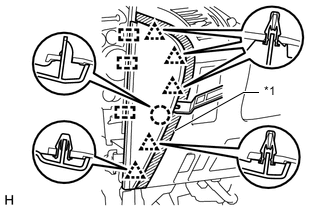
Text in Illustration *1 Protective Tape
-
Put protective tape around the instrument side panel.
-
Using a moulding remover, detach the 5 clips, claw and 3 guides and remove the instrument side panel.
-
-
REMOVE INSTRUMENT CLUSTER FINISH PANEL ORNAMENT (for LHD)
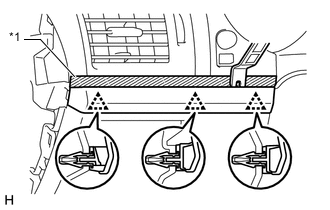
Text in Illustration *1 Protective Tape
-
Put protective tape around the instrument cluster finish panel ornament.
-
Using a moulding remover, detach the 3 clips and remove the instrument cluster finish panel ornament.
-
-
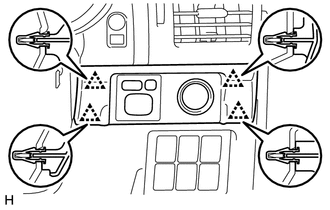
REMOVE INSTRUMENT PANEL FINISH PLATE GARNISH (for RHD)
-
Detach the 4 clips.
-
Disconnect each connector and remove the instrument panel finish plate garnish.
-
-
REMOVE LOWER INSTRUMENT PANEL FINISH PANEL ASSEMBLY
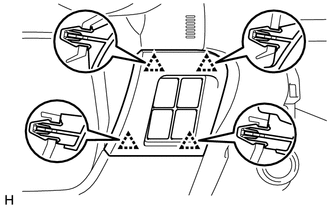
-
Detach the 4 clips.
-
Disconnect each connector and remove the instrument panel finish panel.
-
-
REMOVE LOWER INSTRUMENT PANEL FINISH PANEL SUB-ASSEMBLY
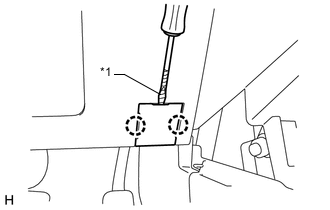
-
Using a screwdriver, detach the 2 claws and open the cover.
Tech Tips
Tape the screwdriver tip before use.
Text in Illustration *1 Protective Tape -
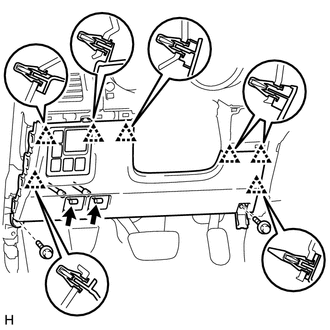
w/o Knee Airbag:
-
Remove the 2 bolts <C>.
-
Detach the 7 clips.
-
Disconnect each connector and each cable and remove the lower instrument panel finish panel.
-
-
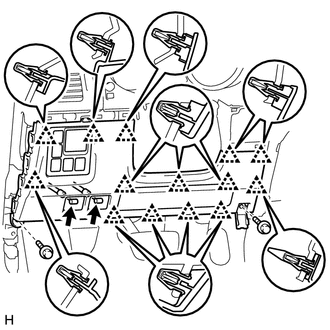
w/ Knee Airbag:
-
Remove the 2 bolts <C>.
-
Detach the 14 clips.
-
Disconnect each connector and each cable and remove the lower instrument panel finish panel.
-
-
-
REMOVE LOWER NO. 1 INSTRUMENT PANEL AIRBAG ASSEMBLY
-
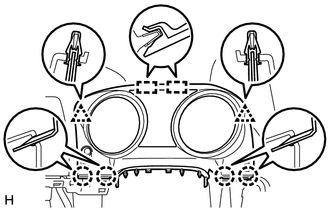
REMOVE INSTRUMENT CLUSTER FINISH PANEL SUB-ASSEMBLY
-
Detach the 4 claws, 2 clips and 2 guides and remove the instrument cluster finish panel.
-
-
REMOVE COMBINATION METER ASSEMBLY
-
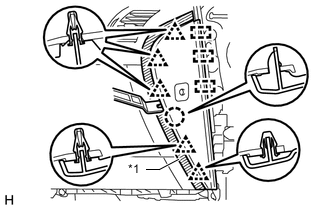
REMOVE INSTRUMENT SIDE PANEL RH
Text in Illustration *1 Protective Tape
-
Put protective tape around the instrument side panel.
-
Using a moulding remover, detach the 5 clips, claw, and 3 guides.
-
Disconnect the connector and remove the instrument side panel.
-
-
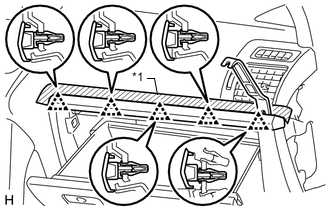
REMOVE INSTRUMENT PANEL ORNAMENT
Text in Illustration *1 Protective Tape
-
Put protective tape around the instrument panel ornament.
-
Using a moulding remover, detach the 5 clips and remove the instrument panel ornament.
-
-
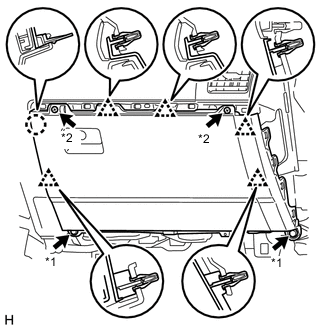
REMOVE GLOVE COMPARTMENT DOOR ASSEMBLY
Text in Illustration *1 Bolt *2 Screw
-
Remove the 2 bolts <C> and 2 screws <A> or <B>.
-
Detach the 5 clips and claw.
-
Disconnect each connector and remove the glove compartment door.
-
-
REMOVE DRIVING SUPPORT SWITCH CONTROL ECU
-
REMOVE 4 WHEEL DRIVE CONTROL ECU
-
REMOVE CENTER INSTRUMENT CLUSTER FINISH PANEL ASSEMBLY (w/o Navigation System)
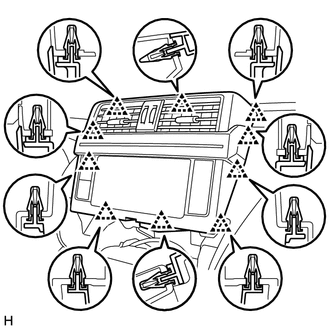
-
Detach the 10 clips and remove the center instrument cluster finish panel.
-
Disconnect each connector.
-
-
REMOVE RADIO TUNER OPENING COVER (w/o Audio)
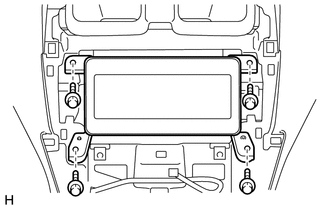
-
Remove the 4 bolts and radio tuner opening cover.
-
-
REMOVE RADIO RECEIVER ASSEMBLY (w/ Radio Receiver)
-
REMOVE DISPLAY AND NAVIGATION MODULE DISPLAY (w/ Navigation System)
-
REMOVE LOWER CENTER INSTRUMENT CLUSTER FINISH PANEL SUB-ASSEMBLY (w/o CRAWL)
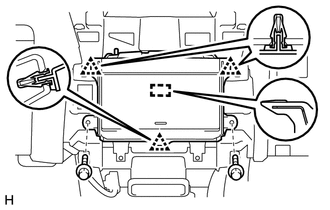
-
Remove the 2 bolts <E>.
-
Detach the 3 clips and guide and remove the lower center instrument cluster finish panel.
-
-
REMOVE CENTER CLUSTER MODULE SWITCH (w/ CRAWL)
-
REMOVE UPPER INSTRUMENT CLUSTER FINISH PANEL
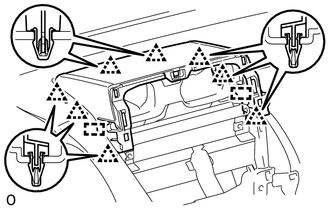
-
Detach the 8 clips and 2 guides and remove the upper instrument cluster finish panel.
-
-
REMOVE FRONT NO. 4 SPEAKER ASSEMBLY
-
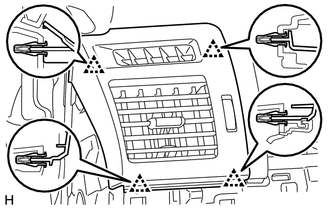
REMOVE NO. 1 INSTRUMENT PANEL REGISTER ASSEMBLY
-
Detach the 4 clips and remove the No. 1 instrument panel register.
-
-
REMOVE NO. 2 INSTRUMENT PANEL REGISTER ASSEMBLY
Tech Tips
Use the same procedure described for the No. 1 instrument panel register.
-
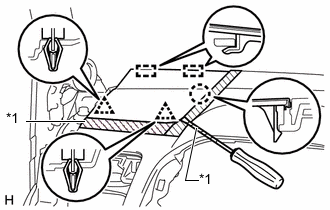
REMOVE NO. 1 INSTRUMENT PANEL SPEAKER PANEL SUB-ASSEMBLY
Text in Illustration *1 Protective Tape
-
Put protective tape around the No. 1 instrument panel speaker panel.
-
Using a screwdriver, detach the 2 clips, claw, and 2 guides and remove the No. 1 instrument panel speaker panel.
Tech Tips
Tape the screwdriver tip before use.
-
-
REMOVE NO. 2 INSTRUMENT PANEL SPEAKER PANEL SUB-ASSEMBLY
Tech Tips
Use the same procedure described for the No. 1 instrument panel speaker panel.
-
REMOVE FRONT NO. 2 SPEAKER ASSEMBLY
-
REMOVE INSTRUMENT PANEL SAFETY PAD SUB-ASSEMBLY
-
for LHD:
-
Partially remove the floor carpet.
Tech Tips
It is not necessary to fully remove the floor carpet. Partially remove it so that the No. 2 instrument panel wire can be removed in a later step.
-
Remove the 6 bolts <E> and nut <F>.
-
Remove the 2 passenger airbag bolts <G>.
-
Remove the 4 bolts, 2 nuts and 2 brackets.
-
Disconnect the connectors and detach the clamps and claws.
-
Detach the 2 guides and remove the instrument panel safety pad.
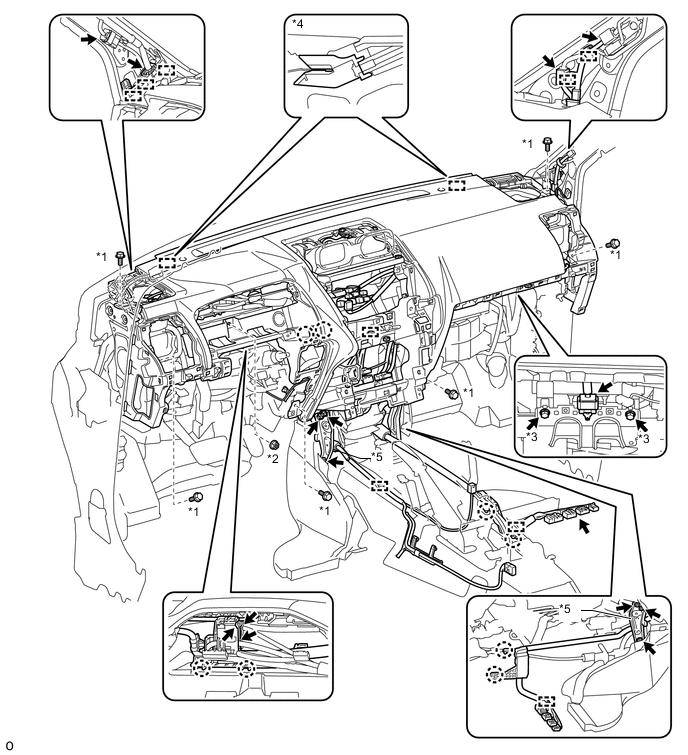
Text in Illustration *1 Bolt <E> *2 Nut <F> *3 Bolt <G> *4 Guide *5 Bracket - -
-
-
for RHD:
-
Partially remove the floor carpet.
Tech Tips
It is not necessary to fully remove the floor carpet. Partially remove it so that the No. 2 instrument panel wire can be removed in a later step.
-
Remove the 6 bolts <E> and nut <F>.
-
Remove the 2 passenger airbag bolts <G>.
-
Remove the 4 bolts, 2 nuts and 2 brackets.
-
Disconnect the connectors and detach the clamps and claws.
-
Detach the 2 guides and remove the instrument panel safety pad.
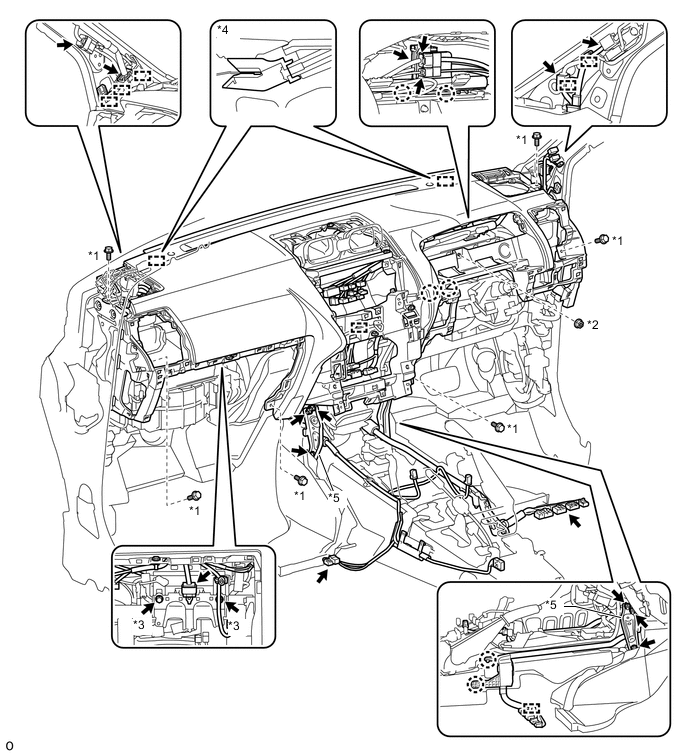
Text in Illustration *1 Bolt <E> *2 Nut <F> *3 Bolt <G> *4 Guide *5 Bracket - -
-
-