FRONT CONSOLE BOX(for Automatic Transmission) REMOVAL
CAUTION / NOTICE / HINT
Tech Tips
-
Use the same procedure for RHD and LHD vehicles.
-
The procedure listed below is for LHD vehicles.
PROCEDURE
-
REMOVE INTEGRATION CONTROL AND PANEL ASSEMBLY
-
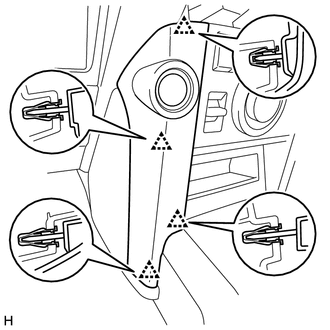
REMOVE INSTRUMENT PANEL FINISH PANEL END LH
-
Detach the 4 clips and remove the instrument panel finish panel end LH.
-
-
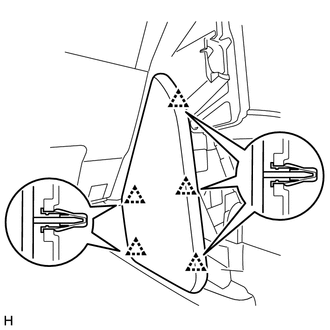
REMOVE NO. 2 INSTRUMENT PANEL FINISH PANEL CUSHION
-
Detach the 5 clips and remove the No. 2 instrument panel finish panel cushion.
-
-
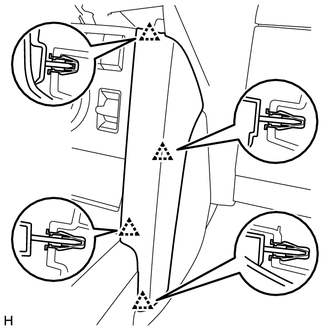
REMOVE INSTRUMENT PANEL FINISH PANEL END RH
-
Detach the 4 clips and remove the instrument panel finish panel end RH.
-
-
REMOVE NO. 1 INSTRUMENT PANEL FINISH PANEL CUSHION
Tech Tips
Use the same procedure described for the No. 2 instrument panel finish panel cushion.
-
REMOVE FRONT CONSOLE UPPER PANEL GARNISH
-
w/o Seat Heater System:
-
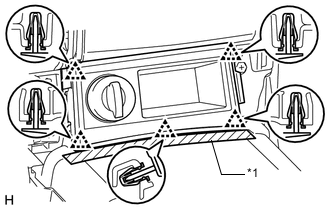
Text in Illustration *1 Protective Tape Put protective tape around the front console upper panel garnish.
-
Detach the 5 clips and remove the front console upper panel garnish.
-
Disconnect the connector.
-
-
w/o CRAWL:
-
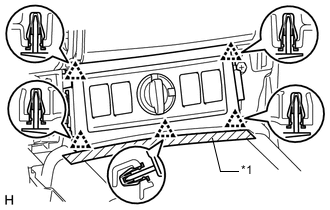
Text in Illustration *1 Protective Tape Put protective tape around the front console upper panel garnish.
-
Detach the 5 clips and remove the front console upper panel garnish.
-
Disconnect each connector.
-
-
w/ CRAWL:
-
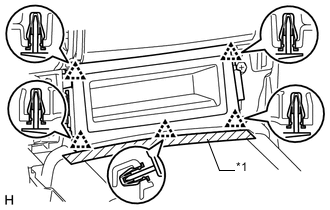
Text in Illustration *1 Protective Tape Put protective tape around the front console upper panel garnish.
-
Detach the 5 clips and remove the front console upper panel garnish.
-
-
-
REMOVE NO. 1 INSTRUMENT PANEL UNDER COVER SUB-ASSEMBLY
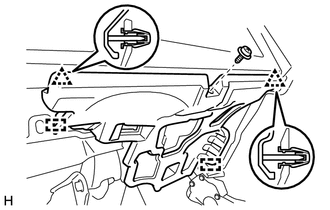
-
for LHD:
-
Remove the screw.
-
Detach the 2 clips and 2 guides and remove the No. 1 instrument panel under cover.
-
Disconnect each connector.
-
-
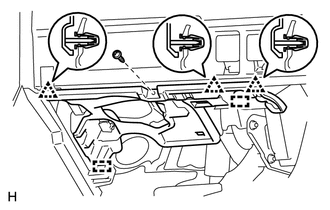
for RHD:
-
Remove the screw.
-
Detach the 3 clips and 2 guides and remove the No. 1 instrument panel under cover.
-
Disconnect each connector.
-
-
-
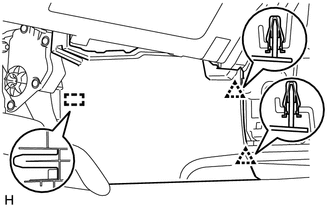
REMOVE FRONT NO. 1 CONSOLE BOX INSERT
-
Detach the 2 clips and guide and remove the front No. 1 console box insert.
-
-
REMOVE NO. 2 INSTRUMENT PANEL UNDER COVER SUB-ASSEMBLY
-
Remove the screw.
-
Detach the 3 clips and 2 guides and remove the No. 2 instrument panel under cover.
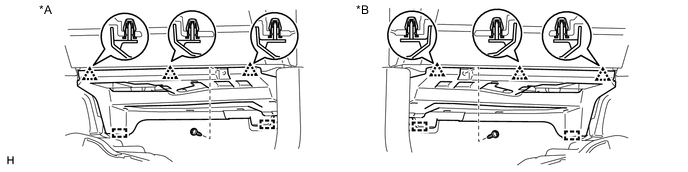
Text in Illustration *A for LHD *B for RHD
-
-
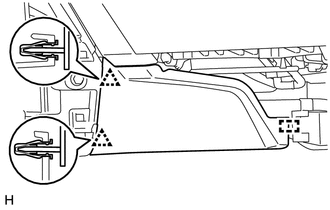
REMOVE FRONT NO. 2 CONSOLE BOX INSERT
-
Detach the 2 clips and guide and remove the front No. 2 console box insert.
-
-
REMOVE SHIFT LEVER KNOB SUB-ASSEMBLY
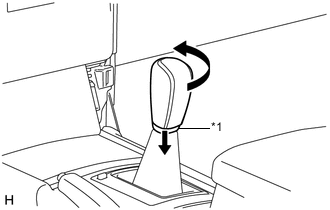
Text in Illustration *1 Shifting Hole Cover
-
Move the shifting hole cover downward.
-
Twist the shift lever knob in the direction indicated by the arrow and remove it.
-
-
REMOVE CONSOLE PANEL SUB-ASSEMBLY
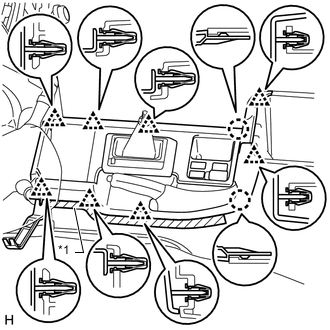
Text in Illustration *1 Protective Tape
-
Put protective tape around the console panel.
-
Using a moulding remover, detach the 8 clips and 2 claws.
-
Disconnect each connector and remove the console panel.
-
-
REMOVE NO. 1 HEATER TO REGISTER DUCT SUB-ASSEMBLY (w/ Cool Box)
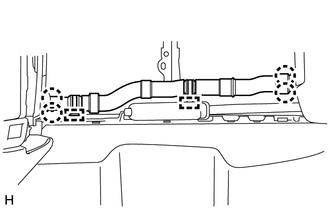
-
Detach the 4 claws.
-
Disconnect the 2 clamps and remove the No. 1 heater to register duct.
-
-
REMOVE NO. 1 CONSOLE BOX DUCT (for Single Air Conditioning System)
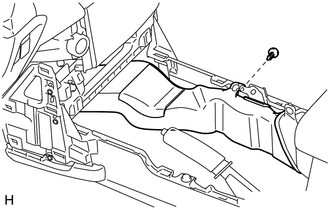
-
Remove the clip and No. 1 console box duct.
-
-
REMOVE REAR CONSOLE END PANEL SUB-ASSEMBLY
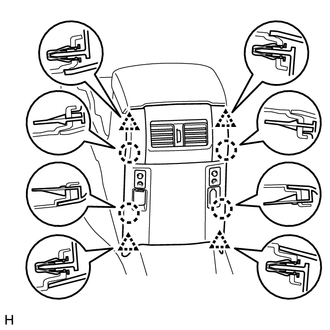
-
Detach the 4 clips and 4 claws.
-
Disconnect each connector and remove the rear console end panel.
-
-
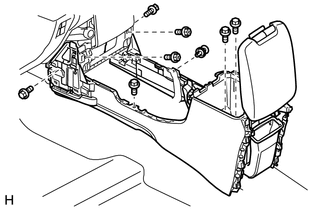
REMOVE REAR CONSOLE BOX ASSEMBLY
-
Remove the 2 screws, clip and 5 bolts.
-
Disconnect each connector and remove the rear console box.
-