CHARGING SYSTEM Noise Occurs from V-ribbed Belt or Generator Assembly
PROCEDURE
-
CONFIRM PROBLEM SYMPTOM
-
Confirm the problem symptom.
Result Symptom Proceed to Noise occurs from fan and generator V belt A Noise occurs from generator assembly B
B 
CHECK FOR NOISE WHEN ROTOR IS TURNING FREELY Click here
A 
-
-
CHECK FAN AND GENERATOR V BELT FOR WEAR
-
Check the fan and generator V belt for wear or damage.
OK The fan and generator V belt is not worn or damaged.
NG 
REPLACE FAN AND GENERATOR V BELT
OK
-
-
CHECK GENERATOR PULLEY WITH CLUTCH FOR WEAR
-
Check the generator pulley with clutch grooves for wear or damage.
OK The generator pulley with clutch grooves are not worn or damaged. Result The Result Proceed to OK A NG (Generator Assembly (for 100 A Type)) B NG (Generator Assembly (for 130 A Type)) C
B
REPLACE GENERATOR PULLEY WITH CLUTCH (for 100 A Type) Click here
C
REPLACE GENERATOR PULLEY WITH CLUTCH (for 130 A Type) Click here
A
-
-
CHECK FOR NOISE WHILE CLUTCH PULLEY IS OPERATING
-
Start the engine and check the generator pulley with clutch for looseness.
OK The generator pulley with clutch is not loose.
NG
TIGHTEN GENERATOR PULLEY WITH CLUTCH TO SPECIFIED TORQUE
OK
-
-
INSPECT GENERATOR PULLEY WITH CLUTCH (UNIT INSPECTION)
-
Remove the generator assembly.
-
for 100 A Type: Click here
-
for 130 A Type: Click here
-
-
Check the installation condition of the generator pulley cap.
OK The generator pulley cap is not loose or missing. -
Check for forming of particles due to friction (for dry type pulley) or grease leaks (for wet type pulley).
OK There are no large amount of particles (for dry type pulley) or grease leaks (for wet type pulley). -
Check the generator pulley with clutch for misalignment (interference with the generator assembly).
OK The generator pulley with clutch is not misaligned (no interference with the generator assembly). -
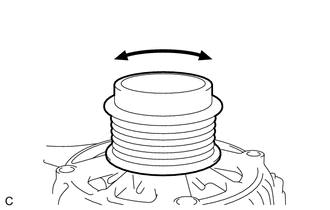
Turn the generator pulley with clutch clockwise and counterclockwise by hand and check for noise.
OK Noise does not occur when turned in both directions. -
Turn the generator pulley with clutch clockwise and counterclockwise by hand and visually check for runout.
OK The generator pulley with clutch does not have runout. -
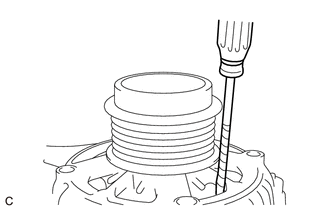
Hold the generator rotor assembly (fan) in the generator assembly with a screwdriver, and check that the generator pulley with clutch locks when turned clockwise and turns freely when turned counterclockwise.
OK The generator pulley with clutch locks when turned clockwise and turns freely when turned counterclockwise. Result The Result Proceed to OK A NG (Generator Assembly (for 100 A Type)) B NG (Generator Assembly (for 130 A Type)) C
A
INSPECT PULLEY OTHER THAN GENERATOR ASSEMBLY PULLEY
B
REPLACE GENERATOR PULLEY WITH CLUTCH (for 100 A Type) Click here
C
REPLACE GENERATOR PULLEY WITH CLUTCH (for 130 A Type) Click here
-
-
CHECK FOR NOISE WHEN ROTOR IS TURNING FREELY
-
Perform a road test and check that noise does not occur when decelerating.
OK Noise does not occur. -
Stop the engine and check that generator pulley with clutch noise does not occur as the engine stops.
OK Noise does not occur. Result The Result Proceed to OK A NG (Generator Assembly (for 100 A Type)) B NG (Generator Assembly (for 130 A Type)) C
B
REPLACE GENERATOR PULLEY WITH CLUTCH (for 100 A Type) Click here
C
REPLACE GENERATOR PULLEY WITH CLUTCH (for 130 A Type) Click here
A
-
-
CHECK ENGAGEMENT OF GENERATOR PULLEY WITH CLUTCH
-
Remove the generator assembly.
-
for 100 A Type: Click here
-
for 130 A Type: Click here
-
-
Hold the generator rotor assembly (fan) in the generator assembly with a screwdriver, and check that the generator pulley with clutch locks when turned from counterclockwise (free turning direction) to clockwise (locking direction).
OK The generator pulley with clutch locks. Result The Result Proceed to OK (Generator Assembly (for 100 A Type)) A OK (Generator Assembly (for 130 A Type)) B NG (Generator Assembly (for 100 A Type)) C NG (Generator Assembly (for 130 A Type)) D
A
REPAIR OR REPLACE GENERATOR ASSEMBLY (for 100 A Type) Click here
B
REPAIR OR REPLACE GENERATOR ASSEMBLY (for 130 A Type) Click here
C
REPLACE GENERATOR PULLEY WITH CLUTCH (for 100 A Type) Click here
D
REPLACE GENERATOR PULLEY WITH CLUTCH (for 130 A Type) Click here
-