TELEVISION CAMERA(for Side) INSTALLATION
PROCEDURE
-
INSTALL SIDE TELEVISION CAMERA ASSEMBLY
-
Install the side television camera with the 3 screws.
-
Connect the connector.
-
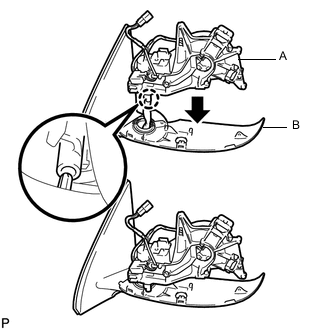
Attach the claw as shown in the illustration to install the part labeled A to the part labeled B.
Note
Be careful not to break the claw.
-
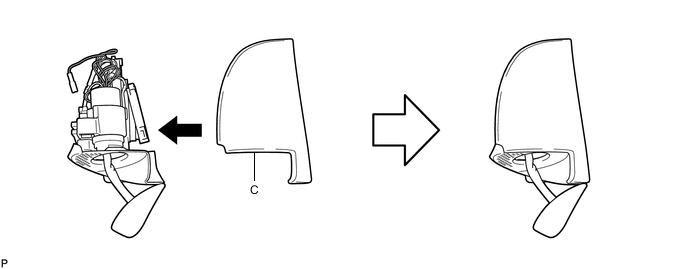
Attach the part labeled C as shown in the illustration.
-
Install the 5 screws.
-
Using a T25 "TORX" socket wrench, install the 3 screws.
Tech Tips
-
Clean the threads of the screw with non-residue solvent.
-
Apply adhesive to the threads of the screw.
Adhesive Toyota Genuine Adhesive 1324, Three Bond 1324 or equivalent
-
-
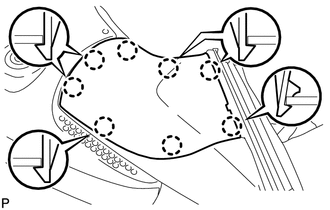
Attach the 8 claws to install the lower cover.
-
Attach the 4 claws to install the rubber base.
-
Install the screw.
-
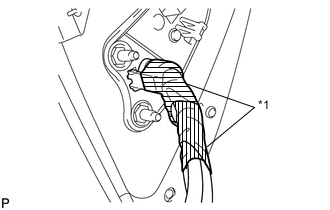
Text in Illustration *1 Tape Apply 2 new pieces of tape so that they overlap.
-
-
INSTALL SIDE TURN SIGNAL LIGHT ASSEMBLY LH
-
INSTALL OUTER MIRROR COVER
-
INSTALL OUTER REAR VIEW MIRROR GLASS
-
INSTALL OUTER REAR VIEW MIRROR ASSEMBLY LH
-
Install the outer rear view mirror Click here.
-
-
ADJUST SIDE TELEVISION CAMERA ASSEMBLY
Tech Tips
Adjust the side television camera for the passenger side only.
-
Adjust the side television camera Click here.
-