MULTI-TERRAIN MONITOR SYSTEM SYSTEM DESCRIPTION
-
GENERAL
-
This system has front, passenger side, driver side and rear television camera assemblies mounted around the vehicle to display around the vehicle on the navigation receiver assembly*1 or radio and display receiver assembly*2. The display panel also shows a composite view consisting of the area behind the vehicle and parking guidelines to assist the driver in parking the vehicle by monitoring the area around the vehicle.
-
*1: for Navigation Receiver Type
-
*2: for Radio and Display Type
-
-
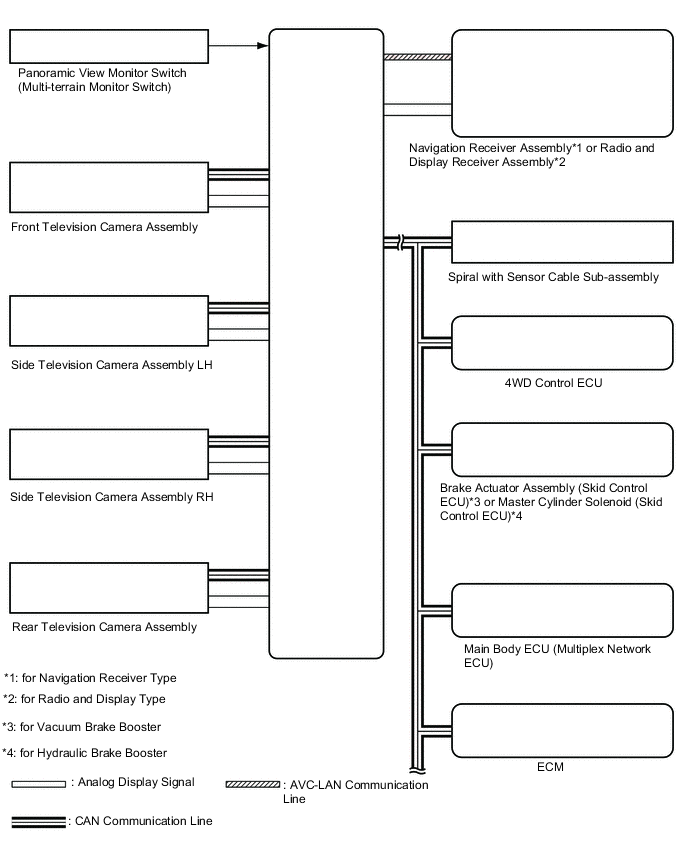
This system consists of the following components:
-
Parking assist ECU
-
Panoramic view monitor switch (multi-terrain monitor switch)
-
Rear television camera assembly
-
Front television camera assembly
-
Side television camera assembly LH
-
Side television camera assembly RH
-
Navigation receiver assembly*1
-
Radio and display receiver assembly*2
-
Spiral with sensor cable sub-assembly
-
Brake actuator assembly (skid control ECU)*3
-
Master cylinder solenoid (Skid control ECU)*4
-
Main body ECU (multiplex network body ECU)
-
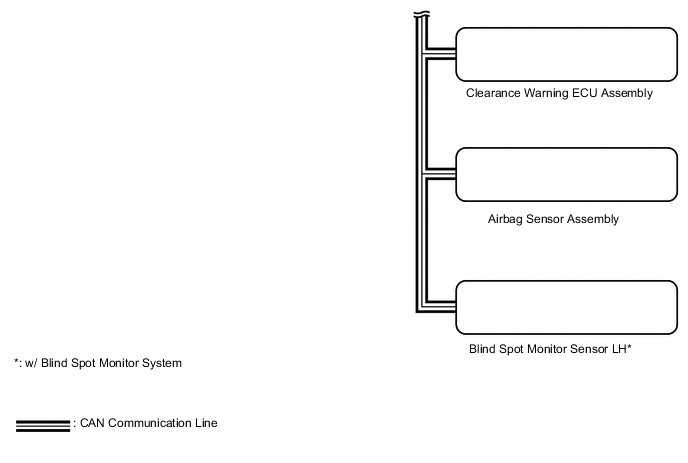
Clearance warning ECU assembly
-
ECM
-
4WD control ECU
-
Airbag sensor assembly
-
Blind spot monitor sensor LH*5
-
*1: for Navigation Receiver Type
-
*2: for Radio and Display Type
-
*3: for Vacuum Brake Booster
-
*4: for Hydraulic Brake Booster
-
*5: w/ Blind Spot Monitor System
-
-
-
This system is equipped with a self-diagnosis system, which is operated from a designated window that appears on the display panel, just as in the navigation system.
-
-
FUNCTION OF COMPONENTS
-
The parking assist ECU controls the system by using information from the following components.
Item Function Rear Television Camera Assembly
-
Mounted on the back door to transmit the rear view of the vehicle to the parking assist ECU.
-
Has a color video camera that uses a Complementary Metal Oxide Semiconductor (CMOS) and a wide-angle lens
Front Television Camera Assembly Generates a video feed showing the front side of the vehicle and transmits the video to the parking assist ECU Side Television Camera Assembly LH Generates a video feed showing the left side of the vehicle and transmits the video to the parking assist ECU Side Television Camera Assembly RH Generates a video feed showing the right side of the vehicle and transmits the video to the parking assist ECU Parking Assist ECU
-
Turns the multi-terrain monitor system ON and OFF according to the display conditions, based on the received panoramic view monitor switch (multi-terrain monitor switch) signals, shift position signals, and vehicle speed signals
-
Sends the display request signals for the panoramic view and wide front view screen, two-side view screen, panoramic view and rear view screen, or moving view screen to the radio receiver assembly according to the display conditions, based on the received panoramic view monitor switch (multi-terrain monitor switch) signals, shift position signals, and vehicle speed signals
-
Sends the display switching request signals for the panoramic view and wide front view screen, two-side view screen, panoramic view and rear view screen, or moving view screen to the radio receiver assembly according to the display conditions, based on the received outer mirror retraction signals
-
Displays the composite image of the surrounding area images taken by each camera and the image calculated from vehicle status information such as the steering angle signals on the display screen
-
Renders each configuration page in the diagnosis window and outputs the screen to the navigation receiver assembly
-
Stops displaying the buttons and guidelines on the panoramic view and rear view monitor screen when the screen is being displayed and a back door open status signal is received
-
Stores each configuration setting from the diagnosis window
Panoramic view monitor switch (multi-terrain monitor switch) Sends switch operation signals to the parking assist ECU Navigation Receiver Assembly*1
Radio and Display Receiver Assembly*2
Allows touch panel operations when the multi-terrain monitor screen or diagnosis screen is displayed Spiral with Sensor Cable Sub-assembly Sends the steering angle signals and sensor status signals to the parking assist ECU via the CAN communication system Brake Actuator Assembly (Skid Control ECU)*3
Master Cylinder Solenoid (Skid Control ECU)*4
Sends the vehicle speed signals, drive type signals, and system status signals to the parking assist ECU via the CAN communication system ECM
-
Sends the engine model signals, and system status signals to the parking assist ECU via the CAN communication system
-
Sends the shift position signals to the parking assist ECU via the CAN communication system
Main Body ECU (Multiplex Network Body ECU)
-
Sends the back door courtesy light switch signal to the parking assist ECU via the CAN communication system
-
Sends the mirror retract request signal to the parking assist ECU via the CAN communication system
Clearance Warning ECU Assembly Sends information from each sonar via the CAN communication system Master Cylinder Solenoid (Skid Control ECU) Sends vehicle speed signals to the parking assist ECU via CAN communication. 4WD Control ECU Sends L4 condition signals to the parking assist ECU via CAN communication. Airbag Sensor Assembly Sends acceleration sensor information to the parking assist ECU via CAN communication. Steering Control ECU Sends VGRS relative angle signals to the parking assist ECU via CAN communication. Blind Spot Monitor Sensor LH*5 Sends RCTA operation condition signals to the parking assist ECU via CAN communication (w/ RCTA).
-
*1: for Navigation Receiver Type
-
*2: for Radio and Display Type
-
*3: for Vacuum Brake Booster
-
*4: for Hydraulic Brake Booster
-
*5: w/ Blind Spot Monitor System
-
-
-
Multi-terrain Monitor Screen Display
-
Panoramic view and wide front view screen
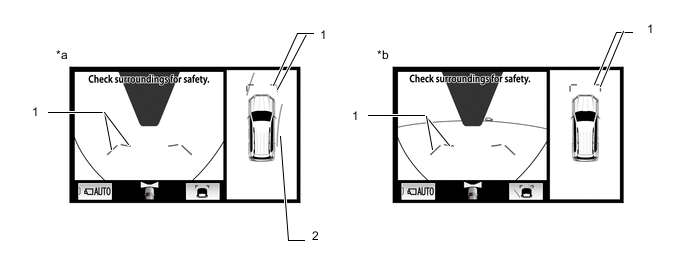
Text in Illustration *a Estimated course line display mode *b Distance guide line display mode Panoramic View and Wide Front View Screen Description Signal Name Color Panoramic View and Wide Front View Screen Estimated course line display mode Distance guide line display mode (1) Front distance guide line Blue Displayed Displayed (2) Front wheel ground contact line Yellow Displayed Not displayed -
Two-side view screen description
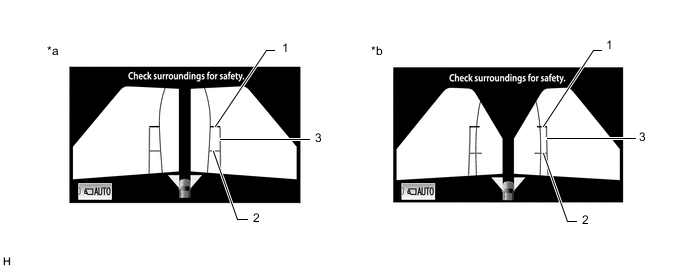
Text in Illustration *a Estimated course line display mode *b Distance guide line display mode Two-side View Screen Description Signal Name Color (1) Front distance guide line Red/Black (2) Front wheel ground contact line Blue (3) Vehicle width parallel line Blue Blue -
Panoramic view and rear view screen
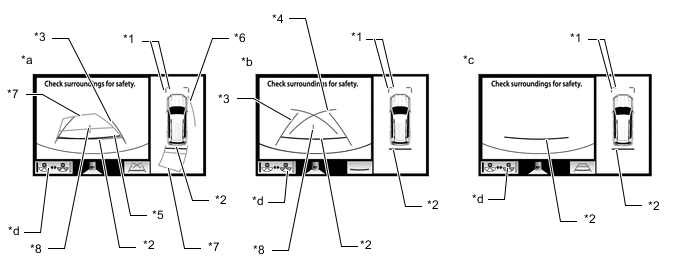
Text in Illustration *a Estimated course line display mode *b Parking guide line display mode *c Distance guide line display mode *d Guide line display mode switching button Tech Tips
In the rear view screen, the screen display mode can be switched by pressing the guide line display mode switching button or rear view screen on the screen.
Panoramic View and Rear View Screen Description Signal Name Color Panoramic View and Rear View Screen Estimated course line display mode Parking guide line display mode Distance guide line display mode (1) Front distance guide line Blue Displayed Displayed Displayed (2) Rear distance guide line Red/Black Displayed Displayed Displayed (3) Rear vehicle width extension line Blue Displayed Displayed Not displayed (4) Parking guide line Blue Not displayed Displayed Not displayed (5) Rear distance guide line Blue Displayed Not displayed Not displayed (6) Side estimated course line Yellow Displayed Not displayed Not displayed (7) Rear estimated course line Yellow Displayed Not displayed Not displayed (8) Vehicle center line Blue Displayed Displayed Not displayed -
Rear view screen
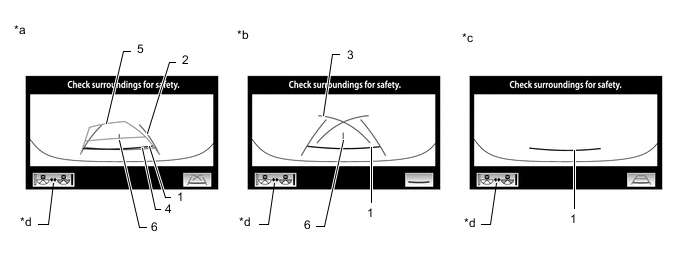
Text in Illustration *a Estimated course line display mode *b Parking guide line display mode *c Distance guide line display mode *d Guide line display mode switching button Tech Tips
The screen changes to the panoramic view and rear view screen when the display mode switch button or rear view screen is selected.
Panoramic View and Rear View Screen Description Signal Name Color Rear View Screen Estimated course line display mode Parking guide line display mode Distance guide line display mode (1) Rear distance guide line Red/Black Displayed Displayed Displayed (2) Rear vehicle width extension line Blue Displayed Displayed Not displayed (3) Parking guide line Blue Not displayed Displayed Not displayed (4) Rear distance guide line Blue Displayed Not displayed Not displayed (5) Rear estimated course line Yellow Displayed Not displayed Not displayed (6) Vehicle center line Blue Displayed Displayed Not displayed -
Side view screen
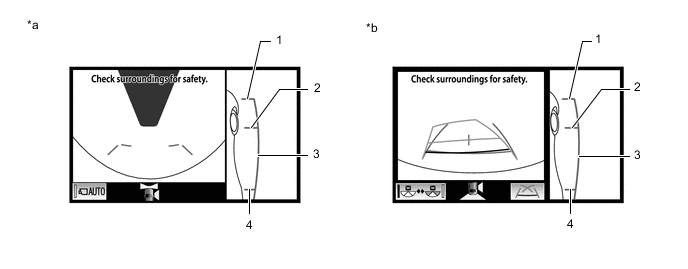
Text in Illustration *a Estimated course line display mode *b Parking guide line display mode Side View Screen Description Signal Name Color (1) Front wheel ground contact line Blue (2) Rear wheel ground contact line Blue (3) Vehicle width parallel line Blue Tech Tips
Refer to the content of panoramic view and rear view screen and panoramic view and wide front view screen for information about the rear view and wide front view screens.
-
-
Multi-terrain Monitor Screen Description (ON LOAD)
-
Manual display mode
-
When the panoramic view monitor switch (multi-terrain monitor switch) is pressed with the engine switch on (IG) or the engine started, the multi-terrain monitor system switches to a screen shown below according to the shift lever position
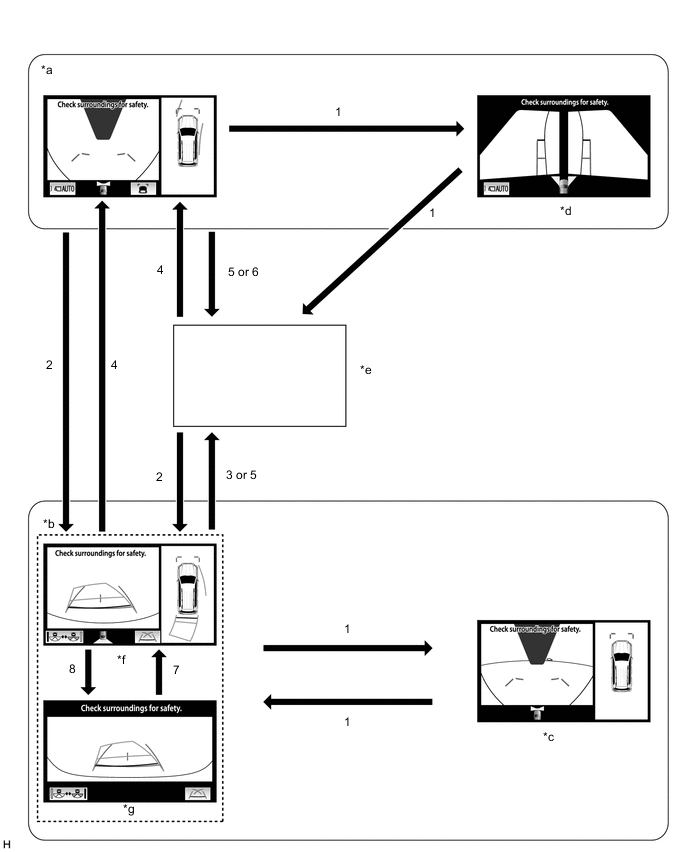
Text in Illustration *a Shift lever not in P or R *b Shift lever in R *c Panoramic view and wide front view screen *d Two-side view screen *e Navigation screen, etc. *f Panoramic view and rear view screen *g Wide rear view screen - - Screen Transition Conditions No. Screen Transition Conditions (1) Panoramic view monitor switch (multi-terrain monitor switch) is pressed (2) Shift lever is moved to R (3) Shift lever is moved to other than P or R (4) Shift lever is moved to other than P or R and operation (1) is performed (5) "MAP/VOICE" switches, etc. on the display are pressed (6) Shift lever is moved to P (7) Switch image mode button or rear view screen is selected (8) Switch image mode button or wide rear view screen is selected Tech Tips
If the panoramic view monitor switch (multi-terrain monitor switch) is pressed at a vehicle speed of approximately 20 km/h (12 mph) or lower, the multi-terrain monitor screen is displayed. If the vehicle speed exceeds approximately 20 km/h (12 mph), the display switches to the navigation screen or information settings screen.
-
-
Screen transition chart (automatic display mode)
-
When the shift lever is not in P or R, in addition to switching screens by pressing the panoramic view monitor switch (multi-terrain monitor switch), the automatic display mode can be selected by pressing the automatic display mode switching button.
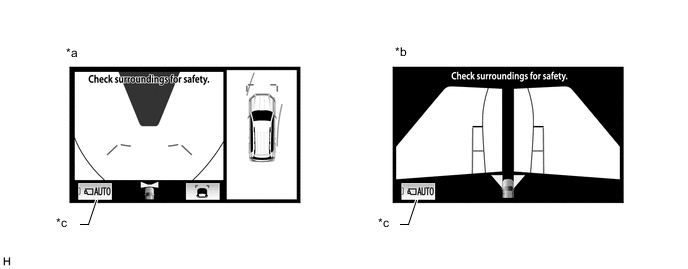
Text in Illustration *a Panoramic view and wide front view screen *b Two-side view screen *c Automatic display mode - - Automatic Display Mode Switching Button
(Indicator in Button)
Screen Switching Mode ON
(Illuminated)
Automatic display mode OFF
(Not illuminated)
Manual display mode Tech Tips
-
In the automatic display mode, press the panoramic view monitor switch (multi-terrain monitor switch) or panel switch to switch screens in the same way as the manual display mode.
-
When switching to the navigation screen, etc. in the automatic display mode, the display switches to the screen that was displayed last. However, the display switches to the panoramic view and wide front view screen if the shift lever is not in P or R after the engine switch is turned from off to on (IG).
-
-
The automatic display mode automatically switches the display according to the vehicle status.
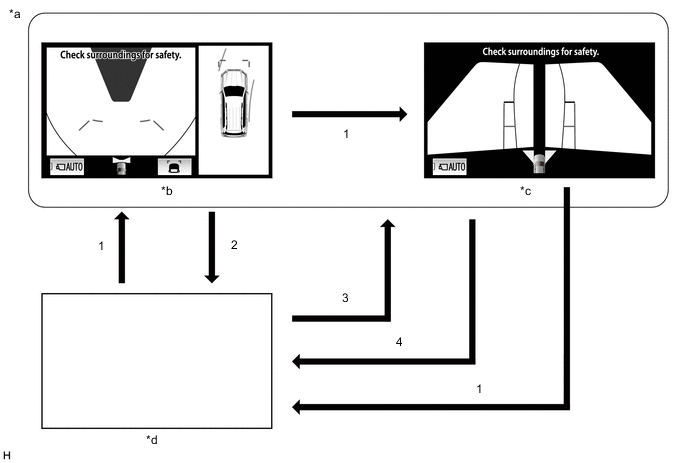
Text in Illustration *a Shift lever not in P or R *b Panoramic view and wide front view screen *c Two-side view screen *d Navigation screen, etc. Screen Transition Conditions (Automatic Display Mode) No. Screen Transition Conditions (1) Panoramic view monitor switch (multi-terrain monitor switch) is pressed (2) Current location switches, etc. on the display are pressed (3) Vehicle speed changes from above approximately 10 km/h (6 mph) to approximately 10 km/h (6 mph) or lower. The screen that was last displayed is displayed on the display.* (4) Vehicle speed changes from approximately 12 km/h (7 mph) or lower to above approximately 12 km/h (7 mph)
-
*: The panoramic view and wide front view screen is the first screen displayed after the engine switch was turned off.
-
-
-
When the outer rear view mirror assembly is retracted
-
When the outer rear view mirrors are retracted, the screen changes according to the current screen display, as follows.
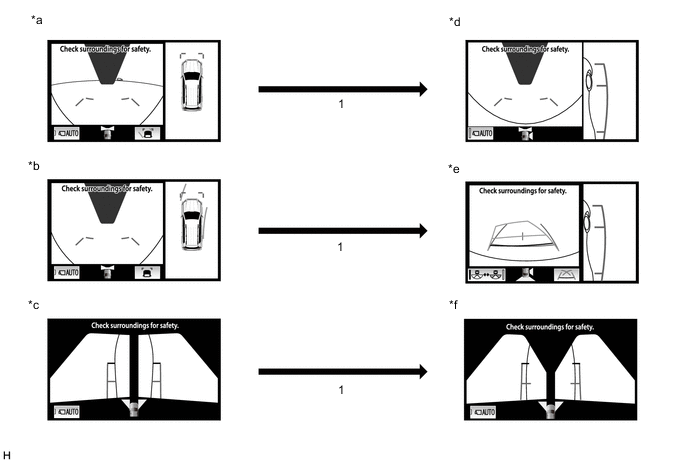
Text in Illustration *a Panoramic view and wide front view screen *b Panoramic view and rear view screen *c Two side view screen (Outer rear view mirror assembly is extracted) *d Side view and wide front view screen *e Side view and rear view screen *f Two side view screen (Outer rear view mirror assembly is retracted) Screen Transition Conditions No. Screen Transition Conditions (1) When outer rear view mirror assembly is retracted
-
-
-
Multi-terrain Monitor Screen Description (OFF LOAD)
-
Manual display mode
-
When the shift lever is moved to R, the screen switches depending on the previously displayed screen.
Figure 1. Example
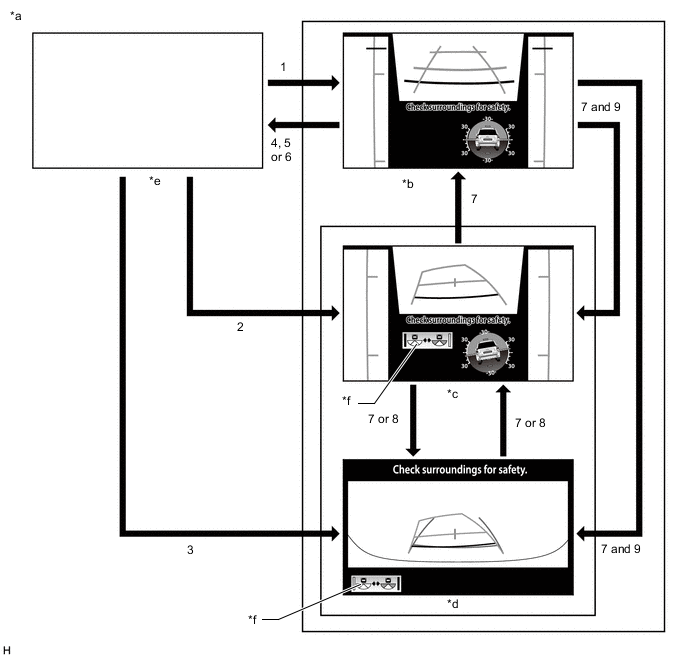
Text in Illustration *a Shift lever in R *b Front view and two-side view screen *c Rear view and two-side view screen *d Wide rear view screen *e Navigation screen, etc. *f Display mode switching button Screen Transition Conditions No. Screen Transition Conditions (1) Shift lever is moved to R and panoramic view monitor switch (multi-terrain monitor switch) is pressed (2) Shift lever is moved to R (ended with display of screen other than wide rear view screen previously) (3) Shift lever is moved to R (ended with display of wide rear view screen previously) (4) Shift lever is moved to P (5) Physical switches of display are operated (6) Shift lever is moved to other than P or R (7) Panoramic view monitor switch (multi-terrain monitor switch) is pressed (8) Display mode switching button is pressed (9) Vehicle speed changes to approximately 12 km/h or more
-
-
Auto display mode
-
The automatic display mode automatically switches the display according to the vehicle status.
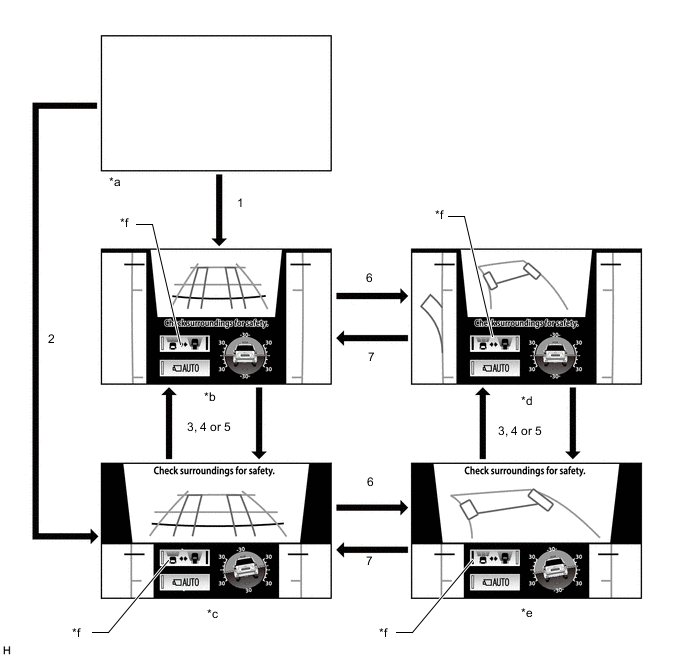
Text in Illustration *a Navigation screen, etc. *b Front view and two-side view screen *c Front view and side view front tires screen *d Under floor view and side view screen *e Under floor view and side view front tires screen *f Under floor view switching button Screen Transition Conditions No. Screen Transition Conditions (1) Shift lever is moved to position other than R and panoramic view monitor switch (multi-terrain monitor switch) is pressed (did not end with display of front view and side view front tires screen previously) (2) Shift lever is moved to position other than R and panoramic view monitor switch (multi-terrain monitor switch) is pressed (ended with display of front view and side view front tires screen previously) (3) Front view screen is touched (4) Side view screen is touched (5) Panoramic view monitor switch (multi-terrain monitor switch) is pressed (6) Under floor view switching button is pressed when vehicle is parked and vehicle position can be estimated (7) Vehicle speed is approximately 5 km/h (3 mph) or less and vehicle position cannot be estimated or under floor view switching button is pressed
-
-
-
OPERATION EXPLANATION
-
The reverse position signal is sent from the shift lever position switch to the parking assist ECU when the shift lever is moved to R.
-
An appropriate steering angle and timing information can be provided for the driver. This is based on the information from the steering angle sensor signal and the vehicle angle data signal that are sent to the parking assist ECU.
Tech Tips
The steering angle sensor signal is used to control parking assist only for estimated guide line mode.
-
-
COMMUNICATION SYSTEM OUTLINE
-
CAN communication system
-
The multi-terrain monitor system uses CAN communication for data communication between the parking assist ECU and other ECUs and between the parking assist ECU and each camera.
-
If a problem occurs in the CAN communication line, the parking assist ECU outputs a CAN communication malfunction DTC. (To check, use the GTS.) Click here
-
If a problem occurs in the CAN communication line, the parking assist ECU outputs a CAN communication malfunction DTC. (To check, use the display diagnosis screen.)
-
If a CAN communication line malfunction DTC is output, repair the malfunction in the communication line and troubleshoot the multi-terrain monitor system when data communication is normal.
-
Since the CAN communication line has its own length and route, it cannot be repaired temporarily with a bypass wire, etc.
-
-
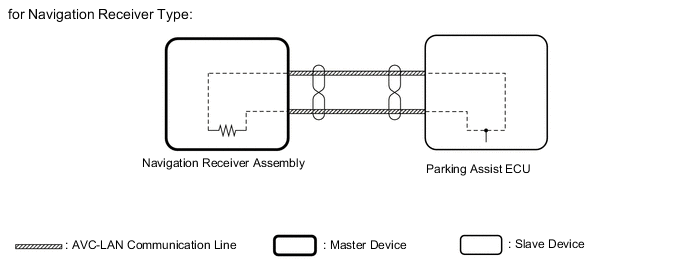
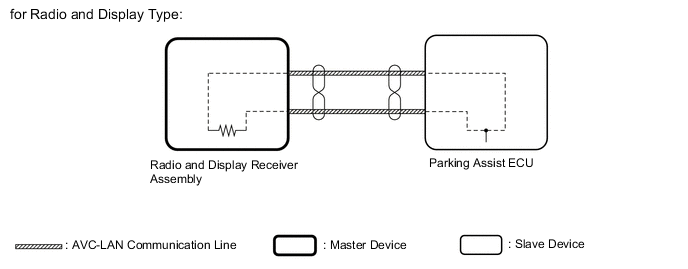
AVC-LAN communication system
-
*1: for Navigation Receiver Type
-
*2: for Radio and Display Type
-
The multi-terrain monitor system uses the AVC-LAN to communicate with other equipment.
-
The master device for the AVC-LAN is the navigation receiver assembly*1 or radio and display receiver assembly*2.
-
Resistance necessary for communication transfer (60 to 80 Ω between the TX+ - TX- terminals) is inside the navigation receiver assembly*1 or radio and display receiver assembly*2.
-
If a malfunction such as a communication line short, +B short, or GND short occurs in the AVC-LAN circuit, communication is interrupted and the multi-terrain monitor system and navigation system do not operate normally.
-
-
-
VIDEO SIGNALS
-
*1: for Navigation Receiver Type
-
*2: for Radio and Display Type
-
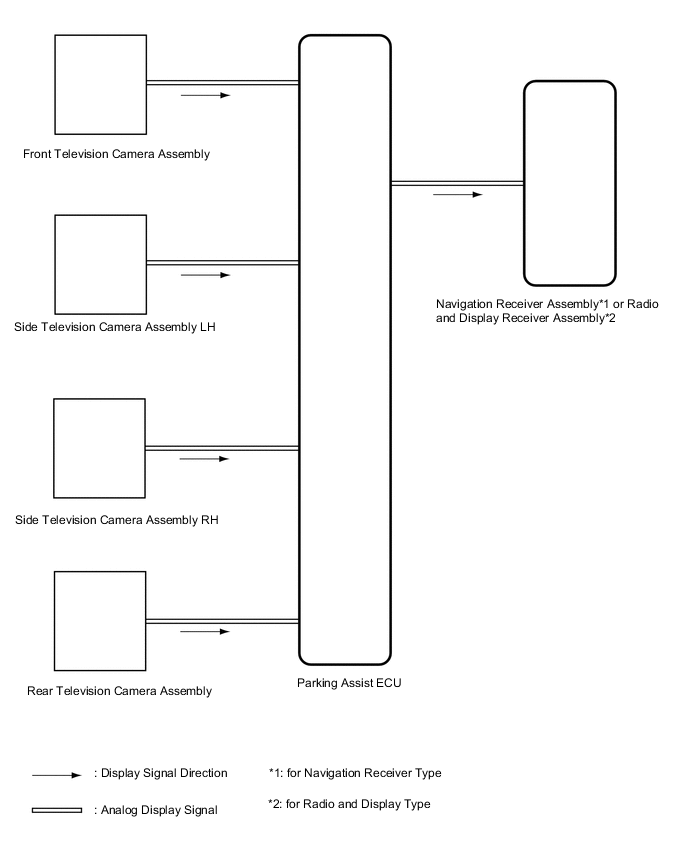
Video signal circuit
-
Video signals from the front television camera assembly are input into the parking assist ECU via analog communication lines (vehicle wire harness).
-
Video signals from the side television camera assembly LH are input into the parking assist ECU via analog communication lines (vehicle wire harness).
-
Video signals from the side television camera assembly RH are input into the parking assist ECU via analog communication lines (vehicle wire harness).
-
Video signals from the rear television camera assembly are input into the parking assist ECU via analog communication lines (vehicle wire harness).
-
Video signals from the parking assist ECU are input into the navigation receiver assembly*1 or radio and display receiver assembly*2 via analog communication lines (vehicle wire harness).
-
-
Screen display
-
Video signals input from each camera are processed in the parking assist ECU and displayed on the navigation receiver assembly*1 or radio and display receiver assembly*2 as the multi-terrain monitor system screen.
-
-
-
DIAGNOSTIC FUNCTION OUTLINE
-
This multi-terrain monitor system has a diagnostic function displayed in the navigation receiver assembly*1 or radio and display receiver assembly*2. This function enables the calibration (adjustment and verification) of the multi-terrain monitor system.
-
*1: for Navigation Receiver Type
-
*2: for Radio and Display Type
-
-
The multi-terrain monitor system can check the following items by using the GTS.
Item Proceed to DTC Data List / Active Test
-
-
CALIBRATION
-
Use the multi-terrain monitor system diagnosis screen for calibration and checking of the multi-terrain monitor system Click here.
Note
Part replacement and work performed during servicing may require calibration of the multi-terrain monitor system and other systems Click here.
-