BLIND SPOT MONITOR SYSTEM, Diagnostic DTC:C1AB3
| DTC Code | DTC Name |
|---|---|
| C1AB3 | Short to GND in Outer Mirror Indicator(Slave) |
DESCRIPTION
This DTC is stored when the blind spot monitor sensor RH detects a ground short in the blind spot monitor indicator RH.
| DTC Code | DTC Detection Condition | Trouble Area |
|---|---|---|
| C1AB3 | With the blind spot monitor main switch assembly (multi-function switch) on, the voltage output from the blind spot monitor sensor to the indicator is low for a certain amount of time. |
|
WIRING DIAGRAM
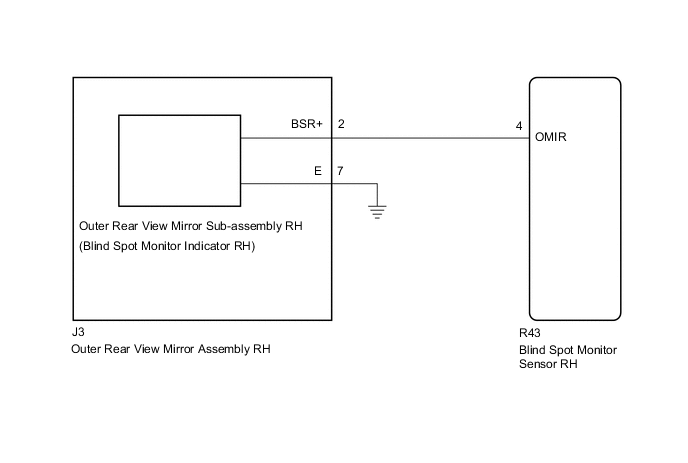
CAUTION / NOTICE / HINT
Note
When checking for DTCs, make sure that the blind spot monitor main switch assembly (multi-function switch) is on.
PROCEDURE
-
CHECK DTC
-
Clear the DTCs Click here.
-
Recheck for DTCs and check if the same DTC is output again Click here.
OK No DTCs are output.
OK 
USE SIMULATION METHOD TO CHECK Click here
NG 
-
-
CHECK HARNESS AND CONNECTOR (OUTER REAR VIEW MIRROR ASSEMBLY RH - BLIND SPOT MONITOR SENSOR RH)
-
Disconnect the J3 outer rear view mirror assembly RH connector.
-
Disconnect the R43 blind spot monitor sensor RH connector.
-
Measure the resistance according to the value(s) in the table below.
Standard Resistance Tester Connection Condition Specified Condition J3-2 (BSR+) - Body ground Always 10 kΩ or higher
NG
REPAIR OR REPLACE HARNESS OR CONNECTOR
OK
-
-
CHECK HARNESS AND CONNECTOR (BLIND SPOT MONITOR SENSOR RH - OUTER REAR VIEW MIRROR SUB-ASSEMBLY RH)
-
Disconnect the R43 blind spot monitor sensor RH connector.
-
Disconnect the outer rear view mirror sub-assembly RH connector.
-
Measure the resistance according to the value(s) in the table below.
Standard Resistance Tester Connection Condition Specified Condition R43-4 (OMIR) - Body ground Always 10 kΩ or higher
NG
REPLACE OUTER REAR VIEW MIRROR ASSEMBLY RH Click here
OK
-
-
CHECK OUTER REAR VIEW MIRROR SUB-ASSEMBLY RH
-
Replace the outer rear view mirror sub-assembly RH with a new or normally functioning one Click here.
-
Clear the DTCs Click here.
-
Recheck for DTCs and check if the same DTC is output again Click here.
OK No DTCs are output.
OK
END (OUTER REAR VIEW MIRROR SUB-ASSEMBLY RH IS DEFECTIVE)
NG
REPLACE BLIND SPOT MONITOR SENSOR RH Click here
-