WIDE VIEW FRONT MONITOR SYSTEM SYSTEM DESCRIPTION
-
*1: for Navigation Receiver Type
-
*2: for Radio and Display Type
-
GENERAL
-
This system has a front television camera assembly to display the front view of the vehicle on the navigation receiver assembly*1 or radio and display receiver assembly*2.
-
This system consists of the following components:
-
Parking assist ECU
-
Front television camera assembly
-
Steering pad switch assembly (wide view front and side monitor switch)
-
Navigation receiver assembly*1
-
Radio and display receiver assembly*2
-
Spiral cable sub-assembly
-
Skid control ECU (brake actuator assembly)
-
Four wheel drive control ECU
-
ECM
-
-
This system is equipped with a self-diagnosis system, which is operated from a designated window that appears on the display panel, just as in the navigation system or audio and visual system.
-
-
FUNCTION OF COMPONENTS
-
The parking assist ECU controls the system by using information from the following components.
Item Function Front Television Camera Assembly Generates a video feed showing the front side of the vehicle and transmits the video to the parking assist ECU. Steering Pad Switch Assembly (Wide View Front and Side Monitor Switch) Operating the switch sends a signal to the parking assist ECU. Parking Assist ECU
-
Turns the front television camera assembly on or off based on parameters such as the display settings, the wide view front and side monitor switch signal, the shift signal and the vehicle speed signal.
-
Display the wide view front and side monitor, side monitor, or wide view front monitor signals to the navigation receiver assembly*1 or radio and display receiver assembly*2 based on parameters such as the display settings, the front and side monitor main switch signal, the shift signal and the vehicle speed signal.
-
Depending on the display settings, renders the output display for the wide view front and side monitor, the side monitor, or the wide view front monitor, and outputs them to the screen of the navigation receiver assembly*1 or radio and display receiver assembly*2.
-
Renders each configuration page in the diagnosis window and outputs the screen to the navigation receiver assembly*1 or radio and display receiver assembly*2.
Navigation Receiver Assembly*1
Radio and Display Receiver Assembly*2
-
Communicates with the parking assist ECU through AVC-LAN communication.
-
This touch panel display is used to view and interact with the wide view front and side monitor, side view monitor, wide view front monitor, and diagnosis screens.
Spiral Cable Sub-assembly Detects the angle of the steering wheel and sends the resulting signals to the parking assist ECU through CAN communication. Skid Control ECU (Brake Actuator Assembly) Sends the inner brake information and ABS ACT information to the parking assist ECU through CAN communication. Four Wheel Drive Control ECU Sends the L4 condition signal to the parking assist ECU through CAN communication. ECM Sends the vehicle condition, 2WD/4WD information and shift position information to the parking assist ECU through CAN communication. -
-
-
OPERATION EXPLANATION
-
The front and side monitor main switch ON signal is sent from the main switch to the parking assist ECU.
After receiving the front and side monitor main switch ON signal, the parking assist ECU switches the display signal to the wide view front monitor system.
-
-
DISPLAY CONDITIONS FOR FRONT MONITOR DISPLAY
Tech Tips
Illustrations may differ from the actual vehicle screen depending on the device settings and options. Therefore, some detailed areas may not be shown exactly the same as on the actual vehicle screen.
-
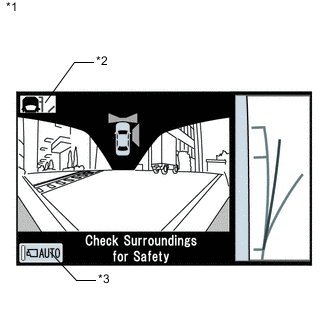
Text in Illustration *1 Wide View Front and Side Monitor Screen *2 Course guideline display change switch *3 Automatic display mode set/cancel switch
(Illustration shows automatic display mode off)
Screen display operation
-
After the display conditions are met when the wide view front and side monitor systems are normally functioning, if the screen is changed from the manual display mode or automatic display mode screen, the wide view front and side monitor screen (H4 mode) or wide view front monitor screen (L4 mode) is displayed as the initial screen.
Tech Tips
-
If the shift lever is not in R and the wide view front and side monitor screen is displayed, the course guideline display change switch and automatic display mode set/cancel switch are displayed and the following operations can be performed.
-
For the course guideline display change switch, refer to the following procedures Click here.
-
Automatic display mode set/cancel switch
Automatic mode display switch
(Indicator in the button)
Display mode ON
(Illuminated)
Automatic display mode OFF
(Not illuminated)
Manual display mode -
The last mode screen is the screen that was displayed last when the screen was changed to the multi-display (display panel), information setting screen, etc.
-
-
-
Display conditions for manual display mode
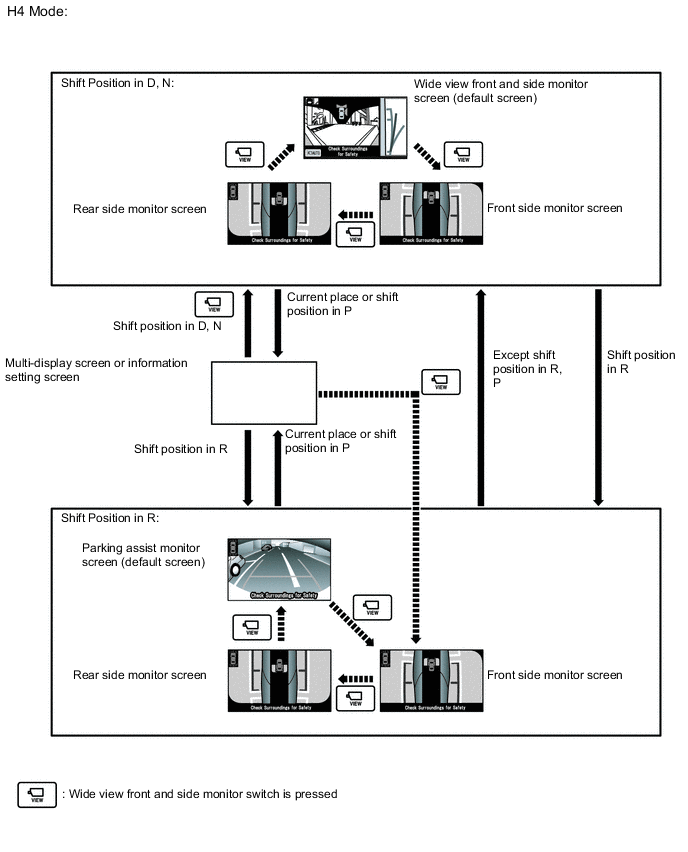
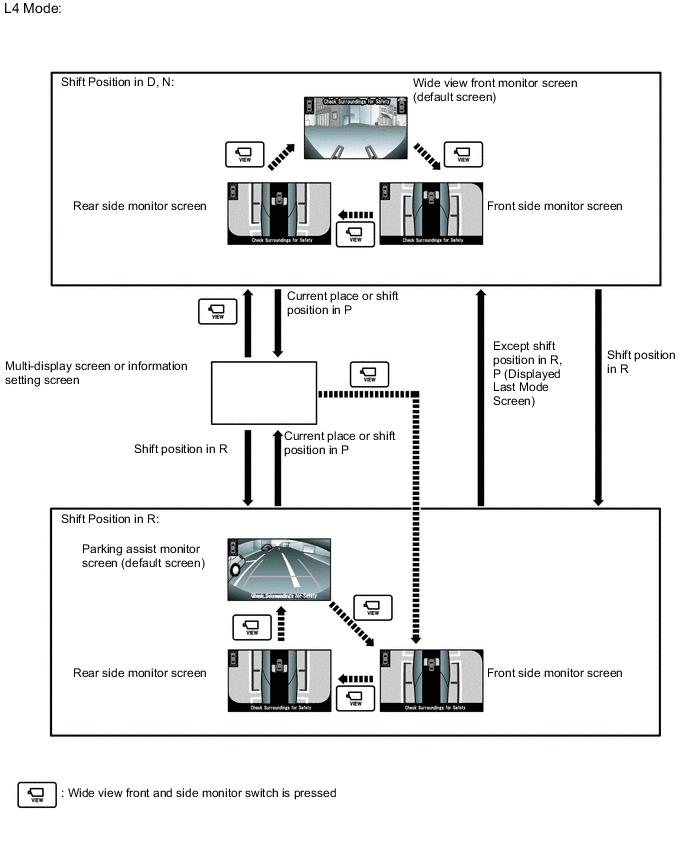
-
H4 mode:
During manual display mode (shift lever in a position other than R), during engine switch on (IG) or engine startup (no DTCs are output), if the following conditions have been met, pressing the wide view front and side monitor switch will change the display mode as follows
Automatic Mode Display Switch Multi-display Screen Shift Lever Vehicle Speed Screen
(changes due to wide view front and side monitor switch operation)
OFF Multi-display screen or information setting screen Other than R 12 km/h (7.5 mph) or less Multi-display screen or information setting screen → Wide view front and side monitor screen → Front side monitor screen → Rear side monitor screen → Wide view front and side monitor screen R position 0 km/h (0 mph) Multi-display screen or information setting screen → Parking assist monitor screen → Wide view front and side monitor screen → Front side monitor screen → Rear side monitor screen → Parking assist monitor screen -
L4 mode:
During manual display mode (shift lever in a position other than R), during engine switch on (IG) or engine startup (no DTCs are output), if the following conditions have been met, pressing the wide view front and side monitor switch will change the display mode as follows
Automatic Mode Display Switch Multi-display Screen Shift Lever Vehicle Speed Screen
(changes due to wide view front and side monitor switch operation)
OFF Multi-display screen or information setting screen Other than R 12 km/h (7.5 mph) or less Multi-display screen or information setting screen → Wide view front monitor screen → Front side monitor screen → Rear side monitor screen → Wide view front monitor screen R position 0 km/h (0 mph) Multi-display screen or information setting screen → Parking assist monitor screen → Wide view front and side monitor screen → Front side monitor screen → Rear side monitor screen → Parking assist monitor screen
-
-
Screen display timer function
-
During manual display mode (when the shift lever is not in R), when the wide view front and side monitor switch is pressed and the following conditions are met, the wide view front and side monitor screen is displayed for a certain period of time even when the vehicle speed is more than 12 km/h (7.5 mph).
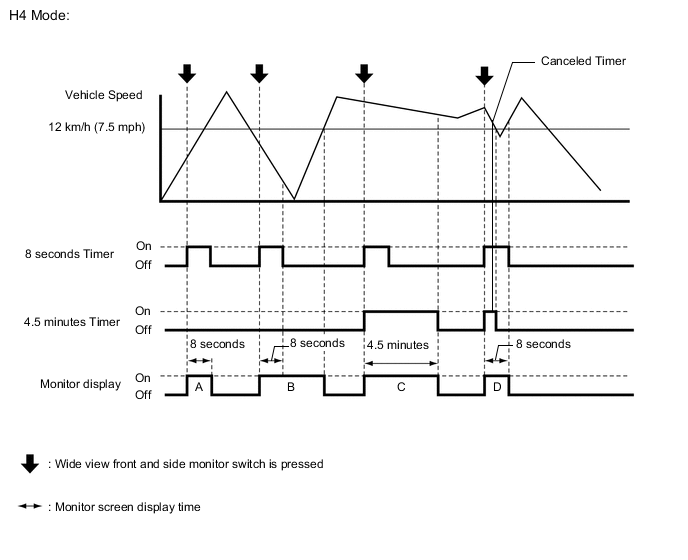
Screen Display Time Time when Wide View Front and Side Monitor Switch is Pressed Change in Vehicle Speed Timer Operation Time Note A
B
12 km/h (7.5 mph) or less 12 km/h (7.5 mph) or less 8 seconds When the wide view front and side monitor switch is pressed with the vehicle speed at 12 km/h (7.5 mph) or less, the camera screen is displayed for 8 seconds from the moment the switch is pressed. After this, if the vehicle speed increases to above 12 km/h (7.5 mph), the camera screen is not displayed. C More than 12 km/h (7.5 mph) More than 12 km/h (7.5 mph) 8 seconds or 4 minutes and 30 seconds When the wide view front and side monitor switch is pressed while the vehicle speed is more than 12 km/h (7.5 mph), the camera screen is displayed for 4 minutes and 30 seconds the moment the switch is pressed (when the vehicle speed is more than 12 km/h (7.5 mph) after 4 minutes and 30 seconds elapse from the time the switch is pressed). D More than 12 km/h (7.5 mph) More than 12 km/h (7.5 mph) → 12 km/h (7.5 mph) or less → More than 12 km/h (7.5 mph) 8 seconds or 4 minutes and 30 seconds When the wide view front and side monitor switch is pressed while the vehicle speed is more than 12 km/h (7.5 mph), the screen display timer operates and the camera screen is displayed. However, after the vehicle speed decreases to 12 km/h (7.5 mph) or less within 4 minutes and 30 seconds (after 8 seconds have elapsed), if the vehicle speed increases to more than 12 km/h (7.5 mph) again, the screen switches to the multi-display or information setting screen.
After the vehicle speed decreases to 12 km/h (7.5 mph) or less within 8 seconds, if the vehicle speed increases to more than 12 km/h (7.5 mph) again, the 4 minute 30 seconds timer is canceled and the camera screen is displayed for 8 seconds the moment the wide view front and side monitor switch is pressed.
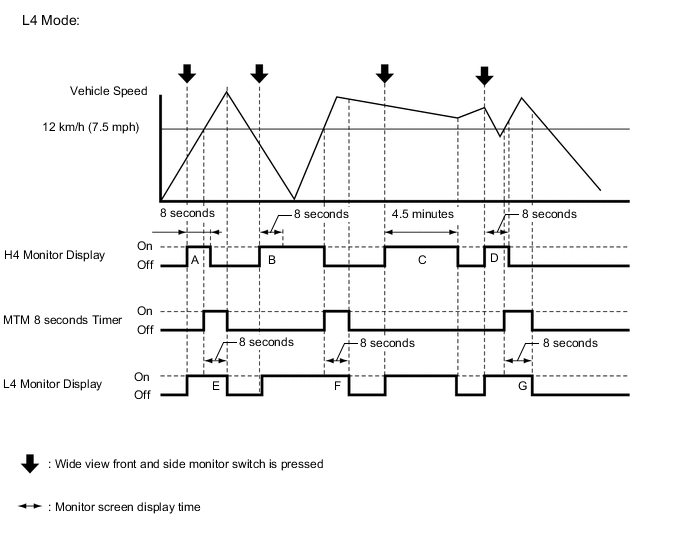
Screen Display Time Time when Wide View Front and Side Monitor Switch is Pressed Change in Vehicle Speed Timer Operation Time Note A
B
12 km/h (7.5 mph) or less 12 km/h (7.5 mph) or less 8 seconds When the wide view front and side monitor switch is pressed with the vehicle speed at 12 km/h (7.5 mph) or less, the camera screen is displayed for 8 seconds from the moment the switch is pressed. After this, if the vehicle speed increases to above 12 km/h (7.5 mph), the camera screen is not displayed. C More than 12 km/h (7.5 mph) More than 12 km/h (7.5 mph) 8 seconds or 4 minutes and 30 seconds When the wide view front and side monitor switch is pressed while the vehicle speed is more than 12 km/h (7.5 mph), the camera screen is displayed for 4 minutes and 30 seconds the moment the switch is pressed (when the vehicle speed is more than 12 km/h (7.5 mph) after 4 minutes and 30 seconds elapse from the time the switch is pressed). D More than 12 km/h (7.5 mph) More than 12 km/h (7.5 mph) → 12 km/h (7.5 mph) or less → More than 12 km/h (7.5 mph) 8 seconds or 4 minutes and 30 seconds When the wide view front and side monitor switch is pressed while the vehicle speed is more than 12 km/h (7.5 mph), the screen display timer operates and the camera screen is displayed. However, after the vehicle speed decreases to 12 km/h (7.5 mph) or less within 4 minutes and 30 seconds (after 8 seconds have elapsed), if the vehicle speed increases to more than 12 km/h (7.5 mph) again, the screen switches to the navigation or information setting screen.
After the vehicle speed decreases to 12 km/h (7.5 mph) or less within 8 seconds, if the vehicle speed increases to more than 12 km/h (7.5 mph) again, the 4 minute 30 second timer is canceled and the camera screen is displayed for 8 seconds the moment the wide view front and side monitor switch is pressed.
E
F
G
More than 12 km/h (7.5 mph) More than 12 km/h (7.5 mph) 8 seconds If the vehicle speed is more than 12 km/h (7.5 mph), the camera screen is displayed for 8 seconds. After that, the camera screen is not displayed. The timer is canceled the moment the vehicle speed decreases to below 12 km/h (7.5 mph) during the 8 second timer.
-
-
Display conditions for automatic display mode
-
In automatic display mode, the screen display is automatically displayed according to driving conditions when the following conditions are met and the wide view front and side monitor systems are normally operating.
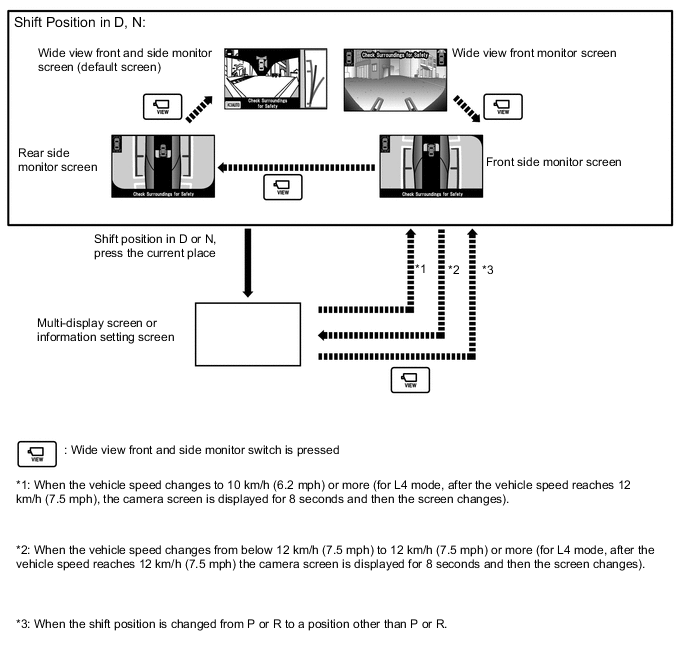
Vehicle Condition Multi-display Screen Shift Lever Vehicle Speed Display Screen Stopped → Driving Multi-display screen or information setting screen Not in P or R 12 km/h (7.5 mph) or less Multi-display screen or information setting screen → Wide view front monitor and side monitor screen* Driving → Stopped Not in P or R 10 km/h (6.2 mph) or less Multi-display screen or information setting screen → Wide view front monitor and side monitor screen*
-
*: The conditions to change the screen after the display screen changes automatically are the same as in manual display mode.
-
-
-
-
COMMUNICATION SYSTEM OUTLINE
-
The components of the wide view front monitor system communicate with each other through the AVC-LAN. If a short circuit or open circuit occurs in the AVC-LAN, communication is interrupted and the front monitor system will stop functioning.
-
-
DIAGNOSTIC FUNCTION OUTLINE
-
This wide view front monitor system has a diagnostic function displayed in the navigation receiver assembly*1 or radio and display receiver assembly*2. This function enables the calibration (adjustment and confirmation) of the system Click here.
-
The system can check the following items by using the GTS.
Item Proceed to DTC
-