REAR SEAT ENTERTAINMENT SYSTEM OPERATION CHECK
-
ENTER DIAGNOSTIC MODE
-
Enter diagnostic mode Click here.
-
-
REAR Check
Tech Tips
-
Use the remote control for each inspection.
-
This mode checks the color display on the television display assembly.
-
Illustrations may differ from the actual vehicle depending on the device settings and options. Therefore, some detailed areas may not be exactly the same as on the actual vehicle.
-
The television display assembly is not a touch panel type. Do not touch the screen.
-
Color Bar Check
-
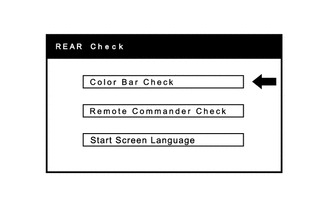
Select "Color Bar Check" from the "REAR Check" screen.
-
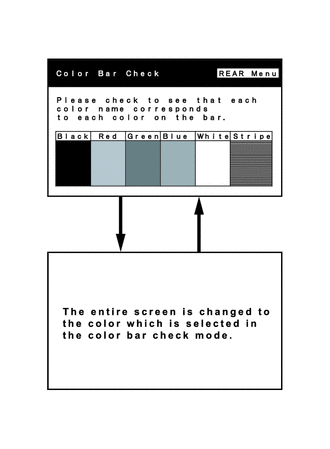
Select a color bar from the "Color Bar Check Mode" screen.
-
Check the display color.
Tech Tips
-
The entire screen turns to the color or stripe which is selected.
-
The screen returns to the "Color Bar Check" screen if the remote controller is operated again.
-
-
-
Remote Commander Check
-
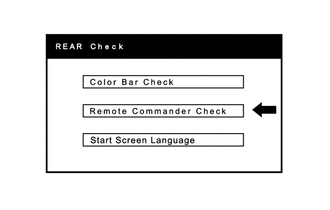
Select "Remote Commander Check" from the "REAR Check" screen.
-
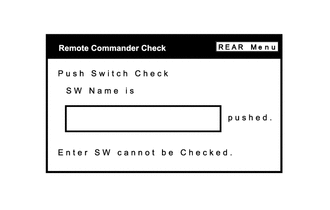
Operate each switch and check that the switch name and condition are correctly displayed.
-
-
Start Screen Language
-
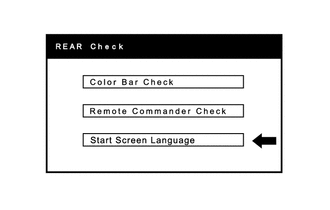
Select "Start Screen Language" from the "REAR Check" screen.
-
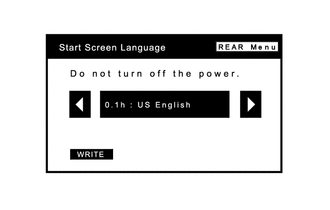
Select the screen language.
-
-