VEHICLE STABILITY CONTROL SYSTEM(for Hydraulic Brake Booster) Downhill Assist Control Indicator Light Remains ON
DESCRIPTION
When the downhill assist control switch is turned on, the downhill assist control function is available and the downhill assist control indicator light illuminates.
WIRING DIAGRAM
Refer to Downhill Assist Control Indicator Light does not Come ON Click here.
CAUTION / NOTICE / HINT
Note
When replacing the skid control ECU (master cylinder solenoid), perform calibration Click here.
PROCEDURE
-
CHECK CAN COMMUNICATION LINE
-
Turn the ignition switch off.
-
Connect the GTS to the DLC3.
-
Turn the ignition switch to ON.
-
Turn the GTS on.
-
Select CAN Bus Check from the System Selection Menu screen and follow the prompts on the screen to inspect the CAN bus.
w/ Central Gateway ECU: Click here
w/o Central Gateway ECU: Click here
OK CAN Bus Check indicates no malfunctions in CAN communication. Result Result Proceed to OK (w/ Combination Switch Assembly) A OK (w/o Combination Switch Assembly) B NG (w/ Central Gateway ECU) C NG (w/o Central Gateway ECU) D
B 
INSPECT DOWNHILL ASSIST CONTROL SWITCH Click here
C 
GO TO CAN COMMUNICATION SYSTEM (HOW TO PROCEED WITH TROUBLESHOOTING) Click here
D
GO TO CAN COMMUNICATION SYSTEM (HOW TO PROCEED WITH TROUBLESHOOTING) Click here
A 
-
-
INSPECT COMBINATION SWITCH ASSEMBLY
-
Remove the downhill assist control switch (combination switch assembly) Click here.
-
Text in Illustration *a Component without harness connected
(Downhill Assist Control Switch (Combination Switch Assembly))
Measure the resistance according to the value(s) in the table below.
Standard Resistance Tester Connection Switch Condition Specified Condition 2 - 5 Not pushed in 10 kΩ or higher Pushed in Below 1 Ω
OK
CHECK HARNESS AND CONNECTOR (SKID CONTROL ECU HZRI CIRCUIT) Click here
NG
REPLACE COMBINATION SWITCH ASSEMBLY Click here
-
-
INSPECT DOWNHILL ASSIST CONTROL SWITCH
-
Remove the downhill assist control switch Click here.
-
Text in Illustration *a Component without harness connected
(Downhill Assist Control Switch)
Measure the resistance according to the value(s) in the table below.
Standard Resistance Tester Connection Switch Condition Specified Condition 2 - 5 Not pushed in 10 kΩ or higher Pushed in Below 1 Ω
NG
REPLACE DOWNHILL ASSIST CONTROL SWITCH Click here
OK
-
-
CHECK HARNESS AND CONNECTOR (SKID CONTROL ECU HZRI CIRCUIT)
-
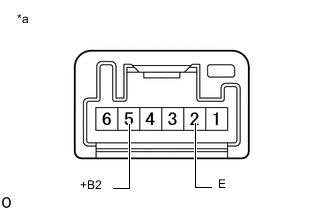
Disconnect the A7 skid control ECU (master cylinder solenoid) connector.
-
w/ Combination Switch Assembly:
Disconnect the G306 downhill assist control switch connector.
-
w/o Combination Switch Assembly:
Disconnect the G232 downhill assist control switch connector.
-
Measure the resistance according to the value(s) in the table below.
Standard Resistance w/ Combination Switch Assembly Tester Connection Condition Specified Condition A7-28 (HZRI) - G306-5 (+B2) Always Below 1 Ω A7-28 (HZRI) or G306-5 (+B2) - Body ground Always 10 kΩ or higher G306-2 (E) - Body ground Always Below 1 Ω w/o Combination Switch Assembly Tester Connection Condition Specified Condition A7-28 (HZRI) - G232-5 (+B2) Always Below 1 Ω A7-28 (HZRI) or G232-5 (+B2) - Body ground Always 10 kΩ or higher G232-2 (E) - Body ground Always Below 1 Ω
NG
REPAIR OR REPLACE HARNESS OR CONNECTOR
OK
-
-
PERFORM ACTIVE TEST USING GTS (DOWNHILL ASSIST CONTROL LIGHT)
-
Turn the ignition switch off.
-
Connect the GTS to the DLC3.
-
Turn the ignition switch to ON.
-
Turn the GTS on.
-
Enter the following menus: Chassis / ABS/VSC/TRC / Active Test.
ABS/VSC/TRC Tester Display Test Part Control Range Diagnostic Note Downhill Assist Control Light Downhill assist control indicator light Indicator light ON/OFF Observe the combination meter. -
When performing the Downhill Assist Control Light Active Test, check Downhill Assist Control Light in the Data List.
ABS/VSC/TRC Tester Display Measurement Item/Range Normal Condition Diagnostic Note Downhill Assist Control Light Downhill assist control indicator light/ ON or OFF ON: Indicator light on
OFF: Indicator light off
- Result Result Proceed to Data List Display Data List Display when Performing Active Test ON/OFF Operation ON Changes between ON and OFF A Does not change between ON and OFF (for LHD) B Does not change between ON and OFF (for RHD) C OFF Changes between ON and OFF A Does not change between ON and OFF (for LHD) B Does not change between ON and OFF (for RHD) C
A
GO TO METER / GAUGE SYSTEM (HOW TO PROCEED WITH TROUBLESHOOTING) Click here
B
REPLACE MASTER CYLINDER SOLENOID Click here
C
REPLACE MASTER CYLINDER SOLENOID Click here
-