KINETIC DYNAMIC SUSPENSION SYSTEM DTC CHECK / CLEAR
-
CHECK DTC (USING INTELLIGENT TESTER)
-
Check DTC.
-
Connect the intelligent tester to the DLC3.
-
Turn the ignition switch to ON and the intelligent tester on.
-
Enter the following menus: Chassis / KDSS / DTC.
-
Read DTCs by following the prompts on the intelligent tester screen.
Tech Tips
Refer to the intelligent tester operator's manual for further details.
-
-
Clear DTC.
Tech Tips
After repairing malfunctions, clear the DTCs.
-
Connect the intelligent tester to the DLC3
-
Turn the ignition switch to ON and the intelligent tester on.
-
Enter the following menus: Chassis / KDSS / DTC.
-
Clear the DTCs by following the prompts on the intelligent tester screen.
Tech Tips
Refer to the intelligent tester operator's manual for further details.
-
-
-
CHECK DTC (USING SST CHECK WIRE)
-
Check DTC.
-
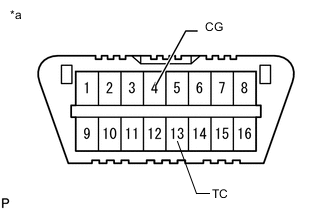
Text in Illustration *a Front view of DLC3 Using SST, connect terminals 13 (TC) and 4 (CG) of the DLC3.
- SST
- 09843-18040
Note
Do not connect the wrong terminals as this will cause damage.
-
Turn the ignition switch to ON.
-
Read the DTCs output from the KDSS indicator light in the combination meter.
Tech Tips
-
When only 1 DTC is stored, the KDSS indicator light outputs the same code after an interval of 4 seconds. Example: When DTC 31 is stored, the light blinks 3 times, turns off for 1.5 seconds, blinks once, turns off for 4 seconds, and then repeats this output pattern.
-
When 2 or more DTCs are stored, the KDSS indicator light outputs the codes with an interval of 2.5 seconds between each different code, and the output of all codes repeats after an interval of 4 seconds.
-
-
Refer to the Diagnostic Trouble Code Chart Click here for DTC information.
-
After completing the check, remove SST check wire from the DLC3.
- SST
- 09843-18040
-
-
Clear DTC.
-
Make sure that the ignition switch is off.
-
Text in Illustration *a Front view of DLC3 Using SST, connect terminals 13 (TC) and 4 (CG) of the DLC3.
- SST
- 09843-18040
Note
Do not connect the wrong terminals as this will cause damage.
-
Turn the ignition switch to ON.
-
Clear the DTCs stored in the ECU by depressing the brake pedal 8 times or more within 5 seconds.
-
Check that the KDSS indicator light blinks at intervals of 0.25 seconds on and 0.25 seconds off.
-
Turn the ignition switch off.
-
Remove SST from the terminals of the DLC3.
- SST
- 09843-18040
Note
After clearing the DTCs, check if the malfunction is detected again. As it is necessary to perform certain system operations or drive the vehicle in order to detect some malfunctions, check that malfunctions are no longer present after performing all necessary operations.
-
-