MILLIMETER WAVE RADAR SENSOR INSTALLATION

CAUTION / NOTICE / HINT
Note
-
If the millimeter wave radar sensor assembly has been struck or dropped, replace the millimeter wave radar sensor assembly with a new one.
-
When the front bumper assembly, radiator grille, millimeter wave radar sensor assembly or No. 1 millimeter wave radar sensor bracket is replaced, check that the position of the manual axis switching mechanism is within the standard value.
PROCEDURE
-
INSTALL MILLIMETER WAVE RADAR SENSOR ASSEMBLY
-
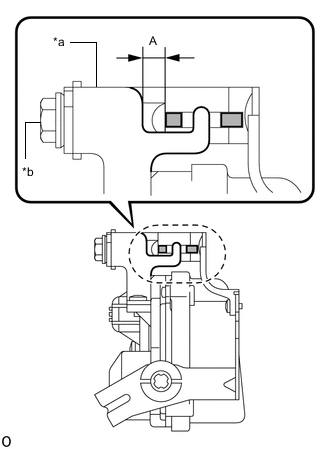
*a Manual axis switching mechanism *b Bolt Set beam axis to the standard position.
-
Turn the bolt so that the beam axis change mechanism is positioned as shown in the illustration.
Standard 3.0 to 5.0 mm (0.118 to 0.197 in.) as indicated by the dimensions shown in the illustration (A). - Torque:
- 1.5 N*m { 15 kgf*cm, 13 in.*lbf }
-
-
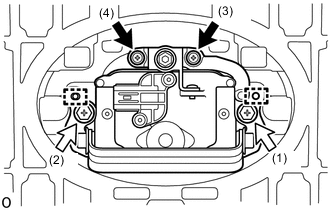

Screw 
Bolt Attach the 2 guides.
-
Temporarily install the millimeter wave radar sensor assembly with the 2 bolts and 2 screws.
-
Tighten the 2 bolts and 2 screws in the order shown in the illustration.
- Torque:
- Bolt
- 2.5 N*m { 25 kgf*cm, 22 in.*lbf }
-
-
INSTALL RADIATOR GRILLE
-
ADJUST MILLIMETER WAVE RADAR SENSOR ASSEMBLY
-
When the millimeter wave radar sensor assembly is replaced, or the No. 1 millimeter wave radar sensor bracket is removed/installed, adjust the millimeter wave radar sensor assembly.
-