ENTRY AND START SYSTEM(for Entry Function) SYSTEM DESCRIPTION
-
MULTI CHANNEL FUNCTION
-
The electrical key transmitter sub-assembly and door control receiver can operate on two different RF channels. When an electrical key transmitter sub-assembly is brought within an exterior detection area, key verification begins. If key verification fails due to wave interference, the channel will be switched and key verification will be performed again.
The multi channel system begins verification using the channel on which the last verification was successfully performed. When verification fails, the system switches to the other channel.
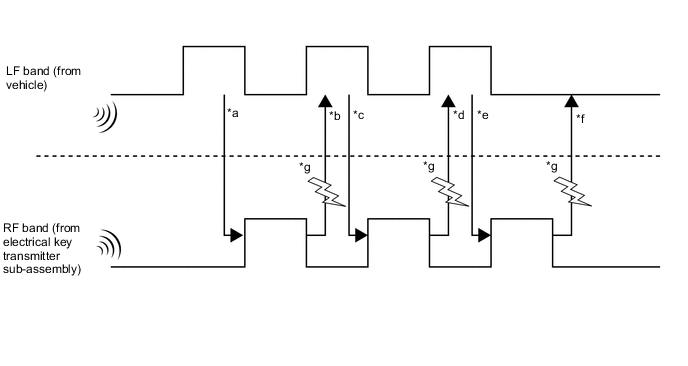
*a Exterior detection areas are created using LF waves (emitted from the vehicle at intervals of 0.25 seconds) to receive a response from the electrical key transmitter sub-assembly. *b When the electrical key transmitter sub-assembly is brought into an exterior detection area, it receives LF waves from the vehicle. Using RF waves, the electrical key transmitter sub-assembly responds to the vehicle. *c Upon receiving the response from the electrical key transmitter sub-assembly, the certification ECU (smart key ECU assembly) activates the electrical key antennas (outside) one by one. Using LF waves, the certification ECU (smart key ECU assembly) determines which exterior detection area the electrical key transmitter sub-assembly is in. *d The electrical key transmitter sub-assembly receives the LF waves from the vehicle and responds using RF waves. (The certification ECU (smart key ECU assembly) recognizes which exterior detection area the electrical key transmitter sub-assembly is in.) *e The certification ECU (smart key ECU assembly) sends registered key ID information to the electrical key transmitter sub-assembly using LF waves. (Up to 7 key IDs can be registered.) *f The electrical key transmitter sub-assembly sends the key ID information using RF waves. When the certification ECU (smart key ECU assembly) receives it, verification completes. *g Wave interference (Channel switching) - - The multi channel system changes the channels when the RF band (*b, *d and *f) is interrupted by wave interference. Refer to the table below to confirm when the system changes the channels.
*b or *d is NG *f is NG Condition RF waves cannot be received RF waves cannot be received properly RF waves cannot be received RF waves cannot be received properly Channel switching The channels will not be switched. The channels will be switched. The channels will not be switched. The channels will be switched*.
-
*: The channels are not switched during vehicle interior verification after an entry lock operation is performed.
-
-
-
BASIC PRECAUTIONS
-
DTC numbers and ECU Data Lists of the entry and start system can be checked using the GTS.
-
Check for DTCs using the following procedure. If any DTCs are output, diagnose those DTCs first.
-
Connect the GTS to the DLC3.
-
Turn the engine switch on (IG).
-
Enter the following menus: Body Electrical / Entry&Start, Power Source Control or Starting Control / Trouble Codes.
-
-
When using the GTS with the engine switch off, connect the GTS to the DLC3 and turn a courtesy light switch on and off at intervals of 1.5 seconds or less until communication between the GTS and the vehicle begins. Then select Model Code "KEY REGIST" under manual mode and enter the following menus: Body Electrical / Entry&Start(CAN). While using the GTS, periodically turn a courtesy light switch on and off at intervals of 1.5 seconds or less to maintain communication between the GTS and the vehicle.
-
If cancel is selected for the entry and start system customize setting, cancel the smart key cancel setting.
-
-
DIAGRAM OF ENTRY AND START SYSTEM
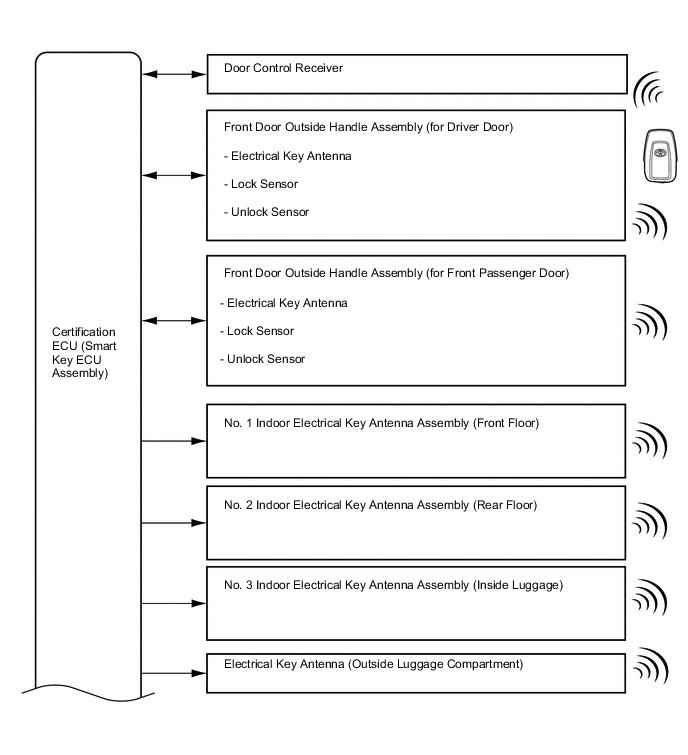
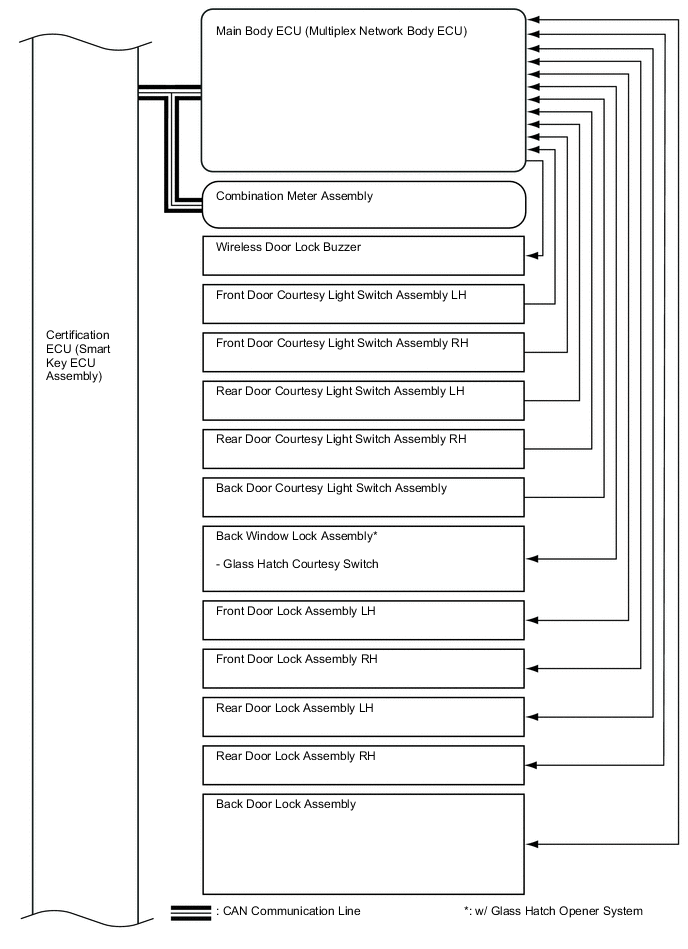
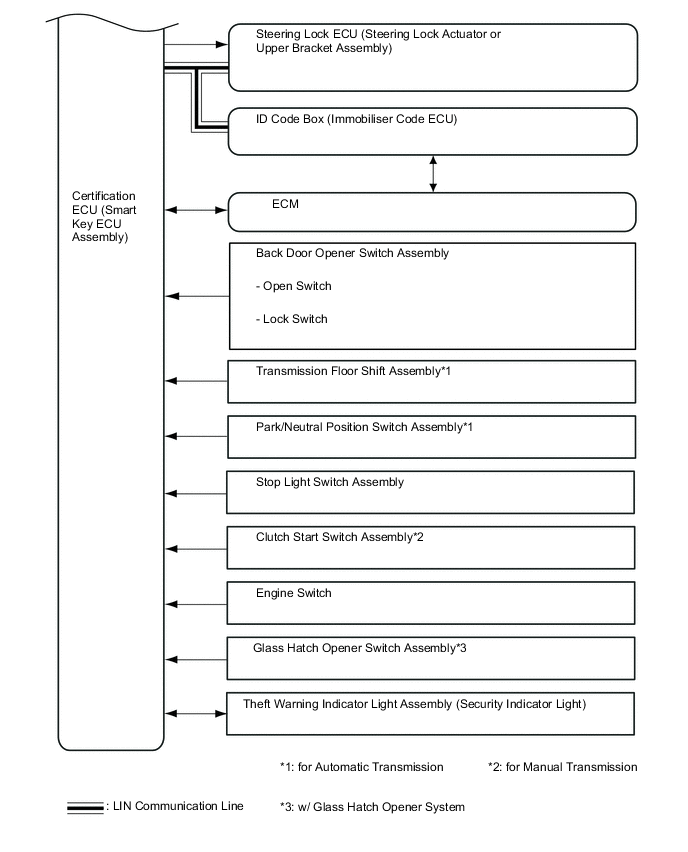
-
SYSTEM DESCRIPTION
The following pattern will be used: "Operation" indicates user operation using the entry and start system. "Expected operation of the vehicle" indicates how a known good vehicle will react in accordance with each operation. "Suspected Area/Diagnosis" indicates suspected malfunctioning areas and tips for each diagnosis if the vehicle did not react as expected.
-
Example: Operation No.
Operation - Expected operation of the vehicle - Waveform or Output Value - Suspected Area Diagnosis - -
-
-
DIAGNOSIS IN ACCORDANCE WITH USER OPERATION
-
Operation 1
Operation Turn the engine switch off and lock all the doors, then take the electrical key transmitter sub-assembly approximately 3 m (9.84 ft.) or more away from the vehicle.
Tech Tips
The detection area of each electrical key antenna (outside) is formed by emitting a periodic LF band request signal every 0.25 seconds. The detection area formed by each front door outside handle assembly (electrical key antenna) has a detection range of approximately 0.7 m (2.30 ft.).
Waveform or Output Value Pulse generation (G215-4 (CLG1) - G215-11 (E)*)
-
*: Click here
-
-
Operation 2
Operation Bring the electrical key transmitter sub-assembly within 0.7 m (2.30 ft.) of the driver door.
Tech Tips
The system is in unlock standby mode when the electrical key transmitter sub-assembly is in the detection area and the key ID code sent by the electrical key transmitter sub-assembly matches the key ID code stored by the certification ECU (smart key ECU assembly). The door unlocks if the unlock sensor is touched by hand with the system in unlock standby mode.
Signal transmission: Certification ECU (smart key ECU assembly) → Door outside handle assembly (electrical key antenna) → Electrical key transmitter sub-assembly → Door control receiver → Certification ECU (smart key ECU assembly) → Main body ECU (multiplex network body ECU)
Expected operation of the vehicle The electrical key transmitter sub-assembly LED starts blinking. If it does not, check the suspected areas in the following table. Waveform or Output Value
-
Pulse generation (G215-4 (CLG1) - G215-11 (E)*)
-
Pulse generation (G214-18 (RCO) - G215-11 (E)*)
-
Pulse generation (G214-20 (RDAM) - G215-11 (E)*)
-
Pulse generation (G214-19 (CSEL) - G215-11 (E)*)
-
*: Click here
Suspected Area Diagnosis Electrical key transmitter sub-assembly
-
The key ID code sent by the electrical key transmitter sub-assembly does not match the key ID code stored in the certification ECU (smart key ECU assembly). Use another electrical key transmitter sub-assembly to check the operation.
-
If the LED of the electrical key transmitter sub-assembly does not blink when it is brought within 0.7 m (2.30 ft.) of the driver door, perform the following procedure.
Press the lock and unlock switches of the electrical key transmitter sub-assembly to check the operation. If the doors can be locked and unlocked, that means the detection area has not been formed. Parts other than the electrical key transmitter sub-assemblies and front door outside handle assemblies may be malfunctioning.
-
If the electrical key transmitter sub-assembly malfunctions, the engine cannot be started and the engine switch cannot be turned on (ACC or IG). Under normal operation, entry warning light is displayed in the combination meter assembly when the engine switch is pressed with the electrical key transmitter sub-assembly in the driver seat area, the shift lever in P*1 and the brake pedal*1 or clutch pedal*2 released. If the door cannot be opened, use the mechanical key installed in the electrical key transmitter sub-assembly to open the door.
Tech Tips
-
Before replacing the electrical key transmitter sub-assembly, check if the transmitter battery is depleted.
-
If the door cannot be opened, use the mechanical key installed in the electrical key transmitter sub-assembly to open the door.
Transmitter battery is depleted
-
Press and hold the lock switch of the electrical key transmitter sub-assembly for 5 seconds and check the number of times that the transmitter LED blinks. If the transmitter LED does not blink or blinks only once or twice, the transmitter battery may be depleted. If the transmitter LED does not blink at all, the electrical key transmitter sub-assembly may be malfunctioning.
-
If the transmitter battery voltage at the time the electrical key transmitter sub-assembly sends a signal drops to 2.2 V or less, "Yes" is displayed for "Key Low Battery" in the Data List.
-
If the transmitter battery voltage drops to 2.0 V or lower, operation cannot be assured.
Tech Tips
The output of the electrical key transmitter sub-assembly will decrease if it is in low temperatures.
-
When the transmitter battery is depleted, the engine cannot be started and the engine switch cannot be turned on (ACC or IG). If the electrical key transmitter sub-assembly is held near the engine switch, the engine can be started.
-
Make sure that the transmitter battery type and installation direction are correct.
Wave Interference
-
If the problem occurs in certain locations or times of day, the possibility of wave interference is high.
-
When the electrical key transmitter sub-assembly is malfunctioning, the transmitter battery is depleted, an electrical key transmitter sub-assembly from another vehicle has been used or wave interference is suspected. "Yes" may be displayed for any of the following Data List items: "Unmatch Code or Form", "No Response", "ID Code Difference" or "Unmatched Vehicle-ID"
Certification ECU (smart key ECU assembly) - Main body ECU (multiplex network body ECU) - Front door outside handle assembly Vehicle exterior detection area is not formed properly.
-
If the electrical key transmitter sub-assembly LED does not blink within 0.7 m (2.30 ft.) of the front door outside handle assembly of the driver door, but blinks within 0.7 m (2.30 ft.) of the front passenger door, the front door outside handle assembly of the driver door may be malfunctioning.
-
Even if the vehicle exterior detection area is not formed properly, the engine switch can be turned on (ACC) and the engine can be started.
-
Formation of the vehicle exterior detection area can be confirmed by using the GTS.
-
Even if the vehicle exterior detection area is not formed properly, the doors can be unlocked by pressing the unlock switch of the electrical key transmitter sub-assembly.
Door Control Receiver
-
If the door control receiver is malfunctioning, it is not possible to unlock the door by a keyless entry operation.
-
If the door control receiver is malfunctioning, it is not possible to unlock the doors by a wireless unlock operation.
-
If the door control receiver is malfunctioning, the engine cannot be started and the engine switch cannot be turned on (ACC or IG) unless in an emergency.
-
Formation of the vehicle exterior detection area can be confirmed by using the GTS.
Battery is discharged It may be possible to tell whether the battery is discharged by operating the horn. Others
-
If the entry and start system function has been canceled through the customize function, the detection area cannot be formed, therefore the electrical key transmitter sub-assembly LED will not blink even if the electrical key transmitter sub-assembly is brought near a front door outside handle assembly.
-
In the entry and start system, if the electrical key transmitter sub-assembly is constantly in the exterior detection area of one of the doors, the transmitter battery could be drained. For this reason, if this state continues for longer than 10 minutes, the entry and start system automatically deactivates the exterior detection area that the electrical key transmitter sub-assembly is in.
-
If the electrical key transmitter sub-assembly is in transmitter battery saving mode, even if it receives LF waves from the vehicle, it does not respond using RF waves, therefore the electrical key transmitter sub-assembly LED does not blink.
-
If the electrical key transmitter sub-assembly is left in the vehicle and the doors are locked using another electrical key transmitter sub-assembly, the electrical key transmitter sub-assembly LED will not blink even if it is brought near a front door outside handle assembly.
-
*1: for Automatic Transmission
-
*2: for Manual Transmission
-
-
Operation 3
Operation Touch the unlock sensor of the driver door with the electrical key transmitter sub-assembly in the exterior detection area. Expected operation of the vehicle While the doors are unlocked, the answer-back is performed at the same time. If they do not, check the suspected areas in the following table. Waveform or Output Value
-
Pulse generation (G215-4 (CLG1) - G215-11 (E)*)
-
Tester connection (driver side junction block assembly (ACT-) - body ground)*
-
*: Click here
Suspected Area Diagnosis The suspected parts below overlap with the parts covered in operation 2 for when the electrical key transmitter sub-assembly LED does not blink. - Front door outside handle assembly (unlock sensor)
-
If the doors can be unlocked by touching the unlock sensor of the front passenger door while carrying the electrical key transmitter sub-assembly, the unlock sensor of the driver door may be malfunctioning.
-
Under normal operation, "ON" is displayed for the Data List item "D-Door Touch Sensor" when the unlock sensor is touched.
Door lock/unlock mechanism If a door cannot be locked/unlocked by operating the door control switch on the door in the cabin, the door lock mechanism is malfunctioning. -
-
Operation 4
Operation After getting into the vehicle while carrying the electrical key transmitter sub-assembly, close the door and press the engine switch once with the shift lever in P*1 while not depressing the brake pedal*1 or clutch pedal*2. Expected operation of the vehicle
-
The blinking security indicator light goes off, and then the set immobiliser function cancels, allowing the vehicle to be driven.
-
The steering is unlocked.
If any of the preceding did not happen, check the suspected areas in the following table.
Tech Tips
When the engine switch is pressed, the indoor electrical key antenna forms a key detection area inside the vehicle and detects the electrical key transmitter sub-assembly in the cabin. The electrical key transmitter sub-assembly sends a key ID code upon receiving a request signal and the electrical key transmitter sub-assembly LED illuminates for a short time. After pressing the engine switch, if the key ID code sent by the electrical key transmitter sub-assembly matches the key ID code stored by the certification ECU (smart key ECU assembly), the ACC relay turns on and entry warning light is displayed in the combination meter assembly. After the power source mode has changed, and L code and S code verification has been completed, the steering will be unlocked and the immobiliser will be inactive. The Data List status of "Immobiliser" will then be changed from "Set" to "Unset".
Signal transmission: Certification ECU (smart key ECU assembly) → Indoor electrical key antenna → Electrical key transmitter sub-assembly → Door control receiver → Certification ECU (smart key ECU assembly)
Tech Tips
The interior detection area is formed when any of the following conditions are met:
-
Door is opened.
-
Within approximately 30 seconds after any of the doors have been opened and closed.
-
The brake pedal*1 or clutch pedal*2 is depressed.
-
Within approximately 30 seconds after the brake pedal*1 or clutch pedal*2 has been depressed.
-
Right after the engine switch is pressed.
Waveform or Output Value
-
Pulse generation (G214-20 (RDAM) - G215-11 (E)*3)
-
Pulse generation (G215-21 (CLG5) - G215-11 (E)*3)
-
Pulse generation (G213-3 (IG1D) - G215-11 (E)*3)
-
*1: for Automatic Transmission
-
*2: for Manual Transmission
-
*3: Click here
Suspected Area Diagnosis Certification ECU (smart key ECU assembly) - Wave Interference
-
If malfunctions occur at a specific location/time, wave interference may be the cause.
-
If wave interference is suspected in the cabin, disconnect all the connectors of electronic devices besides standard equipment, or remove the electronic devices and check for noise.
Indoor electrical key antenna assemblies that form the interior detection areas
-
If the interior detection areas are not formed properly, the engine cannot be started and the engine switch cannot be turned on (ACC or IG). If the electrical key transmitter sub-assembly is held near the engine switch in an emergency, the engine can be started.
-
Using the GTS, enter key diagnostic mode to forcibly form the interior detection area. If the electrical key transmitter sub-assembly is brought near the area, short beeps sound.
Engine switch Under normal operation, after the engine switch is pressed, "ON" is displayed for the Data List items "Start Switch1" and "Start Switch2". ID code box (immobiliser code ECU) In order to unlock the steering, it is necessary for "S Code Check" in the Data List to display "OK". If "S Code Check" displays "OK", the certification ECU (smart key ECU assembly) code and ID code box (immobiliser code ECU) code match. Park/neutral position switch assembly* Under normal conditions, "Neutral SW/ Clutch SW" in the Data List displays "ON" when the shift lever is moved to P. Steering lock ECU (steering lock actuator or upper bracket assembly)
-
If "OK" is displayed for the Data List item "L Code Check" when the engine switch is turned on (ACC), power will be supplied to the steering motor for approximately 10 seconds. Then the ECU sends an unlock signal to the steering motor and the Data List item "Unlock Request Receive" temporarily changes from "NG" to "OK". After the steering unlocks, the ECU receives the unlocked signal from the steering motor and the Data List item "Steering Unlock" changes from "Unset" to "Set".
-
In order to unlock the steering, it is necessary that "OK" is displayed for the Data List item "L Code Check" (the ID code stored in the steering lock ECU (steering lock actuator or upper bracket assembly) matches that of the ID code box (immobiliser code ECU))
-
*: for Automatic Transmission
-
-
Operation 5
Operation Depress the brake pedal*1 or clutch pedal*2 with the shift lever in P*1 while carrying an electrical key transmitter sub-assembly. Expected operation of the vehicle The entry warning light appears in the combination meter assembly. If it does not, check the suspected areas in the following table.
-
*1: for Automatic Transmission
-
*2: for Manual Transmission
Suspected Area Diagnosis Stop light switch assembly*1 If the brake pedal is depressed, "ON" is displayed for the Data List item "Stop Light Switch1". Clutch start switch assembly*2 If the clutch pedal is depressed, "ON" is displayed for the Data List item "Neutral SW/ Clutch SW". Certification ECU (smart key ECU assembly) Start function-Terminals of ECU
-
*1: for Automatic Transmission
-
*2: for Manual Transmission
-
-
Operation 6
Operation After getting into the vehicle while carrying the electrical key transmitter sub-assembly, press the engine switch with the shift lever in P*1 while depressing the brake pedal*1 or clutch pedal*2. Expected operation of the vehicle The engine starts. If it does not, check the suspected areas in the following table.
-
*1: for Automatic Transmission
-
*2: for Manual Transmission
Suspected Area Diagnosis Steering lock system Under normal operation, the steering will be unlocked and "ON" is displayed for the Data List item "Steering Unlock Switch". Battery is discharged Whether the battery is discharged or not can be checked easily by operating the horn. -
-
Operation 7
Operation Press the engine switch. Expected operation of the vehicle The engine stops, the entry warning light illuminates and then goes off and the security indicator light changes from off to blinking. -
Operation 8
Operation Open any of the doors with the engine switch off. Expected operation of the vehicle The steering locks. If it does not, check the suspected areas in the following table. Suspected Area Diagnosis Steering lock system - Door courtesy light switch assembly When the driver door is opened, "ON" is displayed for the Data List item "FL Door Courtesy SW". (for LHD)
When the driver door is opened, "ON" is displayed for the Data List item "FR Door Courtesy SW". (for RHD)
-
Operation 9
Operation Touch the lock sensor of the driver door outside handle while carrying the electrical key transmitter sub-assembly. Expected operation of the vehicle Answer-back is performed at the same time when the doors are locked.
-
-
BATTERY SAVING FUNCTION
-
When the entry and start system is operating, the vehicle performs key detection operations every 0.25 seconds. Therefore, if the vehicle is left as is for a long period of time, the battery may become fully discharged. The following controls help reduce the rate at which the battery is discharged.
-
If the entry and start system is not operated for 5 days or more, periodic signal transmission from the electrical key antennas stops. However, the doors can still be unlocked by touching the unlock sensor of a front door outside handle assembly.
-
If the entry and start system is not operated for 14 days or more, the lock and unlock sensors of the front passenger door outside handle assembly are disabled. Therefore, only the unlock sensor of the front door outside handle assembly of the driver door can be used to unlock the doors.
-
If 10 minutes or more elapse while the electrical key transmitter sub-assembly is in an exterior detection area, the front door outside handle assembly (electrical key antenna) detecting the electrical key transmitter sub-assembly will stop operating.
-
-
To restore operation of the entry and start system, perform any of the following operations.
-
While carrying the electrical key transmitter sub-assembly, touch the lock or unlock sensor of the front door outside handle assembly of the driver side door and perform a door lock or unlock operation.
-
Lock or unlock the doors with the wireless operation.
-
Insert the mechanical key into the door key cylinder of the driver door and lock or unlock the doors.
-
-
-
WIRELESS BUZZER VOLUME ADJUSTMENT FUNCTION (w/ Wireless Door Lock Buzzer Answer-back Function)
-
The volume of the wireless buzzer can be changed through the customize function.
Tech Tips
The volume of the following wireless buzzer operations cannot be adjusted.
-
Warning function buzzer operations
-
Customize function buzzer operations
-
Buzzer operations for key diagnostic mode using the GTS
-
Key registration buzzer operations
-
-
-
WARNING FUNCTION
-
Warning Function
-
When any of the situations below occur, the entry and start system sounds the wireless door lock buzzer, a buzzer in the combination meter assembly, displays a message on the multi-information display*1 and blinks an entry warning indicator*2 in order to alert the driver.
-
*1: w/ Multi-information Display (TFT Display Type)
*2: w/ Multi-information Display (Segment Display Type)
Situation Condition A* The shift lever is in a position other than P and the engine is left running when the driver gets out of the vehicle. B The shift lever is in P* and the engine is left running when the driver gets out of the vehicle. C The engine is left running when a passenger gets out of the vehicle while holding the key. D The key is not within the detection areas. E The vehicle is driven without a key. F The key is left in the vehicle. G A door is ajar. H The key reminder sounds. I The key battery is weak. J Steering lock does not release. K A malfunction has been detected in a vehicle speed signal, etc. L The engine cannot be started. M Immobiliser system certification confirmation occurs. N Engine start operation guide (ACC) O Engine start operation guide (IG ON) P* The engine switch cannot be turned off (shift lever in any position except P). Q* The engine switch cannot be turned off (shift lever in P). R Auto power off operation occurs. S Engine emergency stop operation is performed. T Engine switch is operated while driving. U Engine switch is operated while driving. V Accessory state W Ignition switch ON state *: for Automatic Transmission
-
Situation A (for Automatic Transmission)
-
There are 2 patterns for situation A.
-
Pattern 1:
When the shift lever is in a position other than P, the driver opens the door and attempts to get out of the vehicle. In this situation, the following control is performed:
Possible Effects without Warning Sudden vehicle movement, Vehicle theft, Vehicle roll-away (Vehicle creep, such as when N is selected) Warning Active Condition The warning is activated when all of the following conditions are met:
-
The engine switch is on (ACC) or on (IG).
-
The shift lever is in any position except P.
-
The driver door is opened.
-
The vehicle speed is not detected.
Warning Method Combination Meter Assembly Buzzer Sounds continuously Multi-information Display*1 The following warning message is displayed:
-
SHIFT TO P POSITION WHEN PARKED
Entry Warning Indicator*2 - Wireless Door Lock Buzzer - Warning Stop Condition The warning is stopped when one of the following conditions is met:
-
The engine switch is turned off.
-
The shift lever is moved to P.
-
The driver door is closed.
-
The vehicle speed is above 5 km/h (3 mph).
*1: w/ Multi-information Display (TFT Display Type)
*2: w/ Multi-information Display (Segment Display Type)
-
-
Pattern 2:
Under the situation of pattern 1, the driver closes the door and attempts to leave the vehicle while holding the key. In this situation, the following control is performed:
Possible Effects without Warning Sudden vehicle movement, Vehicle theft, Vehicle roll-away (Vehicle creep, such as when N is selected) Warning Active Condition The warning is activated when all of the following conditions are met:
-
The engine switch is on (ACC) or on (IG).
-
The shift lever is in any position except P.
-
The driver door is opened → closed.
-
The key is not detected in the vehicle (interior key certification fails).
-
The vehicle speed is not detected.
Warning Method Combination Meter Assembly Buzzer Sounds continuously Multi-information Display*1 The following warning messages are displayed:
-
SHIFT TO P POSITION WHEN PARKED
-
KEY NOT DETECTED CHECK KEY POSITION
Entry Warning Indicator*2 Blinks in Yellow Wireless Door Lock Buzzer Sounds continuously Buzzer and Wireless Door Lock Buzzer Warning Stop Condition The warning is stopped when one of the following conditions is met:
-
The engine switch is turned off.
-
The shift lever is moved to P.
-
The vehicle speed is above 5 km/h (3 mph).
-
The key is detected in the vehicle (interior key certification result is OK).
"Shift to P position when parked" Message Warning Stop Condition The warning is stopped when either of the following conditions is met:
-
The shift lever is moved to P.
-
The vehicle speed is above 5 km/h (3 mph).
"KEY NOT DETECTED CHECK KEY POSITION" Message Warning Stop Condition*1 The warning is stopped when either of the following conditions is met:
-
The engine switch is turned off.
-
The key is detected in the vehicle (interior key certification result is OK).
Entry Warning Indicator Warning Stop Condition*2 *1: w/ Multi-information Display (TFT Display Type)
*2: w/ Multi-information Display (Segment Display Type)
-
-
Situation B
-
There are 3 patterns for situation B.
-
Pattern 1:
When the shift lever is in P*1 and the engine switch is in a mode other than off (the steering remains unlocked), the driver door is opened and the driver attempts to leave the vehicle. In this situation, the following control is performed:
Possible Effects without Warning Vehicle theft Warning Active Condition Condition 1
The warning is activated when both of the following conditions are met:
-
The engine switch is on (ACC).
-
The driver door is open.
Condition 2
The warning is activated when all of the following conditions are met for 1 second:
-
The engine switch is turned off.
-
The steering lock remains unlocked.
-
The driver door is open.
Warning Method Combination Meter Assembly Buzzer Sounds continuously at short and even intervals Multi-information Display*2 - Entry Warning Indicator*3 - Wireless Door Lock Buzzer - Warning Stop Condition The warning is stopped when one of the following conditions is met:
-
The engine switch is turned on (IG).
-
The driver door is closed.
-
The engine switch is turned off and the steering wheel lock control is performed.
*1: for Automatic Transmission
*2: w/ Multi-information Display (TFT Display Type)
*3: w/ Multi-information Display (Segment Display Type)
-
-
Pattern 2:
Under the situation of pattern 1, the driver opens and closes the driver door and attempts to leave the vehicle while holding the key. In this situation, the following control is performed:
Possible Effects without Warning Vehicle theft Warning Active Condition The warning is activated when all of the following conditions are met:
-
The engine switch is on (ACC) or on (IG).
-
The shift lever is in P.*1
-
The driver door is opened → closed.
-
The key is not detected in the vehicle (interior key certification fails).
-
The vehicle speed is not detected.
Warning Method Combination Meter Assembly Buzzer Sounds once Multi-information Display*2 The following warning message is displayed:
-
KEY NOT DETECTED CHECK KEY POSITION
Entry Warning Indicator*3 Blinks in Yellow Wireless Door Lock Buzzer Sounds 3 times Warning Stop Condition The warning is stopped when either of the following conditions is met:
-
The engine switch is turned off.
-
The key is detected in the vehicle (interior key certification result is OK).
*1: for Automatic Transmission
*2: w/ Multi-information Display (TFT Display Type)
*3: w/ Multi-information Display (Segment Display Type)
-
-
Pattern 3:
Under the situation of pattern 2, the driver touches the lock sensor on the door outside handle. In this situation, the following control is performed:
Possible Effects without Warning Vehicle theft Warning Active Condition The warning is activated when all of the following conditions are met:
-
The engine switch is on (ACC) or on (IG).
-
The shift lever is in P.*1
-
The key is not detected in the vehicle (interior key certification fails), but detected in an outside detection area (exterior key certification result is OK).
-
The lock sensor on the outside door handle is on (touched) or the unlock switch of the back door is on (pressed).
-
The vehicle speed is not detected.
Warning Method Combination Meter Assembly Buzzer Sounds once Multi-information Display*2 The following warning messages are displayed:
-
TURN POWER OFF
-
KEY NOT DETECTED CHECK KEY POSITION
Entry Warning Indicator*3 Blinks in Yellow Wireless Door Lock Buzzer Sounds continuously Wireless Door Lock Buzzer Warning Stop Condition The warning is stopped when one of the following conditions is met:
-
5 seconds elapse.
-
The engine switch is turned off.
-
The shift lever is moved to any position except P.*1
-
The vehicle speed is above 5 km/h (3 mph).
-
The key is detected in the vehicle (interior key certification result is OK).
-
Any door is opened or closed.
"TURN POWER OFF" Message Warning Stop Condition The warning is stopped when one of the following conditions is met:
-
60 seconds elapse.
-
The engine switch is turned off.
-
The shift lever is moved to any position except P.*1
-
The vehicle speed is above 5 km/h (3 mph).
"KEY NOT DETECTED CHECK KEY POSITION" Message Warning Stop Condition*2 The warning is stopped when either of the following conditions is met:
-
The engine switch is turned off.
-
The key is detected in the vehicle (interior key certification result is OK).
Entry Warning Indicator Warning Stop Condition*3 *1: for Automatic Transmission
*2: w/ Multi-information Display (TFT Display Type)
*3: w/ Multi-information Display (Segment Display Type)
-
-
Situation C
-
When the engine is left running, a passenger leaves the vehicle while holding the key. In this situation, the following control is performed:
Possible Effects without Warning Engine cannot be restarted. Warning Active Condition The warning is activated when all of the following conditions are met:
-
The engine switch is on (ACC) or on (IG).
-
A door other than the driver door is opened → closed.
-
The key is not detected in the vehicle (interior key certification fails).
-
The vehicle speed is not detected.
Warning Method Combination Meter Assembly Buzzer Sounds once Multi-information Display*1 The following warning message is displayed:
-
KEY NOT DETECTED CHECK KEY POSITION
Entry Warning Indicator*2 Blinks in Yellow Wireless Door Lock Buzzer Sounds 3 times Warning Stop Condition The warning is stopped when either of the following conditions is met:
-
The engine switch is turned off.
-
The key is detected in the vehicle (interior key certification result is OK).
*1: w/ Multi-information Display (TFT Display Type)
*2: w/ Multi-information Display (Segment Display Type)
-
-
Situation D
-
When the key is not in the vehicle, the driver attempts to turn the engine switch on (IG) (emergency key operation* is included). In this situation, the following control is performed:
Tech Tips
*: Emergency key operation is an operation that changes the power source by touching the engine switch with the key.
Possible Effects without Warning User becomes confused Warning Active Condition The warning is activated when all of the following conditions are met:
-
The immobiliser system is set.
-
The key is not in the vehicle (interior key certification fails and transponder certification fails).
-
No records of unlock operation using a mechanical key and key certification failure when the engine switch was turned on (IG).
Warning Method Combination Meter Assembly Buzzer Sounds once Multi-information Display*1 The following warning message is displayed:
-
KEY NOT DETECTED CHECK KEY POSITION
Entry Warning Indicator*2 Blinks in Yellow Wireless Door Lock Buzzer - Warning Stop Condition The warning is stopped when one of the following conditions is met:
-
15 seconds elapse.
-
The key is detected in the vehicle (interior key certification result is OK and transponder certification result is OK).
-
30 seconds have elapsed since a door was opened using a door outside door handle.
*1: w/ Multi-information Display (TFT Display Type)
*2: w/ Multi-information Display (Segment Display Type)
-
-
Situation E
-
The vehicle starts moving without a registered key in the vehicle. In this situation, the following control is performed:
Possible Effects without Warning Engine cannot be restarted. Warning Active Condition The warning is activated when all of the following conditions are met:
-
The engine switch is on (IG).
-
The warning is activated in situation C.
-
The vehicle speed is above 5 km/h (3 mph).
-
The key is not detected in the vehicle (interior key certification fails).
Warning Method Combination Meter Assembly Buzzer Sounds 9 times Multi-information Display*1 The following warning message is displayed:
-
KEY NOT DETECTED CHECK KEY POSITION
Entry Warning Indicator*2 Blinks in Yellow Wireless Door Lock Buzzer - Warning Stop Condition The warning is stopped when either of the following conditions is met:
-
The engine switch is turned off.
-
The key is detected in the vehicle (interior key certification result is OK).
*1: w/ Multi-information Display (TFT Display Type)
*2: w/ Multi-information Display (Segment Display Type)
-
-
Situation F
-
The lock sensor on a door outside handle is touched or the lock switch of the back door is pressed to perform entry lock with the key left in the vehicle. In this situation, the following control is performed:
Possible Effects without Warning Vehicle theft Warning Active Condition The warning is activated when all of the following conditions are met:
-
The engine switch is off.
-
All doors and glass hatch*1 are closed.
-
The key is detected in the vehicle (interior key certification result is OK).
-
The lock sensor on the outside door handle is on (touched), the lock button on the key or the back door lock switch is pressed.
-
Any door is unlocked.
-
The vehicle speed is not detected.
Warning Method Combination Meter Assembly Buzzer - Multi-information Display*2 The following warning message is displayed:
-
KEY DETECTED IN VEHICLE
Entry Warning Indicator*3 - Wireless Door Lock Buzzer Sounds continuously Wireless Door Lock Buzzer Warning Stop Condition The warning is stopped when any of the following conditions is met:
-
5 seconds elapse.
-
The engine switch is turned on (ACC) or on (IG).
-
The vehicle speed is above 5 km/h (3 mph).
-
Any door is opened.
-
Lock operation is detected.
"Key detected in vehicle" Message Warning Stop Condition The warning is stopped when any of the following conditions is met:
-
60 seconds elapse.
-
The engine switch is turned on (ACC) or on (IG).
-
The vehicle speed is above 5 km/h (3 mph).
-
Lock operation is detected.
*1: w/ Glass Hatch Opener System
*2: w/ Multi-information Display (TFT Display Type)
*3: w/ Multi-information Display (Segment Display Type)
-
-
Situation G
-
The lock sensor on the door outside handle is touched or the lock switch of the back door is pressed to perform entry lock, however, a door or glass hatch*1 is ajar. In this situation, the following control is performed:
Possible Effects without Warning Vehicle theft Warning Active Condition The warning is activated when all of the following conditions are met:
-
The engine switch is off.
-
Any door or glass hatch*1 is open other than the door where the entry lock operation is performed.
-
The lock sensor on the outside door handle is on (touched), the lock button on the key or the back door lock switch is pressed.
-
The key is in an outside detection area (exterior key certification result is OK).
Warning Method Combination Meter Assembly Buzzer - Multi-information Display*2 - Entry Warning Indicator*3 - Wireless Door Lock Buzzer Sounds continuously Warning Stop Condition The warning is stopped when one of the following conditions is met:
-
5 seconds elapse.
-
The engine switch is turned on (ACC) or on (IG).
-
All doors and glass hatch*1 are closed.
-
Unlock operation is performed using the wireless door lock remote function.
-
Unlock operation is performed using the touch sensor on the inside of an outside door handle or pressing the lock button on the key or the back door lock switch.
*1: w/ Glass Hatch Opener System
*2: w/ Multi-information Display (TFT Display Type)
*3: w/ Multi-information Display (Segment Display Type)
-
-
Situation H
-
The door and glass hatch*1 are closed and locked with the key left in the vehicle. In this situation, the following control is performed:
Possible Effects without Warning Vehicle theft Warning Active Condition Condition 1
The warning is activated when all of the following conditions are met:
-
The door is locked using the keyless lock operation.*
-
The key is in the vehicle (interior key certification result is OK).
-
The vehicle speed is not detected.
Condition 2
The warning is activated when all of the following conditions are met (Models compliant with Thatcham only):
-
The engine switch is turned off.
-
All doors and glass hatch*1 are closed and locked.
-
Lock operation without using the entry system is detected.
-
The key is in the vehicle (interior key certification result is OK).
Tech Tips
*: Keyless lock operation is door lock operation without using the key. First, set the lock position (door lock knob) when the door is open, and close the door while pulling the door handle to lock the door.
Warning Method Combination Meter Assembly Buzzer Sounds once Multi-information Display*2 The following warning message is displayed:
-
KEY DETECTED IN VEHICLE
Entry Warning Indicator*3 - Wireless Door Lock Buzzer Sounds continuously Wireless Door Lock Buzzer Warning Stop Condition The warning is stopped when one of the following conditions is met:
-
5 seconds elapse.
-
The engine switch is turned to other mode.
-
Any door or glass hatch*1 is opened.
-
Lock operation is detected.
-
The vehicle speed is above 5 km/h (3 mph).
"KEY DETECTED IN VEHICLE" Message Warning Stop Condition The warning is stopped when one of the following conditions is met:
-
60 seconds elapse.
-
The engine switch is turned to another mode.
-
Lock operation is detected.
-
The vehicle speed is above 5 km/h (3 mph).
*1: w/ Glass Hatch Opener System
*2: w/ Multi-information Display (TFT Display Type)
*3: w/ Multi-information Display (Segment Display Type)
-
-
Situation I
-
The vehicle is driven using a key that has a low battery. In this situation, the following control is performed:
Possible Effects without Warning Usability function, engine cannot be restarted Warning Active Condition Condition 1
The warning is activated when all of the following conditions are met:
-
The engine switch is turned off after being left on (IG) for more than 20 minutes.
-
The key battery voltage is low (key battery low code is received).
-
The key is in the vehicle (interior key certification result is OK).
-
The vehicle speed is not detected.
Condition 2
The warning is activated when all of the following conditions are met:
-
The engine is stopped → restarted (engine speed is 500 rpm or more).
-
The key battery voltage is low (key battery low code is received).
-
The key is in the vehicle (interior key certification result is OK).
-
The vehicle speed is not detected.
-
The low key battery warning for condition 1 was performed.*
Tech Tips
*: Warning performed after 20 minutes of the engine switch being turned on (IG)
Warning Method Combination Meter Assembly Buzzer Sounds once Multi-information Display*1 The following warning message is displayed:
-
KEY BATTERY LOW HAVE YOUR VEHICLE CHECKED BY A DEALER
Entry Warning Indicator*2 Blinks in Yellow Wireless Door Lock Buzzer - Warning Stop Condition The warning is stopped when either of the following conditions is met:
-
15 seconds elapse.
-
The vehicle speed is above 5 km/h (3 mph).
*1: w/ Multi-information Display (TFT Display Type)
*2: w/ Multi-information Display (Segment Display Type)
-
-
Situation J
-
The shift lever is moved to a position other than P*1 or the steering lock cannot be released before the steering lock is unlocked. In this situation, the following control is performed:
Possible Effects without Warning Usability function Warning Active Condition The warning is activated when the following condition is met:
The steering lock cannot be released (the steering lock ECU judgment).
Warning Method Combination Meter Assembly Buzzer Sounds once Multi-information Display*2 The following warning message is displayed:
-
PUSH THE ENGINE SWITCH WHILE TURNING THE STEERING WHEEL IN EITHER DIRECTION
Entry Warning Indicator*3 Quickly Blinks in Green Wireless Door Lock Buzzer - Warning Stop Condition The engine switch is pushed while the steering wheel is turned left and right.
The warning is stopped when either of the following conditions is met:
-
15 seconds elapse.
-
The steering lock is released.
*1: for Automatic Transmission
*2: w/ Multi-information Display (TFT Display Type)
*3: w/ Multi-information Display (Segment Display Type)
-
-
Situation K
-
A vehicle speed signal malfunction or malfunction that interferes with steering lock ECU (steering lock actuator or upper bracket assembly) operation has been detected. In this situation, the following control is performed:
Possible Effects without Warning Malfunction Detection Warning Active Condition The warning is activated when either of the following conditions is met:
-
The steering lock ECU (steering lock actuator or upper bracket assembly) or steering lock/unlock position switch is malfunctioning.
-
The vehicle speed is judged as abnormal or vehicle speed signal communication is malfunctioning.
Warning Method Combination Meter Assembly Buzzer Sounds once Multi-information Display*1 The following warning message is displayed:
-
CHECK ENTRY & START SYSTEM HAVE YOUR VEHICLE CHECKED BY A DEALER
Entry Warning Indicator*2 Blinks in Yellow Wireless Door Lock Buzzer - Warning Stop Condition The warning is stopped when either of the following conditions is met:
-
15 seconds elapse.
-
The system returns to normal.
*1: w/ Multi-information Display (TFT Display Type)
*2: w/ Multi-information Display (Segment Display Type)
-
-
Situation L
-
When the driver attempts to start the engine after unlocking the driver door using the mechanical key, the key cannot be detected in the vehicle or cannot be detected in the vehicle 2 times in a row. In this situation, the following control is performed:
Possible Effects without Warning Usability function Warning Active Condition The warning is activated when the engine switch is pressed with all of the following conditions met:
-
The immobiliser system is set.
-
The key is not detected in the vehicle (interior key certification fails).
-
The doors were unlocked using a mechanical key or when the engine switch is pressed, a certification error occurs 2 times in a row.
Warning Method Combination Meter Assembly Buzzer Sounds once Multi-information Display*1 The following warning message is displayed for 60 seconds (and then automatically turned off):
-
DEPRESS BRAKE PEDAL, TOUCH ENGINE SWITCH WITH KEY*3
-
DEPRESS CLUTCH PEDAL, TOUCH ENGINE SWITCH WITH KEY*4
Entry Warning Indicator*2 Blinks in Yellow Wireless Door Lock Buzzer - Warning Stop Condition The warning is stopped when one of the following conditions is met:
-
60 seconds elapse.
-
The key is detected in the vehicle (interior key certification result is OK and transponder certification result is OK).
-
30 seconds have elapsed since the door was opened using a door outside door handle.
*1: w/ Multi-information Display (TFT Display Type)
*2: w/ Multi-information Display (Segment Display Type)
*3: for Automatic Transmission
*4: for Manual Transmission
-
-
Situation M
-
The engine switch is touched with a key when the key battery voltage is low, system operation is canceled or radio interference occurs. In this situation, the following control is performed:
Possible Effects without Warning Usability function Warning Active Condition Transponder certification result is OK. Warning Method Combination Meter Assembly Buzzer Sounds once Multi-information Display*1 The following warning message is displayed:
-
DEPRESS BRAKE PEDAL AND PUSH ENGINE SWITCH TO START*3
-
DEPRESS CLUTCH PEDAL AND PUSH ENGINE SWITCH TO START*4
Entry Warning Indicator*2 - Wireless Door Lock Buzzer - Warning Stop Condition The warning is stopped when one of the following conditions is met:
-
10 seconds elapse.
-
The key is detected in the vehicle (interior key certification results is OK).
-
The engine is running at 500 r/min or more.
-
The engine is started.
-
The immobiliser system is set and interior certification is stopped or key certification fails.
*1: w/ Multi-information Display (TFT Display Type)
*2: w/ Multi-information Display (Segment Display Type)
*3: for Automatic Transmission
*4: for Manual Transmission
-
-
Situation N
-
The system recognizes the situation that indicates the driver may start the engine (when the driver enters the vehicle or the engine switch is on (ACC)). In this situation, the following control is performed:
Possible Effects without Warning Engine cannot be restarted Warning Active Condition The warning is activated when either of the following conditions is met:
-
When the door is unlocked from the outside of the vehicle with the engine switch off, the driver door is closed → opened.
-
Each time the power source mode is changed from off to on (ACC) without the brake pedal*1 or clutch pedal*2 depressed.
Warning Method Combination Meter Assembly Buzzer - Multi-information Display*3 The following warning message is displayed:
-
DEPRESS BRAKE PEDAL AND PUSH ENGINE SWITCH TO START*1
-
DEPRESS CLUTCH PEDAL AND PUSH ENGINE SWITCH TO START*2
Entry Warning Indicator*4 - Wireless Door Lock Buzzer - Warning Stop Condition The warning is stopped when one of the following conditions is met:
-
20 seconds have elapsed since the warning started.
-
The engine is started.
-
Door lock operation is performed from the outside of the vehicle.
-
Wireless operation is performed from the inside of the vehicle or door lock operation is performed using a keyless lock function.
*1: for Automatic Transmission
*2: for Manual Transmission
*3: w/ Multi-information Display (TFT Display Type)
*4: w/ Multi-information Display (Segment Display Type)
-
-
Situation O
-
The system recognizes the situation that indicates the driver may start the engine (when the engine switch is on (IG)). In this situation, the following control is performed:
Possible Effects without Warning Engine cannot be restarted Warning Active Condition The warning is activated when either of the following conditions is met:
-
Each time the power source mode is changed from off to on (IG) (the engine is not started) with the shift lever in P and without the brake pedal*1 or clutch pedal*2 depressed.
-
When the engine switch is on (IG) (the engine is not started) with the shift lever in a position other than P, the shift lever is moved to P.*1
Warning Method Combination Meter Assembly Buzzer - Multi-information Display*3 The following warning message is displayed:
-
DEPRESS BRAKE PEDAL AND PUSH ENGINE SWITCH TO START*1
-
DEPRESS CLUTCH PEDAL AND PUSH ENGINE SWITCH TO START*2
Entry Warning Indicator*4 - Wireless Door Lock Buzzer - Warning Stop Condition The warning is stopped when one of the following conditions is met:
-
The power source mode is changed to any mode other than on (IG).
-
The vehicle speed is above 5 km/h (3 mph).
-
The shift lever is in a position other than P or N.
*1: for Automatic Transmission
*2: for Manual Transmission
*3: w/ Multi-information Display (TFT Display Type)
*4: w/ Multi-information Display (Segment Display Type)
-
-
Situation P (for Automatic Transmission)
-
The driver attempts to turn the engine switch off with the shift lever in any position other than P or N. In this situation, the following control is performed:
Possible Effects without Warning Discharged vehicle battery, vehicle roll-away. Warning Active Condition The engine switch is turned off when the shift lever in a position other than P or N. (Excluding an emergency stop by pressing the engine switch 3 times quickly or pressing and holding the engine switch for 2 seconds or more.) Warning Method Combination Meter Assembly Buzzer Sounds once Multi-information Display*1 The following warning message is displayed:
-
SHIFT TO P POSITION WHEN PARKED
Entry Warning Indicator*2 - Wireless Door Lock Buzzer - Warning Stop Condition The warning is stopped when either of the following conditions is met:
-
The shift lever is moved to P.
-
The engine switch is turned to a mode other than on (ACC).
*1: w/ Multi-information Display (TFT Display Type)
*2: w/ Multi-information Display (Segment Display Type)
-
-
Situation Q (for Automatic Transmission)
-
Under situation P, the shift lever is moved to P. In this situation, the following control is performed:
Possible Effects without Warning Discharged vehicle battery, vehicle roll-away (vehicle creep, such as when N is selected) Warning Active Condition The shift lever is moved to P. Warning Method Combination Meter Assembly Buzzer Sounds once Multi-information Display*1 The following warning message is displayed:
-
TURN POWER OFF
Entry Warning Indicator*2 - Wireless Door Lock Buzzer - Warning Stop Condition The warning is stopped when either of the following conditions is met:
-
The power source mode is changed to a mode other than on (ACC).
-
The shift lever is in any position other than P.
*1: w/ Multi-information Display (TFT Display Type)
*2: w/ Multi-information Display (Segment Display Type)
-
-
Situation R
-
Automatic power off operation occurs. In this situation, the following control is performed:
Possible Effects without Warning Usability function Warning Active Condition The warning is activated when all of the following conditions are met:
-
The shift lever is in P.*1
-
The engine switch is on (ACC) or on (IG).
-
The vehicle speed is not detected and the engine is stopped.
-
The power source is turned off by the automatic power off function (the vehicle remains not operated for 20 minutes with the engine switch on (ACC) or for 1 hour with the engine switch on (IG)).
Warning Method Combination Meter Assembly Buzzer - Multi-information Display*2 The following warning message is displayed:
-
AUTO POWER OFF TO CONSERVE BATTERY
Entry Warning Indicator*3 - Wireless Door Lock Buzzer - Warning Stop Condition The warning is stopped when either of the following conditions is met:
-
10 seconds have elapsed since the warning started.
-
The engine switch is turned on (ACC) or on (IG).
*1: for Automatic Transmission
*2: w/ Multi-information Display (TFT Display Type)
*3: w/ Multi-information Display (Segment Display Type)
-
-
Situation S
-
The driver stopped the engine using emergency operation while driving. In this situation, the following control is performed:
Possible Effects without Warning Usability function Warning Active Condition The warning is activated when either of the following conditions is met:
-
The engine is stopped by emergency stop operation while driving.
-
After emergency stop operation, the engine switch is turned on (IG), the vehicle speed is detected and the engine is not started.
Warning Method Combination Meter Assembly Buzzer Sounds continuously Multi-information Display*1 The following warning message is displayed:
-
Shift to N and Press Engine Switch to Restart*3
-
Depress clutch and press engine switch to restart*4
Entry Warning Indicator*2 - Wireless Door Lock Buzzer - Warning Stop Condition The warning is stopped when one of the following conditions is met:
-
The shift lever is moved to P.*3
-
The vehicle speed is not detected (after the engine switch is turned on (IG) using engine switch operation).
-
The engine switch is operated.
-
The engine has started.
*1: w/ Multi-information Display (TFT Display Type)
*2: w/ Multi-information Display (Segment Display Type)
*3: for Automatic Transmission
*4: for Manual Transmission
-
-
Situation T
-
The driver pressed the engine switch while driving. In this situation, the following control is performed:
Possible Effects without Warning Wrong operation is prevented Warning Active Condition The vehicle is moving, the vehicle speed is detected and the engine switch is pressed. Warning Method Combination Meter Assembly Buzzer Sounds intermittently Multi-information Display*1 - Entry Warning Indicator*2 - Wireless Door Lock Buzzer - Warning Stop Condition The warning is stopped when either of the following conditions is met:
-
2 seconds have elapsed since the engine switch operation was stopped.
-
The engine switch is turned off.
*1: w/ Multi-information Display (TFT Display Type)
*2: w/ Multi-information Display (Segment Display Type)
-
-
Situation U
-
The driver pressed the engine switch while driving. In this situation, the following control is performed:
Possible Effects without Warning Usability function Warning Active Condition The vehicle is moving, the vehicle speed is detected and the engine switch is pressed. Warning Method Combination Meter Assembly Buzzer Sounds once Multi-information Display*1 The following warning message is displayed:
-
Push and Hold Engine Switch for Emergency Stop
Entry Warning Indicator*2 - Wireless Door Lock Buzzer - Warning Stop Condition The warning is stopped when either of the following conditions is met:
-
10 seconds elapse.
-
The engine switch is turned off.
*1: w/ Multi-information Display (TFT Display Type)
*2: w/ Multi-information Display (Segment Display Type)
-
-
Situation V
-
The power source is changed to on (ACC). In this situation, the following control is performed:
Possible Effects without Warning Usability function Warning Active Condition The power source is changed to on (ACC). Warning Method Combination Meter Assembly Buzzer - Multi-information Display*1 ACCESSORY Entry Warning Indicator*2 Slowly Blinks in Green Wireless Door Lock Buzzer - Warning Stop Condition The warning is stopped when the following condition is met:
-
The power source is changed to a mode other than on (ACC).
-
Engine can be started.*2
-
The entry and start system is malfunction.*2
*1: w/ Multi-information Display (TFT Display Type)
*2: w/ Multi-information Display (Segment Display Type)
-
-
Situation W
-
The power source is changed to on (IG). In this situation, the following control is performed:
Possible Effects without Warning Usability function Warning Active Condition The power source is changed to on (IG). Warning Method Combination Meter Assembly Buzzer - Multi-information Display*1 IGNITION ON Entry Warning Indicator*2 Slowly Blinks in Green Wireless Door Lock Buzzer - Warning Stop Condition The warning is stopped when either of the following conditions is met:
-
The power source is changed to a mode other than on (IG).
-
The display in the odometer area is changed due to user operation.*1
-
Engine can be started.*2
-
The entry and start system is malfunction.*2
*1: w/ Multi-information Display (TFT Display Type)
*2: w/ Multi-information Display (Segment Display Type)
-
-
-
-