VEHICLE PROXIMITY NOTIFICATION SYSTEM, Diagnostic DTC:B1350

| DTC Code | DTC Name |
|---|---|
| B1350 | Speaker Circuit |
DESCRIPTION
The vehicle approaching speaker assembly circuit consists of the vehicle approaching speaker controller and vehicle approaching speaker assembly.
This DTC is stored when a malfunction is detected in the vehicle approaching speaker assembly circuit.
| DTC No. | DTC Detection Condition | Trouble Area |
|---|---|---|
| B1350 | Either of the following conditions is met:
|
|
WIRING DIAGRAM
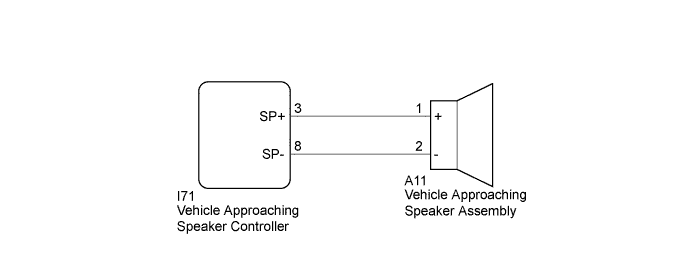
INSPECTION PROCEDURE
PROCEDURE
-
CHECK HARNESS AND CONNECTOR (VEHICLE APPROACHING SPEAKER CONTROLLER - VEHICLE APPROACHING SPEAKER ASSEMBLY)
-
Disconnect the I71 vehicle approaching speaker controller connector.
-
Disconnect the A11 vehicle approaching speaker assembly connector.
-
Measure the resistance according to the value(s) in the table below.
Standard Resistance Tester Connection Condition Specified Condition I71-3 (SP+) - A11-1 (+) Always Below 1 Ω I71-8 (SP-) - A11-2 (-) Always Below 1 Ω I71-3 (SP+) or A11-1 (+) - Body ground Always 10 kΩ or higher I71-8 (SP-) or A11-2 (-) - Body ground Always 10 kΩ or higher
NG 
REPAIR OR REPLACE HARNESS OR CONNECTOR
OK 
-
-
INSPECT VEHICLE APPROACHING SPEAKER CONTROLLER
-
Reconnect the I71 vehicle approaching speaker controller connector.
-
Connect the Techstream to the DLC3.
-
Turn the power switch on (IG).
-
Turn the Techstream on.
-
Enter the following menus: Body Electrical / Vehicle Proximity Notification System / Active Test.
-
Perform the Active Test according to the display on the Techstream.
Vehicle Proximity Notification System Tester Display Test Part Control Range Diagnostic Note Proximity Sound (Vehicle Stationary) Proximity sound (Vehicle stationary) OFF or ON Produces warning sound when vehicle is stopped -
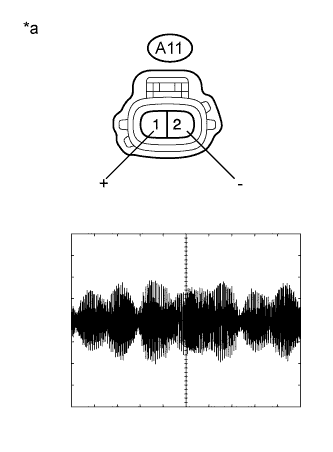
Text in Illustration *a Front view of wire harness connector
(to Vehicle Approaching Speaker Assembly)
Check the signal waveform according to the condition(s) in the table below.
Item Condition Tool setting 1 V/DIV., 200 ms./DIV. Vehicle condition Vehicle approaching speaker operating OK The waveform is similar to that shown in the illustration.
NG
REPLACE VEHICLE APPROACHING SPEAKER CONTROLLER Click here
OK
-
-
INSPECT VEHICLE APPROACHING SPEAKER ASSEMBLY
-
Remove the vehicle approaching speaker assembly Click here.
-
Inspect the vehicle approaching speaker assembly Click here.
NG
REPLACE VEHICLE APPROACHING SPEAKER ASSEMBLY Click here
OK 
USE SIMULATION METHOD TO CHECK Click here
-