INSTRUMENT PANEL SAFETY PAD INSTALLATION

-
INSTALL INSTRUMENT PANEL SAFETY PAD ASSEMBLY
-
Engage the 5 guides and temporarily install the instrument panel safety pad assembly as shown in the illustration.
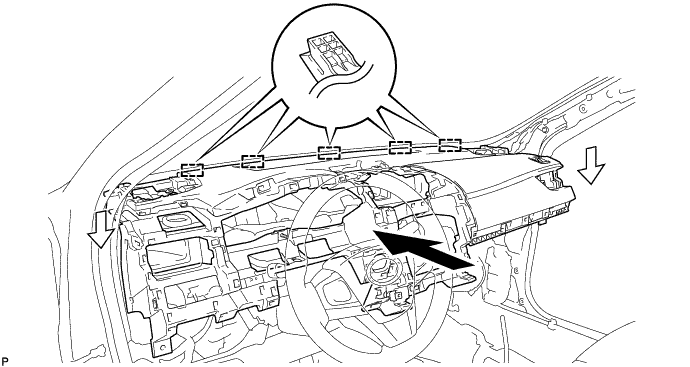
Note
-
Do not damage the instrument panel safety pad assembly.
-
Do not allow the wire harnesses to interfere with the surrounding parts.
-
-
Install the 2 clips.
-
Install the 3 bolts <B> and nut <F> or <G>.
-
Install the 2 passenger airbag bolts <A>.
- Torque:
- 20 N*m { 204 kgf*cm, 15 ft.*lbf }
-
Engage each clamp.
-
Connect each connector.
-
Engage the clamp.
-
Install the radio tuner mounting bracket with the 2 bolts <B>.
-
-
CONNECT NO. 2 INSTRUMENT PANEL WIRE
-
Check that the power switch is off.
-
Check that the cable is disconnected from the negative (-) auxiliary battery terminal.
CAUTION:
Wait at least 90 seconds after disconnecting the cable from the negative (-) auxiliary battery terminal to disable the SRS system.
-
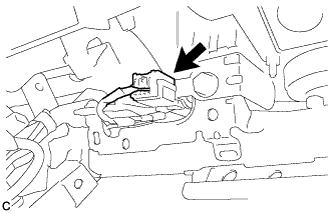
Connect the connector.
Note
When connecting any airbag connector, take care not to damage the airbag wire harness.
-
-
INSTALL NO. 1 INSTRUMENT PANEL GARNISH SUB-ASSEMBLY
-

Engage the 10 clips to install the No. 1 instrument panel garnish sub-assembly.
-
-
INSTALL CONSOLE BOX INSERT
-
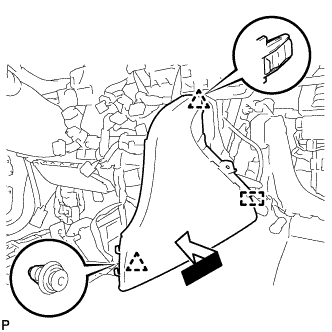
Engage the guide and 2 clips as shown in the illustration.
-
Install the console box insert with the screw <C> or <D>.
-
-
INSTALL FRONT NO. 2 CONSOLE BOX INSERT
-
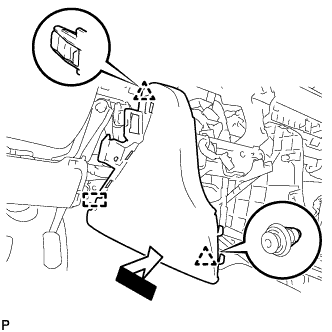
Engage the guide and 2 clips as shown in the illustration.
-
Install the front No. 2 console box insert with the screw <C> or <D>.
-
Engage the 2 claws to connect the room temperature sensor.
-
-
INSTALL LOWER INSTRUMENT PANEL FINISH PANEL ASSEMBLY
-
Connect the connector.
-
Engage the 4 clips and guide to install the lower instrument panel finish panel assembly.
-
-
INSTALL FRONT NO. 2 SPEAKER ASSEMBLY (for LH Side)
Note
Do not touch the speaker cone.
-
Connect the connector.
-

Text in Illustration *A LH Side *B RH Side Install the front No. 2 speaker assembly with the 2 screws.
Tech Tips
Install the screws in the order shown in the illustration.
-
-
INSTALL NO. 1 INSTRUMENT PANEL SPEAKER PANEL SUB-ASSEMBLY
-

Engage the 2 guides.
-
Engage the 3 claws and 2 clips to install the No. 1 instrument panel speaker panel sub-assembly.
-
-
INSTALL FRONT PILLAR GARNISH LH
-
Remove the protective cover.
-
Make sure that the front pillar garnish clip is not damaged.
Note
If there is any damage, replace the garnish clip with a new one.
-
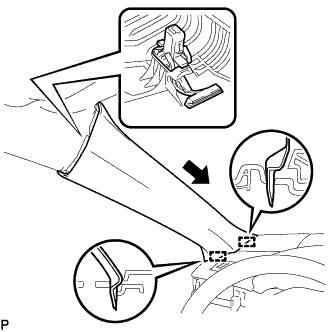
Install the front pillar garnish clip to front pillar garnish LH.
Tech Tips
Install the front pillar garnish clip so that it faces as shown in the illustration.
-
Engage the 2 guides as shown in the illustration.
-
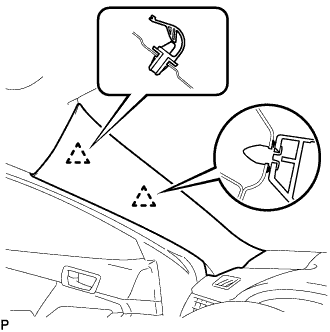
Engage the 2 clips to install the front pillar garnish LH.
-
-
INSTALL FRONT NO. 2 SPEAKER ASSEMBLY (for RH Side)
Tech Tips
Use the same procedure as for the LH side Click here.
-
INSTALL NO. 2 INSTRUMENT PANEL SPEAKER PANEL SUB-ASSEMBLY
-

Engage the 2 guides.
-
Engage the 3 claws and 2 clips to install the No. 2 instrument panel speaker panel sub-assembly.
-
-
INSTALL FRONT PILLAR GARNISH RH
Tech Tips
Use the same procedure as for the LH side Click here.
-
INSTALL NO. 3 INSTRUMENT PANEL REGISTER ASSEMBLY
-

Engage the 4 clips to install the No. 3 instrument panel register assembly.
-
-
INSTALL NO. 2 INSTRUMENT CLUSTER FINISH PANEL GARNISH
-

Engage the 5 clips to install the No. 2 instrument cluster finish panel garnish.
-
-
INSTALL LOWER INSTRUMENT PANEL SUB-ASSEMBLY
-
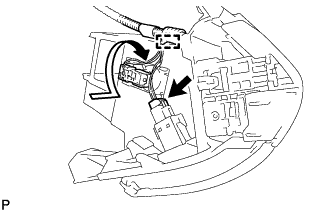
Connect the connector.
-
Engage the glove compartment light as shown in the illustration.
-
Engage the clamp.
-
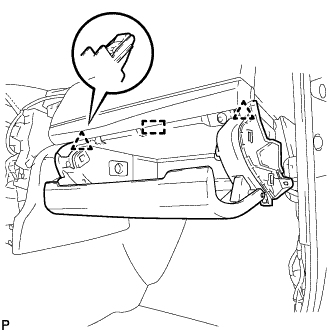
Engage the guide and 2 clips.
-
Install the lower instrument panel sub-assembly with the 5 screws <C> or <D>.
-
-
INSTALL LOWER NO. 2 INSTRUMENT PANEL AIRBAG ASSEMBLY
-
Check that the power switch is off.
-
Check that the cable is disconnected from the negative (-) auxiliary battery terminal.
CAUTION:
Wait at least 90 seconds after disconnecting the cable from the negative (-) auxiliary battery terminal to disable the SRS system.
-
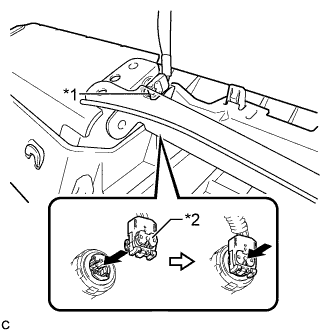
Text in Illustration *1 Airbag Connector *2 Airbag Connector Lock Connect the airbag connector to the lower No. 2 instrument panel airbag assembly.
Note
When connecting any airbag connector, take care not to damage the airbag wire harness.
-
Push in the lock to install the airbag connector.
-
Temporarily install the lower No. 2 instrument panel airbag assembly with the 3 claws.
-
Install the 3 bolts.
- Torque:
- 10 N*m { 102 kgf*cm, 7 ft.*lbf }
Note
Confirm that the lower No. 2 instrument panel airbag assembly is installed securely without any excessive gaps and is not protruding outward.
-
-
INSTALL NO. 2 INSTRUMENT PANEL UNDER COVER SUB-ASSEMBLY
-
Connect the connector.
-
Engage the 2 guides and 4 claws to install the No. 2 instrument panel under cover sub-assembly.
-
-
INSTALL INSTRUMENT SIDE PANEL RH
-
Engage the 3 guides.
-
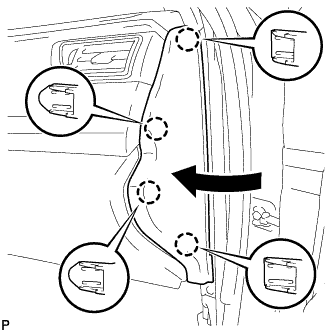
Engage the 4 claws to install the instrument side panel RH as shown in the illustration.
-
-
INSTALL FRONT DOOR OPENING TRIM WEATHERSTRIP RH
-
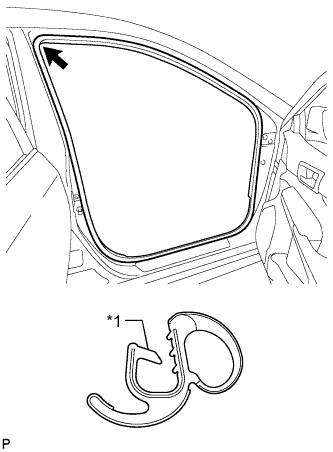
Text in Illustration *1 Alignment Mark (White) Align the alignment mark (White) on the weatherstrip with the protruding portion on the body indicated by the arrow in the illustration, and install the front door opening trim weatherstrip RH.
Note
After installation, check that the corners fit correctly.
-
-
INSTALL COWL SIDE TRIM SUB-ASSEMBLY RH
Tech Tips
Use the same procedure as for the LH side Click here.
-
INSTALL FRONT DOOR SCUFF PLATE RH
Tech Tips
Use the same procedure as for the LH side Click here.
-
INSTALL FRONT NO. 3 SPEAKER ASSEMBLY (for 10 Speakers)
Note
Do not touch the speaker cone.
-
Connect the connector.
-

Install the front No. 3 speaker assembly with the 2 screws.
Tech Tips
Install the screws in the order shown in the illustration.
-
-
INSTALL RADIO RECEIVER ASSEMBLY WITH AIR CONDITIONING CONTROL ASSEMBLY (for Radio and Display Type)
-
Connect each connector.
-
Engage the 4 clips to the vehicle body to temporarily install the radio receiver assembly with air conditioning control assembly.
-
Install the radio receiver assembly with air conditioning control assembly with the 4 bolts and 2 screws.
-
-
INSTALL NAVIGATION RECEIVER ASSEMBLY WITH AIR CONDITIONING CONTROL ASSEMBLY (for Navigation Receiver Type)
-
Connect each connector.
-
Engage the 4 clips to the vehicle body to temporarily install the navigation receiver assembly with air conditioning control assembly.
-
Install the navigation receiver assembly with air conditioning control assembly with the 4 bolts and 2 screws.
-
-
INSTALL UPPER CONSOLE PANEL SUB-ASSEMBLY
-
Connect each connector.
-
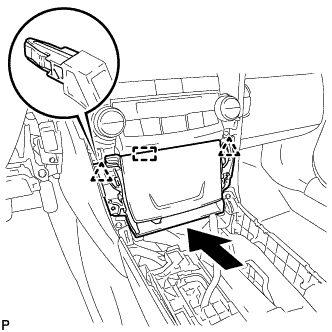
Engage the guide and 2 clips as shown in the illustration.
-
Install the upper console panel sub-assembly with the 2 screws <C> or <D>.
-
-
INSTALL NO. 1 SPEAKER OPENING COVER ASSEMBLY
-
Connect the connector.
-
Engage the clamp.
-
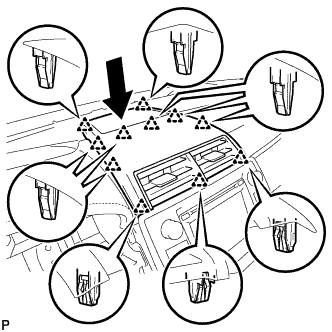
Engage the 11 clips to install the No. 1 speaker opening cover assembly as shown in the illustration.
-
-
INSTALL REAR CONSOLE BOX ASSEMBLY
-
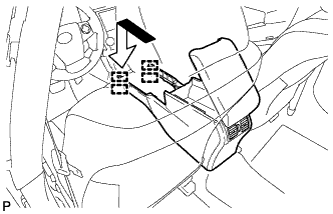
Engage the 4 guides as shown in the illustration.
-
Install the rear console box assembly with the 2 bolts and 2 screws.
-
Connect the connector and engage the clamp.
-
-
INSTALL CONSOLE BOX CARPET
-
Install the console box carpet.
-
-
INSTALL NO. 4 CONSOLE BOX DUCT
-
Engage the claw to install the No. 4 console box duct.
-
-
INSTALL INSTRUMENT PANEL CUP HOLDER TRAY
-
Install the front console upper panel garnish.
-
Install the instrument panel cup holder tray and front console upper panel garnish with the 6 screws <C> or <D>.
-
-
INSTALL CONSOLE BOX CUP HOLDER
-
Install the console box cup holder to the rear console upper panel sub-assembly.
-
-
INSTALL REAR CONSOLE UPPER PANEL SUB-ASSEMBLY
-
Engage the 6 clips.
-
Install the rear console upper panel sub-assembly with the 2 screws <C> or <D>.
-
Connect the connector.
-
Move the shift lever to P.
-
-
INSTALL SHIFT LEVER KNOB SUB-ASSEMBLY
-
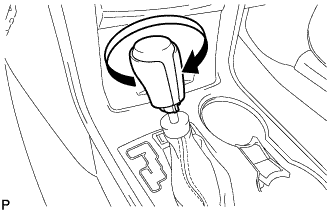
Turn the shift lever knob sub-assembly clockwise to install the shift lever knob sub-assembly.
-
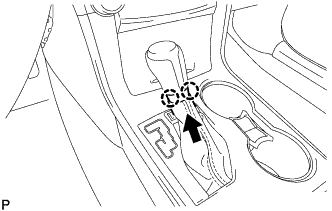
Engage the 2 claws as shown in the illustration.
-
-
INSTALL UPPER CONSOLE BOX SUB-ASSEMBLY
-
Connect each connector.
-
Engage the 4 clips to install the upper console box sub-assembly.
-
-
INSTALL LOWER NO. 1 INSTRUMENT PANEL FINISH PANEL ASSEMBLY
-
Engage the 4 claws, 9 clips and 3 guides.
-
Install the lower No. 1 instrument panel finish panel assembly with the bolt <B> and screw <C> or <D>.
-
-
CONNECT HOOD LOCK CONTROL LEVER SUB-ASSEMBLY
-
Engage the claw and 2 guides to connect the hood lock control lever sub-assembly.
-
-
INSTALL COMBINATION METER ASSEMBLY
-
Connect the 2 connectors.
-
Engage the wire harness clamp.
-
Install the combination meter assembly with the 4 screws.
-
-
INSTALL INSTRUMENT CLUSTER FINISH PANEL ASSEMBLY
-
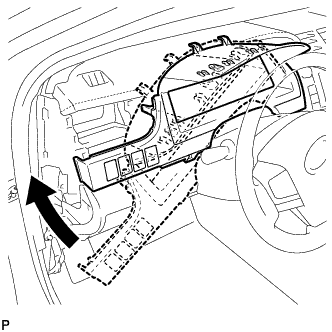
Temporarily install the instrument cluster finish panel assembly as shown in the illustration.
-
Connect each connector.
-
Engage the 5 claws, 5 clips and 2 guides, and install the instrument cluster finish panel assembly.
-
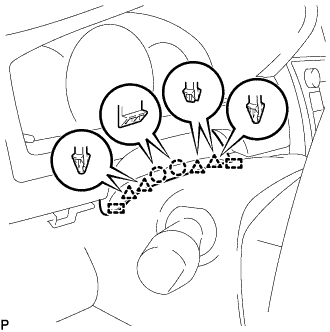
Engage the 2 claws, 4 clips and 2 guides.
-
-
INSTALL NO. 1 INSTRUMENT PANEL REGISTER ASSEMBLY
-
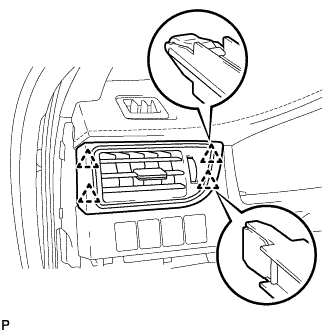
Engage the 4 clips to install the No. 1 instrument panel register assembly.
-
-
INSTALL NO. 1 INSTRUMENT CLUSTER FINISH PANEL GARNISH
-
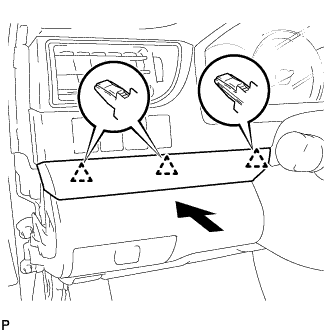
Engage the 3 clips to install the No. 1 instrument cluster finish panel garnish.
-
-
INSTALL INSTRUMENT SIDE PANEL LH
-
Engage the 3 guides.
-
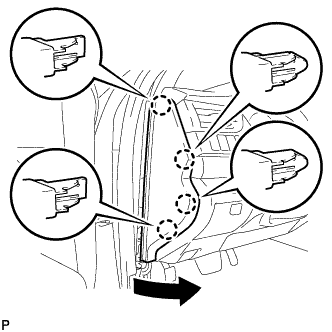
Engage the 4 claws to install the instrument side panel LH as shown in the illustration.
-
-
INSTALL FRONT DOOR OPENING TRIM WEATHERSTRIP LH
-
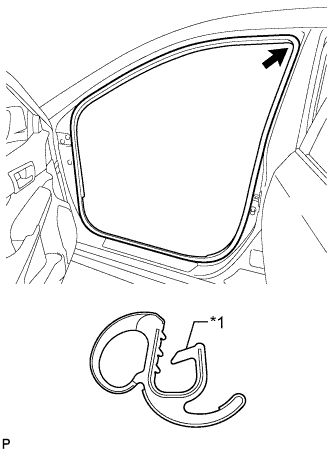
Text in Illustration *1 Alignment Mark (Yellow) Align the alignment mark (Yellow) on the weatherstrip with the protruding portion on the body indicated by the arrow in the illustration, and install the front door opening trim weatherstrip LH.
Note
After installation, check that the corners fit correctly.
-
-
INSTALL COWL SIDE TRIM SUB-ASSEMBLY LH
-
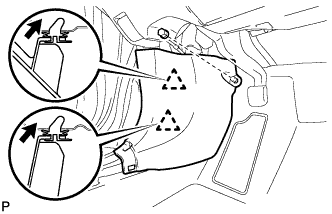
Insert the 2 clips in the direction indicated by the arrows shown in the illustration to engage them.
-
Install the cowl side trim sub-assembly LH with the clip.
-
-
INSTALL FRONT DOOR SCUFF PLATE LH
-
Engage the 10 claws to install the front door scuff plate LH.
-
-
CONNECT CABLE TO AUXILIARY BATTERY NEGATIVE TERMINAL
Note
When disconnecting the cable, some systems need to be initialized after the cable is reconnected Click here.
-
INSTALL LUGGAGE TRIM SERVICE HOLE COVER
-
Engage the claw to connect the luggage trim service hole cover.
-
-
INSPECT SRS WARNING LIGHT