PRE-COLLISION SYSTEM TERMINALS OF ECU

-
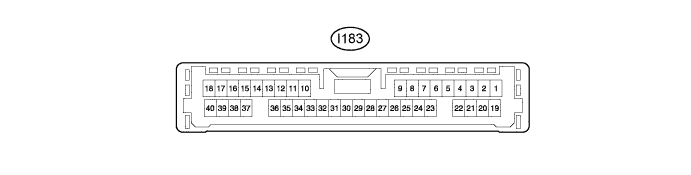
CHECK DRIVING SUPPORT ECU ASSEMBLY
-
Disconnect the I183 driving support ECU assembly connector.
Note
Do not apply excessive force to the connector. If a force of 10 kg or more is applied, the connector may break.
-
Measure the resistance and voltage on the wire harness side connector according to the value(s) in the table below.
Terminal No. (Symbol) Wiring Color Terminal Description Condition Specified Condition I183-5 (PBSW) - Body ground G - Body ground Pre-collision system cancel switch assembly signal Pre-collision system cancel switch assembly on Below 1 Ω Pre-collision system cancel switch assembly off 10 kΩ or higher I183-25 (GND) - Body ground W-B - Body ground Ground Always Below 1 Ω I183-30 (B) - Body ground V - Body ground Power source Power switch on (IG) 11 to 14 V Power switch off Below 1 V Tech Tips
If the result is not as specified, there may be a malfunction on the wire harness side.
-
Reconnect the I183 driving support ECU assembly connector.
-
Check for pulses according to the value(s) in the table below.
Terminal No. (Symbol) Wiring Color Terminal Description Condition Specified Condition I183-17 (CA2L) - I183-25 (GND) LG - W-B CAN communication signal Power switch on (IG) Pulse generation
(See waveform 1)
I183-18 (CA1N) - I183-25 (GND) W - W-B CAN communication signal Power switch on (IG) Pulse generation
(See waveform 2)
I183-39 (CA2H) - I183-25 (GND) L - W-B CAN communication signal Power switch on (IG) Pulse generation
(See waveform 3)
I183-40 (CA1P) - I183-25 (GND) R - W-B CAN communication signal Power switch on (IG) Pulse generation
(See waveform 4)
-
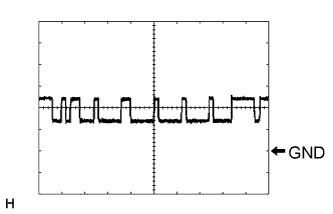
Waveform 1
-
CAN communication signal
Item Content Tester Connection I183-17 (CA2L) - I183-25 (GND) Tool Setting 1 V/DIV., 10 μsec./DIV. Condition Power switch on (IG) Tech Tips
The waveform varies depending on the CAN communication signal.
-
-
Waveform 2
-
CAN communication signal
Item Content Tester Connection I183-18 (CA1N) - I183-25 (GND) Tool Setting 1 V/DIV., 10 μsec./DIV. Condition Power switch on (IG) Tech Tips
The waveform varies depending on the CAN communication signal.
-
-
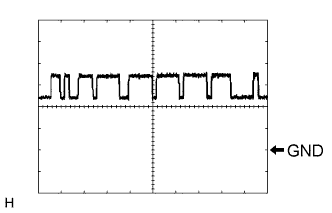
Waveform 3
-
CAN communication signal
Item Content Tester Connection I183-39 (CA2H) - I183-25 (GND) Tool Setting 1 V/DIV., 10 μsec./DIV. Condition Power switch on (IG) Tech Tips
The waveform varies depending on the CAN communication signal.
-
-
Waveform 4
-
CAN communication signal
Item Content Tester Connection I183-40 (CA1P) - I183-25 (GND) Tool Setting 1 V/DIV., 10 μsec./DIV. Condition Power switch on (IG) Tech Tips
The waveform varies depending on the CAN communication signal.
-
-