PRE-COLLISION SYSTEM SYSTEM DESCRIPTION

-
PRE-COLLISION SYSTEM
-
The pre-collision system detects vehicles and obstacles in front of the vehicle and performs the following: 1) optimally uses system controls to avoid collisions, and 2) uses system controls to reduce impact during a collision.
-
The operation of this system can be disabled by pressing and holding the pre-collision system cancel switch assembly.
Tech Tips
When the pre-collision system is disabled, a warning message is displayed on the multi-information display for 6 seconds and the PCS warning indicator will be illuminated.
-
The operation of the pre-collision brake assist and pre-collision brake control are disabled when the VSC system is disabled.
Tech Tips
When the pre-collision brake assist and pre-collision brake control are disabled, a warning message will be displayed on the multi-information display for approximately 6 seconds and the PCS warning indicator will be illuminated.
-
-
OUTLINE OF PRE-COLLISION SYSTEM
Operating Condition Control Transmitting ECU Receiving ECU Part Operated Collision is possible Pre-collision alarm Driving Support ECU Assembly
-
Combination meter assembly (warning message)
-
Millimeter wave radar sensor assembly (warning buzzer)
-
Combination meter assembly (warning message)
-
Skid control buzzer assembly (warning buzzer)
Possibility of a collision is high Pre-collision brake assist Driving Support ECU Assembly Skid Control ECU (Brake Booster with Master Cylinder Assembly) Brake system Collision is unavoidable Pre-collision brake control Driving Support ECU Assembly Skid Control ECU (Brake Booster with Master Cylinder Assembly) Brake system
-
When operating according to millimeter wave radar sensor assembly detection:
The millimeter wave radar sensor assembly detects vehicles and other objects on the road in front of the user's vehicle. The driving support ECU assembly determines if the possibility of a collision is high or if a collision is unavoidable based on obstacle position, vehicle speed and road surface condition. If the driving support ECU assembly determines that the possibility of collision is high or that a collision is unavoidable, it transmits this information to the following areas via CAN communication:
-
Combination meter assembly (warning message) (activates pre-collision alarm)
-
Millimeter wave radar sensor assembly (warning buzzer) (activates pre-collision alarm)
-
Brake actuator assembly (activates pre-collision brake assist)
-
Brake actuator assembly (activates pre-collision brake)
-
-
-
OUTLINE OF PRE-COLLISION ALARM
-
When the system determines that there is a high possibility of colliding with an obstacle in front of the vehicle, the multi-information display and warning buzzer are used to warn the driver and help with collision avoidance.
-
-
OUTLINE OF PRE-COLLISION BRAKE ASSIST CONTROL
-
The pre-collision brake assist operates depending on what the millimeter wave radar sensor assembly detects. The system then enters standby mode before a collision. When the driver depresses the brake pedal, brake fluid pressure is increased to improve fluid pressure response and improve the rate of deceleration.
-
Operating conditions
-
Refer to the millimeter wave radar sensor assembly description under "Outline of Pre-collision System" (see above).
-
When the driver depresses the brake pedal after the driving support ECU assembly determines that the possibility of a collision is high:
Brake fluid pressure is increased at the same time the driver depresses the brake pedal.
-
-
-
OUTLINE OF PRE-COLLISION BRAKE CONTROL
-
The pre-collision brake operation is performed depending on what the millimeter wave radar sensor assembly detects.
-
Operating conditions
-
Refer to the millimeter wave radar sensor assembly description under "Outline of Pre-collision System" (see above).
-
When the driving support ECU assembly determines that a collision is unavoidable, the system performs brake control (pre-collision brake operation) to reduce the vehicle speed.
When a preceding vehicle is detected, the system advances brake control (pre-collision brake operation) activation timing in order to increase speed reduction performance.
-
-
-
PRE-COLLISION SYSTEM SENSITIVITY SWITCHING FUNCTION
-
Each time the switch is pressed, the sensitivity display on the multi-information display changes between "Far", "Middle" and "Near", and the sensitivity of the pre-collision system is changed to the displayed level.
Tech Tips
-
The sensitivity display on the multi-information display is displayed for 6 seconds.
-
"Middle" is the default setting.
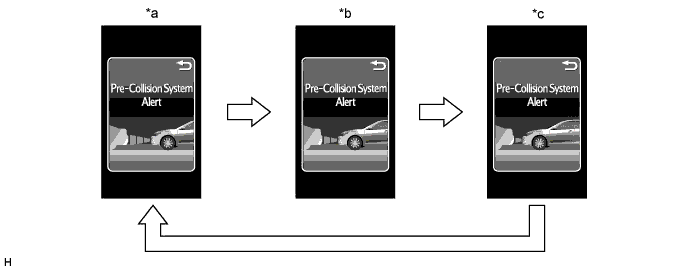
Text in Illustration *a Far *b Middle *c Near - - -
-
-
PRE-COLLISION SYSTEM CANCEL FUNCTION
-
When the switch is pressed and held for 3 seconds, the pre-collision system is canceled.
Tech Tips
When the pre-collision system is canceled, a warning message will be displayed on the multi-information display and the PCS warning indicator will be illuminated.
-
-
OPERATIVE CONDITION AND INOPERATIVE CONDITION OF EACH CONTROL (REVIEW)
Tech Tips
Each function will operate when all items marked (○) are satisfied.
Pre-collision Alarm Pre-collision Brake Assist Pre-collision Brake Power switch is on (IG) ○ ○ ○ When warning message is not displayed on multi-information display * * * When a seat belt is not fastened ○ ○ ○ When the vehicle speed is 15 km/h (9 mph) or more and relative speed is 10 km/h (7 mph) or more ○ X ○ When the vehicle speed is 30 km/h (19 mph) or more and relative speed is 30 km/h (19 mph) or more X ○ X When the VSC system is disabled ○ X X When the VSC system is enabled ○ ○ ○
-
○: Operation conditions are included
-
X: Not operation conditions are included
-
*: Inoperative parts differ depending on malfunction areas
-
-
CASES OF UNNECESSARY PRE-COLLISION SYSTEM OPERATION
-
When the millimeter wave radar sensor assembly detects an object in front of the vehicle under the following conditions, the driving support ECU assembly may determine that the possibility of a collision is high or a collision is unavoidable, and activate the pre-collision system. This activation of the system is not abnormal.
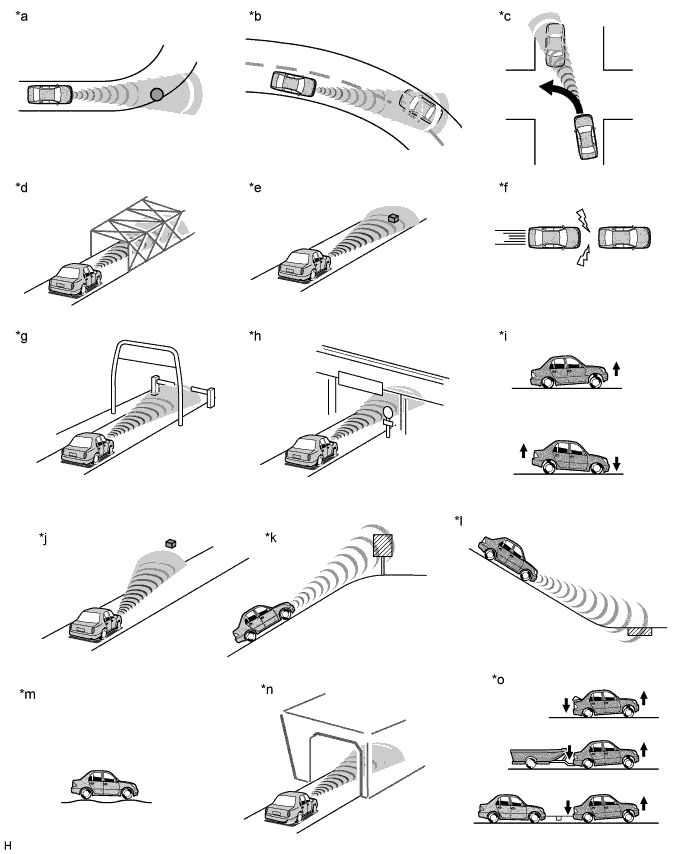
Text in Illustration *a There are objects on the side of the road at the beginning of a curve (a guardrail, street lamp, billboard, etc.). *b Passing an oncoming vehicle on a curve. *c There is an oncoming vehicle when making a left turn. *d Crossing a narrow metal bridge. *e There are metal objects on the road. *f Approaching a leading vehicle suddenly. *g Approaching an electrical toll collection gate (reacts to bar). *h Crossing an overpass, traffic sign, signboard. *i The vehicle height drastically changes (nose-up, nose-down). *j Misalignment of millimeter wave radar sensor assembly (reinstallation, collision, etc). *k There is a billboard or sign at the top of an incline. *l There are metal objects at the bottom of a decline (a metal plate covering road construction, a mesh drain cover, a manhole, etc.). *m Roughness in road surface. *n When passing through a tunnel. *o The front of the vehicle is inclined (due to towing a trailer or another vehicle, or carrying a heavy load). - - Tech Tips
-
The pre-collision system will not activate when approaching safety cones or other plastic objects as they cannot be detected by the millimeter wave radar sensor assembly.
-
The pre-collision system may or may not activate when the millimeter wave radar sensor assembly detects the following objects: people, bicycles, motorcycles, trees, animals, snow fences, etc.
-
Detection performance may deteriorate under the following conditions.
-
On a tight curve or bumpy road
-
Something or someone suddenly emerges in the direction of travel of the driver's vehicle at a place such as an intersection
-
Another vehicle suddenly cuts in the traveling direction of the driver's own vehicle
-
In severe weather such as heavy rain, fog, snow or a sand storm
-
Vehicle is skidding sideways while the electronically controlled brake system is not operating
-
Vehicle height changes significantly (front of vehicle inclined either upward or downward)
-
Millimeter wave radar sensor assembly is misaligned (due to reinstallation or collision)
-
An obstacle suddenly appears in front of the vehicle due to the steering wheel being turned sharply, etc.
Object Type Example Objects that cannot be detected Plastic items (safety cones) Objects that cannot be detected in a stable manner People, bicycles, motorcycles, trees, animals, snow fences, etc.
-
-