DYNAMIC RADAR CRUISE CONTROL SYSTEM Cruise Main Indicator Light Circuit
DESCRIPTION
When the cruise control system is turned on using the cruise control main switch (ON-OFF button), the cruise control indicator light (vehicle-to-vehicle distance control mode) illuminates. The driving support ECU assembly uses these and other indicators to indicate the control condition (presence or absence of a vehicle in front, vehicle-to-vehicle distance, and set vehicle speed) and fail-safe state through the CAN communication system.
Tech Tips
If the preceding vehicle in the same lane significantly decreases vehicle speed or another vehicle moves in front of your vehicle, adequate deceleration cannot be applied by the cruise control system and the vehicle-to-vehicle distance will become shorter. At this time, the system sounds the buzzer to warn the driver. The indicators for the dynamic radar cruise control system use CAN for communication. Therefore, if there are any indicator malfunctions, check for DTCs in the CAN communication system before troubleshooting this circuit.
WIRING DIAGRAM
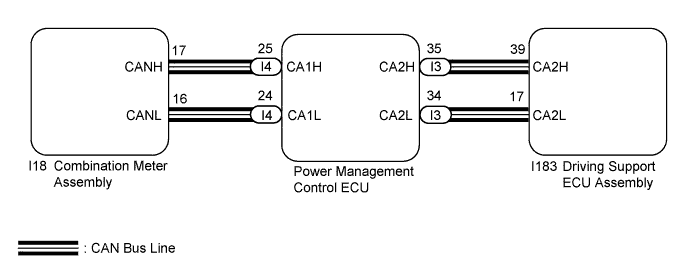
INSPECTION PROCEDURE
PROCEDURE
-
PERFORM ACTIVE TEST USING TECHSTREAM (METER DISPLAY 1)
-
Connect the Techstream to the DLC3.
-
Turn the power switch on (IG).
-
Turn the Techstream on.
-
Enter the following menus: Body Electrical / Combination Meter / Active Test.
-
Perform Active Test according to the display on the Techstream.
Combination Meter Tester Display Test Part Control Range Diagnostic Note Meter Display 1 Multi-information display OFF or All - OK The display changes in accordance with Active Test operation.
NG 
GO TO METER / GAUGE SYSTEM Click here
OK 
-
-
READ VALUE USING TECHSTREAM (CCS MAIN SW-RELAY)
-
Connect the Techstream to the DLC3.
-
Turn the power switch on (IG).
-
Turn the Techstream on.
-
Enter the following menus: Powertrain / Radar Cruise / Data List.
-
Read the Data List according to the display on the Techstream.
Radar Cruise Tester Display Test Part Control Range Diagnostic Note CCS Main SW-Ready Dynamic radar cruise control system standby condition/ON or OFF ON: Dynamic radar cruise control system standby
OFF: Dynamic radar cruise control system not standby
- OK When the cruise control main switch (ON/OFF button) is operated, the display changes shown above.
NG
REPLACE DRIVING SUPPORT ECU ASSEMBLY
OK 
REPLACE PROCEED TO NEXT SUSPECTED AREA SHOWN IN PROBLEM SYMPTOMS TABLE Click here
-