DYNAMIC RADAR CRUISE CONTROL SYSTEM, Diagnostic DTC:C1A40

| DTC Code | DTC Name |
|---|---|
| C1A40 | ENG / EHV Device |
DESCRIPTION
When the driving support ECU assembly receives a hybrid control system or SFI system malfunction signal from the power management control ECU or ECM via CAN communication, DTC C1A40 is stored.
| DTC No. | DTC Detection Condition | Trouble Area |
|---|---|---|
| C1A40 | When the power switch is on (IG), a hybrid control system or EFI system malfunction signal is detected for 3 seconds or more. |
|
WIRING DIAGRAM
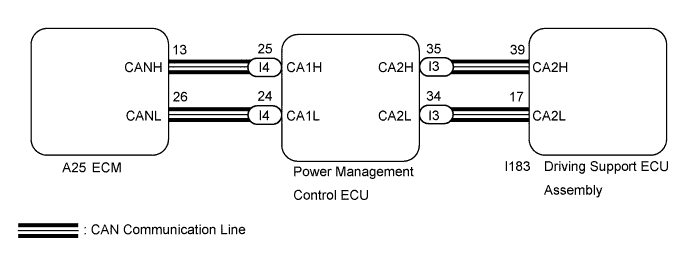
INSPECTION PROCEDURE
Note
-
When replacing the driving support ECU assembly, always replace it with a new one. If a driving support ECU assembly which was installed to another vehicle is used, the information stored in the driving support ECU assembly will not match the information from the vehicle. As a result, a DTC may be stored.
-
If the ECM or power management control ECU is replaced, refer to Registration Click here.
PROCEDURE
-
CHECK FOR DTCs (HYBRID CONTROL SYSTEM)
-
Connect the Techstream to the DLC3.
-
Turn the power switch on (IG).
-
Turn the Techstream on.
-
Enter the following menus: Powertrain / Hybrid Control / Trouble Codes.
-
Check for DTCs.
Result Result Proceed to Hybrid control system DTC is not output A Hybrid control system DTC C1A40 is output B
B 
GO TO HYBRID CONTROL SYSTEM Click here
A 
-
-
CHECK FOR DTCs (SFI SYSTEM)
-
Connect the Techstream to the DLC3.
-
Turn the power switch on (IG).
-
Turn the Techstream on.
-
Enter the following menus: Powertrain / Engine and ECT / Trouble Codes.
-
Check for DTCs.
Result Result Proceed to SFI system DTC is not output A SFI system DTC is output B
B
GO TO SFI SYSTEM Click here
A
-
-
REPLACE POWER MANAGEMENT CONTROL ECU
-
Replace the power management control ECU Click here.
NEXT
-
-
CHECK FOR DTCs (DTC C1A40)
-
Connect the Techstream to the DLC3.
-
Turn the power switch on (IG).
-
Turn the Techstream on.
-
Clear the DTCs Click here.
-
Perform the following to make sure that the DTC detection conditions are met.
Tech Tips
If the detection conditions are not met, the malfunction cannot be detected.
-
Drive the vehicle at a speed for which cruise control operation is possible.
-
Turn the cruise control system on using the cruise control main switch (ON-OFF button).
-
Push the cruise control main switch to -/SET to begin control of vehicle speed using the cruise control system.
-
-
Enter the following menus: Powertrain / Radar Cruise / Trouble Codes.
-
Check for DTCs.
Result Result Proceed to DTC C1A40 is not output A DTC C1A40 is output B
B 
REPLACE ECM Click here
A 
END (POWER MANAGEMENT CONTROL ECU WAS DEFECTIVE)
-
-
REPLACE ECM
-
Replace the ECM Click here.
NEXT
-
-
CHECK FOR DTCs (DTC C1A40)
-
Connect the Techstream to the DLC3.
-
Turn the power switch on (IG).
-
Turn the Techstream on.
-
Clear the DTCs Click here.
-
Perform the following to make sure that the DTC detection conditions are met.
Tech Tips
If the detection conditions are not met, the malfunction cannot be detected.
-
Drive the vehicle at a speed for which cruise control operation is possible.
-
Turn the cruise control system on using the cruise control main switch (ON-OFF button).
-
Push the cruise control main switch to -/SET to begin control of vehicle speed using the cruise control system.
-
-
Enter the following menus: Powertrain / Radar Cruise / Trouble Codes.
-
Check for DTCs.
Result Result Proceed to DTC C1A40 is not output A DTC C1A40 is output B
B
REPLACE DRIVING SUPPORT ECU ASSEMBLY Click here
A
END (ECM WAS DEFECTIVE)
-