HYBRID CONTROL SYSTEM, Diagnostic DTC:P0A92-261

| DTC Code | DTC Name |
|---|---|
| P0A92-261 | Hybrid Generator Performance |
DTC SUMMARY
MALFUNCTION DESCRIPTIONThis DTC indicates that magnetic force deterioration of the permanent magnet located in the rotor inside the generator has been detected. The cause of this malfunction may be one of the following:
| Area | Main Malfunction Description | Step |
|---|---|---|
| Inverter low-voltage circuit | The connectors are not connected properly | 3 |
| Power management control ECU | Power management control ECU internal circuit malfunction | 4 |
| Inside of inverter | Inverter with converter assembly internal circuit malfunction | 4 |
| Hybrid vehicle transaxle assembly (including generator) |
|
5 |
DESCRIPTION
For a description of generator (MG1) Click here.
| DTC No. | INF Code | DTC Detection Condition | Trouble Area |
|---|---|---|---|
| P0A92 | 261 | Generator magnetic force deterioration or same phase short circuit: Magnetic force of the generator decreases or a coil circuit in one of the 3 phases remains shorted for a certain period of time. (1 trip detection logic) |
|
MONITOR DESCRIPTION
The MG ECU monitors the generator. If the MG ECU detects a reduction in the magnetic force of the generator or an inphase short, it interprets this as a generator malfunction and the power management control ECU will illuminate the MIL and store a DTC.
MONITOR STRATEGY
| Related DTCs | P0A92 (INF 261): Magnetic force deterioration / same phase short circuit |
| Required sensors / components | Generator (MG1), inverter, generator resolver |
| Frequency of operation | Continuous |
| Duration | TMC's intellectual property |
| MIL operation | 1 driving cycle |
| Sequence of operation | None |
TYPICAL ENABLING CONDITIONS
| The monitor will run whenever the following DTCs are not present | TMC's intellectual property |
| Other conditions belong to TMC's intellectual property | - |
TYPICAL MALFUNCTION THRESHOLDS
| TMC's intellectual property | - |
COMPONENT OPERATING RANGE
| Power management control ECU | DTC P0A92 (INF 261) is not detected |
CONFIRMATION DRIVING PATTERN
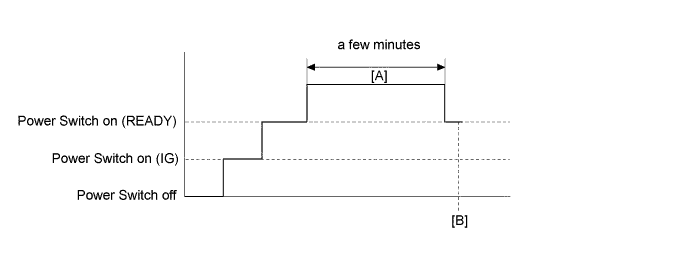
-
Connect the Techstream to the DLC3.
-
Turn the power switch on (IG) and turn the Techstream on.
-
Clear the DTCs (even if no DTCs are stored, perform the clear DTC procedure).
-
Turn the power switch off and wait for 30 seconds or more.
-
Turn the power switch on (IG) and turn the Techstream on.
-
Turn the power switch on (READY).
-
Drive the vehicle until the cumulative traveling time using the engine is a few minutes. (It is not necessary to drive continuously using the engine.) [A]
-
Enter the following menus: Powertrain / Hybrid Control / Trouble Codes. [B]
-
Read the current DTCs.
Tech Tips
-
If a current DTC is output, the system is malfunctioning.
-
If current DTCs are not output, perform the following steps to check for permanent DTCs.
-
-
Check that the permanent DTCs are cleared.
-
If the permanent DTCs are not cleared, perform the universal trip, and then check for permanent DTCs again.
WIRING DIAGRAM
Refer to the wiring diagram for the generator high-voltage circuit Click here.
Refer to the wiring diagram for the shut down signal circuit Click here.
INSPECTION PROCEDURE
CAUTION:
-
Before inspecting the high-voltage system or disconnecting the low voltage connector of the inverter with converter assembly, take safety precautions such as wearing insulated gloves and removing the service plug grip to prevent electrical shocks. After removing the service plug grip, put it in your pocket to prevent other technicians from accidentally reconnecting it while you are working on the high-voltage system.
-
After removing the service plug grip, wait for at least 10 minutes before touching any of the high-voltage connectors or terminals. After waiting for 10 minutes, check the voltage at the terminals in the inspection point in the inverter with converter assembly. The voltage should be 0 V before beginning work Click here.
Tech Tips
Waiting for at least 10 minutes is required to discharge the high-voltage capacitor inside the inverter with converter assembly.
Note
After turning the power switch off, waiting time may be required before disconnecting the cable from the negative (-) auxiliary battery terminal. Therefore, make sure to read the disconnecting the cable from the negative (-) auxiliary battery terminal notices before proceeding with work Click here.
Tech Tips
After the repair, clear the DTCs and perform the following procedure to check that DTCs are not output.
-
Drive the vehicle until the cumulative traveling time using the engine is a few minutes.
(It is not necessary to drive continuously using the engine.)
PROCEDURE
-
CHECK DTC OUTPUT (HYBRID CONTROL)
-
Connect the Techstream to the DLC3.
-
Turn the power switch on (IG).
-
Enter the following menus: Powertrain / Hybrid Control / Trouble Codes.
-
Check if DTCs are output.
Result Result Proceed to P0A92-261 only is output, or DTCs except the ones in the table below are also output. A Any of the following DTCs are also output. B Malfunction Content Relevant DTC Microcomputer malfunction P0A1A (all INF codes)*1 Generator Control Module P0A1B-168, 192, 193, 198, 661, 786, 794, 795, 796 Drive Motor "A" Control Module P0A1D (all INF codes)*1 Hybrid Powertrain Control Module Power source circuit malfunction P0A1B-163, 164, 511, 512 Drive Motor "A" Control Module Sensor and actuator circuit malfunction P0A3F-243 Drive Motor "A" Position Sensor Circuit P0A40-500 Drive Motor "A" Position Sensor Circuit Range/Performance P0A41-245 Drive Motor "A" Position Sensor Circuit Low P0A4B-253 Generator Position Sensor Circuit P0A4C-513 Generator Position Sensor Circuit Range/Performance P0A4D-255 Generator Position Sensor Circuit Low P0A51-174 Drive Motor "A" Current Sensor Circuit P0A60 (all INF codes)*1 Drive Motor "A" Phase V Current P0A63 (all INF codes)*1 Drive Motor "A" Phase W Current P0A72 (all INF codes)*1 Generator Phase V Current P0A75 (all INF codes)*1 Generator Phase W Current System malfunction P0AA6 (all INF codes)*1 Hybrid Battery Voltage System Isolation Fault P3004-132 High Voltage Power Resource P0A78-266, 267, 282, 306, 586 Drive Motor "A" Inverter Performance P0A7A-203, 344 Generator Inverter Performance P0A90-509 Drive Motor "A" Performance P0A92-521 Hybrid Generator Performance P0A94-585, 587, 589, 590 DC / DC Converter Performance P0C76-523 Hybrid Battery System Discharge Time Too Long Tech Tips
-
*1: If any INF codes are output for this DTC, refer to the corresponding diagnostic procedure.
-
P0A92-261 may be output as a result of the malfunction indicated by the DTCs above.
-
The chart above is listed in inspection order of priority.
-
Check DTCs that are output at the same time by following the listed order. (The main cause of the malfunction can be determined without performing unnecessary inspections.)
-
-
Turn the power switch off.
B 
GO TO DTC CHART (HYBRID CONTROL SYSTEM) Click here
A 
-
-
SIMULATION TEST
-
Turn the power switch on (READY).
-
Connect the Techstream to the DLC3.
-
Clear the DTCs.
-
Drive the vehicle until the cumulative traveling time using the engine is a few minutes. (It is not necessary to drive continuously using the engine.)
Tech Tips
If the accelerator pedal is depressed with the shift lever in P, the engine will start.
-
Enter the following menus: Powertrain / Hybrid Control / Trouble Codes.
-
Check if DTCs are output.
Result Result Proceed to P0A92-261 is output or no DTCs are output. A P0A7A-344 or P0A92-521 is output. B -
Turn the power switch off.
B
GO TO DTC CHART (HYBRID CONTROL SYSTEM) Click here
A
-
-
CHECK CONNECTOR CONNECTION CONDITION (INVERTER WITH CONVERTER ASSEMBLY CONNECTOR)
CAUTION:
Be sure to wear insulated gloves.
-
Check that the service plug grip is not installed.
Note
After removing the service plug grip, do not turn the power switch on (READY), unless instructed by the repair manual because this may cause a malfunction.
-
Check the connection condition of the low voltage connector of the inverter with converter assembly and the contact pressure of each terminal. Check the terminals for deformation, and check the connector for water ingress and foreign matter Click here.
Note
Before disconnecting the connector, confirm that it is properly connected by checking that the locking claws are engaged and that the connector does not pull out.
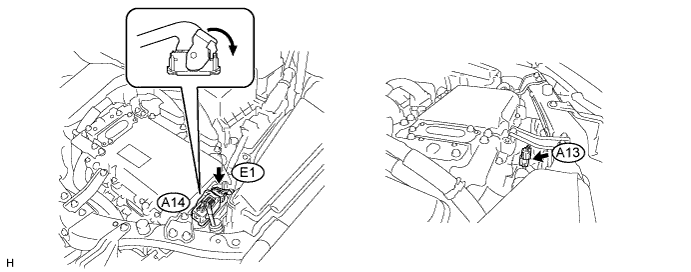
OK - The connector is connected securely. - The terminals are not deformed and are connected securely. - No water or foreign matter in the connector. Result Result Proceed to OK A NG (The connector is not connected securely.) B NG (The terminals are not making secure contact or are deformed, or water or foreign matter exists in the connector.) C Tech Tips
When connecting the connector, insert it with the locking lever in the raised position. Rotate the lever downward and make sure that the connector is pulled into its socket. When the locking lever is in its fully closed position, a click will be heard as its locking claws engage. After the click is heard, pull up on the connector to confirm that it is properly connected.
B
CONNECT SECURELY
C
REPAIR OR REPLACE HARNESS OR CONNECTOR
A
-
-
CHECK SHUT DOWN SIGNAL CIRCUIT
NEXT
-
CHECK GENERATOR HIGH-VOLTAGE CIRCUIT
Tech Tips
If the "Generator High-voltage Circuit" inspection results are normal, perform the next step.
NEXT 
REPLACE INVERTER WITH CONVERTER ASSEMBLY AND HYBRID VEHICLE TRANSAXLE ASSEMBLY